


What are social media and review widgets for Ghost?
Social media widgets for Ghost make it possible to show live content from Google, Instagram, TikTok, YouTube, Facebook, and other platforms directly on your website. Instead of manually swapping screenshots or pasting testimonials into static sections, a Ghost review widget pulls content from connected sources and keeps it updated as new reviews and posts come in.

On a Ghost site, that can mean adding Google reviews to a landing page, dropping an Instagram feed into a brand page, embedding TikTok videos inside campaign content, or publishing shoppable UGC that leads visitors from social proof to the right product or offer. One embed handles the display, which keeps the setup cleaner and the upkeep lighter.
Why use EmbedSocial on Ghost?
Ghost is known for being fast, focused, and clean. That makes it a strong place to publish social proof that feels current without turning the site into a cluttered patchwork of widgets.
EmbedSocial is a UGC and review management platform built to help teams collect, manage, moderate, and publish social proof from multiple sources in one place. It combines AI-powered styling, automatic syncing, and moderation tools so your site can keep showing fresh content without manual rewrites every week.
With one account, you can manage Google reviews, Instagram feeds, TikTok videos, YouTube content, Facebook posts, testimonials, social proof notifications, and shoppable galleries. In other words, fewer tools, fewer duplicated workflows, and less fiddling around in the backend.
EmbedSocial also helps turn social content into action by letting you tag products or offers directly inside shoppable widgets, which makes the jump from discovery to click much shorter.
Reviews refresh automatically every 10 minutes, social feeds continue syncing in the background, and newly published content can appear on your Ghost pages within minutes.
You can start from 200+ templates or use the AI vibe editor to generate a design from a simple prompt.
Benefits of social proof for Ghost publications
When you add live reviews, videos, and UGC to a Ghost site, the content works harder. It does not just look good. It proves something:
- Increase trust on key pages—show real customer proof where visitors are deciding whether to subscribe, enquire, or buy;
- Make brand pages feel more current—replace static proof blocks with content that keeps updating on its own;
- Encourage deeper scrolling—use social feeds and video widgets to give readers more to engage with;
- Reduce manual publishing work—stop updating testimonial sections by hand every time new content appears;
- Connect proof with action—turn UGC into clickable paths toward products, services, or offers;
- Show stronger credibility signals—combine reviews from multiple platforms in one more convincing display;
- Reuse proof across your site—publish the same widget in different Ghost pages without rebuilding it from scratch
Ghost review widget and social media features
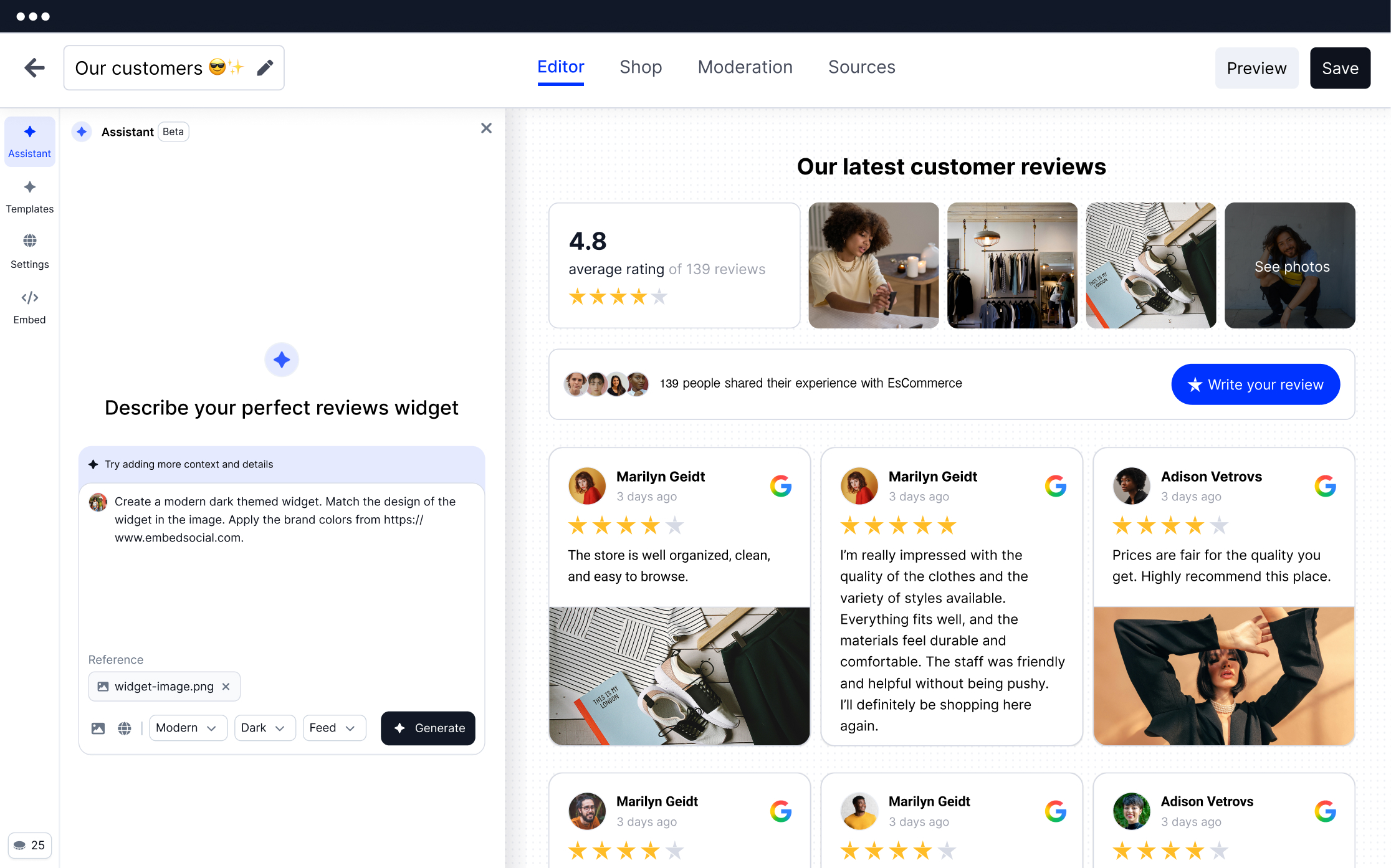
- Google reviews auto-sync—connect your Google Business Profile and have newly published reviews appear on your Ghost website automatically, usually within 10 to 15 minutes.
- Ghost Instagram feed—display your recent Instagram posts, reels, and stories on Ghost pages so your site keeps showing fresh visual content without manual updates.
- TikTok video widget—add TikTok videos to your site using layouts such as grid, carousel, or autoplay, depending on how you want the content presented.
- YouTube feed widget—bring in YouTube videos, playlists, and Shorts to build richer content blocks for demos, walkthroughs, reviews, or brand storytelling.
- Shoppable UGC galleries—make user-generated content more actionable by attaching products or offers directly to social posts inside the widget.
- Testimonial widgets—create trust-building sections with content from Google, Facebook, and custom forms using formats like sliders, grids, or wall-of-love layouts.
- AI vibe editor and 200+ templates—choose a prebuilt layout or describe the style you want in plain language and let the AI generate the widget design.
- AI moderation and tagging—review, organise, filter, and approve UGC and reviews before anything is shown live on your site.
- Schema markup—add aggregate star rating schema to supported review widgets to help search engines better interpret your review content.
- Widget analytics—monitor views, clicks, and engagement so you can see which widgets are actually earning their spot.
Additional capabilities for Ghost publications:
- Site-wide widget reuse—use the same widget across posts, pages, and other Ghost content areas;
- Combined source displays—pull review and social content from different platforms into one widget;
- Detailed content filtering—control what appears by rating, keyword, hashtag, or content type;
- Flexible embed placement—add widgets through HTML cards or broader code injection options;
- Responsive presentation—keep widgets looking polished across desktop, tablet, and mobile screens;
- Review capture tools—collect new testimonials and feedback through dedicated request forms;
- Email and SMS request flows—send review requests automatically to generate fresh content;
- Advanced design controls—adjust styling with built-in settings and custom CSS support
How to add social media widgets to Ghost
Follow these steps to embed any EmbedSocial widget on your Ghost publication:
Step 1: Create your EmbedSocial account
Sign up for a free EmbedSocial account at embedsocial.com. No credit card required. Start from one of 200+ templates or use the AI vibe editor to generate the layout you want.
Step 2: Connect your sources
Go to the Sources tab and connect the platforms you want to use—Google Business Profile for reviews, Instagram for posts and stories, TikTok for videos, YouTube for playlists, or Facebook for posts and reviews.
Step 3: Customize your widget
Choose a layout such as slider, grid, carousel, wall of love, or masonry. Apply filters by rating, keyword, or content type. Then adjust colours, fonts, spacing, and other style settings so the widget fits your Ghost theme.
Step 4: Copy your embed code
Open the Embed tab inside the widget editor and copy the JavaScript snippet for your widget.
Step 5: Add the widget to your Ghost publication
In Ghost, the most direct method is to paste the widget code into an HTML card inside the editor. Ghost’s documentation states that HTML cards are designed for adding code and embedding third-party content directly into posts and pages.
If you want the script available more broadly, Ghost also supports Code Injection, which lets you add scripts and other code in the site header or footer. Ghost documents Code Injection as a built-in way to add JavaScript, styles, and other custom code across the site.
That means you can place widgets inside individual pages and posts with an HTML card, or use Code Injection when the implementation needs a wider reach across your Ghost site.
Note: The free plan supports a Google Maps source with a badge and currently shows 5 random Google reviews. For full review imports, shoppable widgets, and advanced controls, use a paid plan after the free trial. For Ghost-specific shoppable UGC, check the shoppable widget page.
Embedding specific widgets on Ghost
Google Reviews on Ghost
Connect your Google Business Profile and display live Google reviews on homepage sections, landing pages, service pages, or dedicated testimonial areas. You can also filter the display to show only your strongest review content.
Learn more about Google reviews widgets →
Ghost Instagram Feed
Bring your latest Instagram posts, reels, and stories into Ghost as a live feed. Use it to add visual proof, branded content, or customer content to the pages that matter most.
Learn more about Instagram feed widgets →
TikTok Widget on Ghost
Embed TikTok videos directly on Ghost pages to showcase customer clips, product use cases, behind-the-scenes content, or brand campaigns.
Learn more about TikTok widgets →
YouTube Feed on Ghost
Add YouTube videos, Shorts, tutorials, and playlists to Ghost pages to build stronger content sections around products, services, or customer stories.
Learn more about YouTube widgets →
Facebook Reviews & Posts on Ghost
Display Facebook reviews and recommendations alongside Google reviews, or embed your Facebook page feed to keep your site updated with recent posts.
Learn more about Facebook widgets →
Shoppable UGC on Ghost
Turn social proof into a direct click path by tagging products or offers inside Instagram posts, TikTok videos, and other UGC galleries.
Learn more about shoppable widgets →
Social Proof App for Ghost & Testimonials
Create dedicated testimonial sections or add trust-building widgets across your Ghost pages by combining reviews from multiple sources into one clean display.
Learn more about testimonial widgets →
Best Ghost review widget comparison
| Feature | EmbedSocial | Competition |
|---|---|---|
| Product tagging | ✅ Shoppable UGC | ❌ |
| Google reviews auto-sync | ✅ Every 10 min | ✅ |
| Instagram + TikTok + YouTube feeds | ✅ All in one account | ⚠️ Separate widgets per plan |
| AI vibe editor | ✅ | ❌ |
| WordPress shortcode + JS embed | ✅ Both | ✅ JS only |
| Schema / rich snippets | ✅ | ✅ |
| AI moderation | ✅ | ❌ |
| Free plan | ✅ | ⚠️ Limited | /tr>




Premium website widgets for Ghost
Display any social media or reviews widget on any website.























Frequently asked questions
Have a question about using EmbedSocial widgets on Ghost?
Check these FAQs or click the bottom right chat icon and talk with us.
Yes. EmbedSocial works perfectly with Ghost through JavaScript embed codes. You can add widgets to your Ghost publication using Code Injection (for site-wide placement) or by adding an HTML card to individual posts and pages (for per-page placement). No Ghost app or plugin required.
Ghost Code Injection is a feature in Ghost’s Settings (Settings → Code Injection) that lets you paste custom code into the Site Header or Site Footer. Paste your EmbedSocial JavaScript code in the Site Footer section, and it will appear on every page of your Ghost publication. This is ideal for embedding the same widget across multiple posts or pages.
Yes. Open your Ghost post or page editor, click the plus icon to add a block, select HTML card, paste your EmbedSocial embed code, and publish. The widget will appear only on that specific post or page. This is perfect for post-specific testimonials or reviews.
EmbedSocial supports Google reviews, Instagram feeds, TikTok videos, YouTube feeds, Facebook posts and reviews, testimonials, social proof notifications, shoppable UGC galleries, and social wall widgets. All widget types work on Ghost through the same JavaScript embed method.
Yes. EmbedSocial uses standard JavaScript that works with any Ghost theme — whether you use Ghost’s default theme, a premium theme from the Ghost Marketplace, or a custom-built theme. No theme-specific configuration required.
Yes. Once connected, Google reviews sync every 10 minutes and social feeds update continuously. New content appears on your Ghost publication within minutes of being published on the source platform.
Yes. The free plan supports a Google Maps source with a review badge and currently shows 5 random Google reviews. For full review imports, shoppable features, and all widget types, check the pricing plans at https://embedsocial.com/pricing/
No. Ghost’s HTML card and Code Injection features let you paste the EmbedSocial JavaScript code without any coding knowledge. Just copy your embed code from EmbedSocial, open Ghost, and paste it into an HTML card or Code Injection. No coding required.
No. EmbedSocial widgets load asynchronously and don’t block your page rendering. The embed code is lightweight and content loads after the main page, so your Core Web Vitals and Ghost site speed are not affected.