What is a shoppable widget for Shopify?
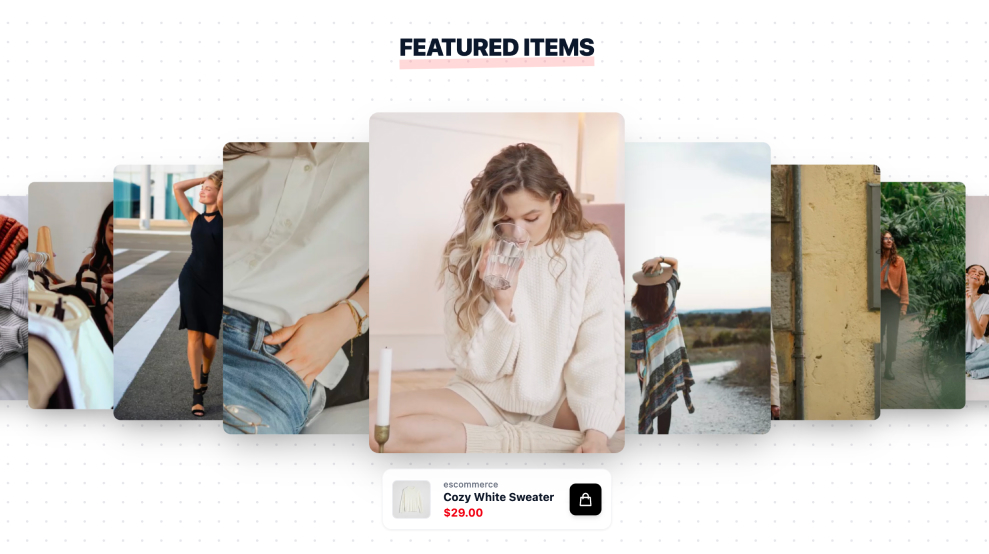
A shoppable widget for Shopify is a dynamic content block that displays product-linked UGC, social posts, or short videos directly on your store. You can place it on your homepage, product pages, or collection pages to show real customer content while giving shoppers a faster path to buy.
With the EmbedSocial: Shoppable UGC app, you can collect UGC from connected sources, curate it, and tag Shopify products so each widget becomes a conversion path. It helps you move shoppers from inspiration to checkout using real customer photos, videos, and reviews in one experience.
This is more than a gallery. It is a conversion-focused shoppable widget for Shopify that helps shoppers discover products with more confidence.
No coding skills or technical knowledge is required!
Why use a shoppable widget on your Shopify store?
Adding a shoppable widget to Shopify does more than improve the look of your storefront. It reduces friction between discovery and purchase while keeping your social proof visible.
- Build trust at a glance
Real customer photos, videos, and reviews help shoppers validate product quality faster. Social proof reduces hesitation when buyers are comparing options on your store. - Drive more conversions
With a shoppable widget for Shopify, your UGC becomes part of the buying journey. Tag products in posts or videos and link directly to product pages to reduce drop-offs. - Increase engagement
Video and UGC widgets naturally keep shoppers exploring. When visitors can browse authentic content and product links in one place, they spend more time on your site. - Encourage product discovery
Show a wider mix of products in real use cases and shoppers discover items they might miss in standard catalog pages, which can support higher AOV and repeat purchases. - Set better expectations
UGC helps shoppers see products in real-life contexts, which can improve purchase confidence and reduce mismatch expectations after delivery. - Keep pages fresh
Auto-updating widgets keep product pages and landing pages active with new content, which supports engagement and can strengthen your merchandising and SEO efforts.
Features of the shoppable widget for Shopify
EmbedSocial: Shoppable UGC is built for Shopify merchants who want a shoppable widget with automation, control, and measurable results. Here are the core capabilities (some advanced features may depend on your plan and connected sources):
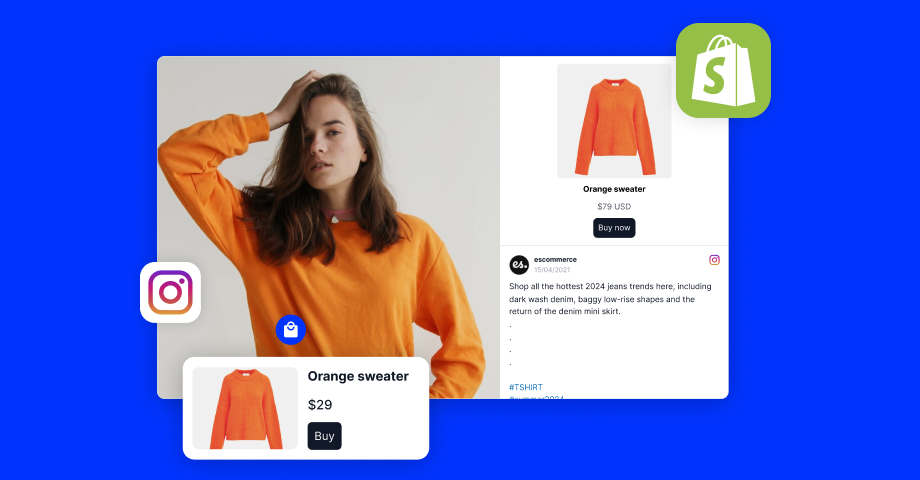
- Shoppable posts and videos
Tag Shopify products in UGC and social content so shoppers can discover items and move to product pages or checkout faster. - Dynamic code to show unique UGC on each product page
Use one reusable widget code in your product template and let dynamically load matching tagged images and videos per product page - API integrations and auto-sync
Pull content from connected social sources automatically and keep your shoppable widget updated without manual publishing every time. - Product cards and buy links
Display product details and clickable buy actions inside the widget so shoppers can browse and purchase with fewer steps. - AI editor, templates, and design controls
Use EmbedSocial’s editor plus templates and styling controls to build on-brand shoppable sections faster, from grids and carousels to product-focused layouts. - AI curation tools (scoring, moderation, tagging)
Use AI-assisted scoring, moderation, and tagging to organize UGC faster and publish the most relevant content in each widget (availability may vary by setup/plan). - Rights-safe publishing workflows
EmbedSocial platform workflows can support UGC rights requests and approval processes so teams can move approved content into widgets faster (verify exact plan availability). - Widget analytics and performance tracking
Track widget views, clicks, and engagement to understand which placements and UGC assets drive the best outcomes. - No-code embed and responsive layouts
Publish with Shopify theme placement or embed code, and keep the shoppable widget fast and responsive across desktop and mobile.
How to add a shoppable widget for Shopify?
Adding a shoppable widget for Shopify is straightforward. Follow these steps to launch quickly and start turning UGC into a shopping experience:
1. Connect to Shopify and sync your products
You have two ways to pull your Shopify product catalog into EmbedSocial:
- Install the Shopify app from the Shopify App Store that will pull all products autmatically into the Products page in your EmbedSocial account;
- Connect Shopify with xml from inside EmbedSocial to import your catalog without adding another app to your Shopify admin, you will need the products xml file to import into EmbedSocial in the Products page.
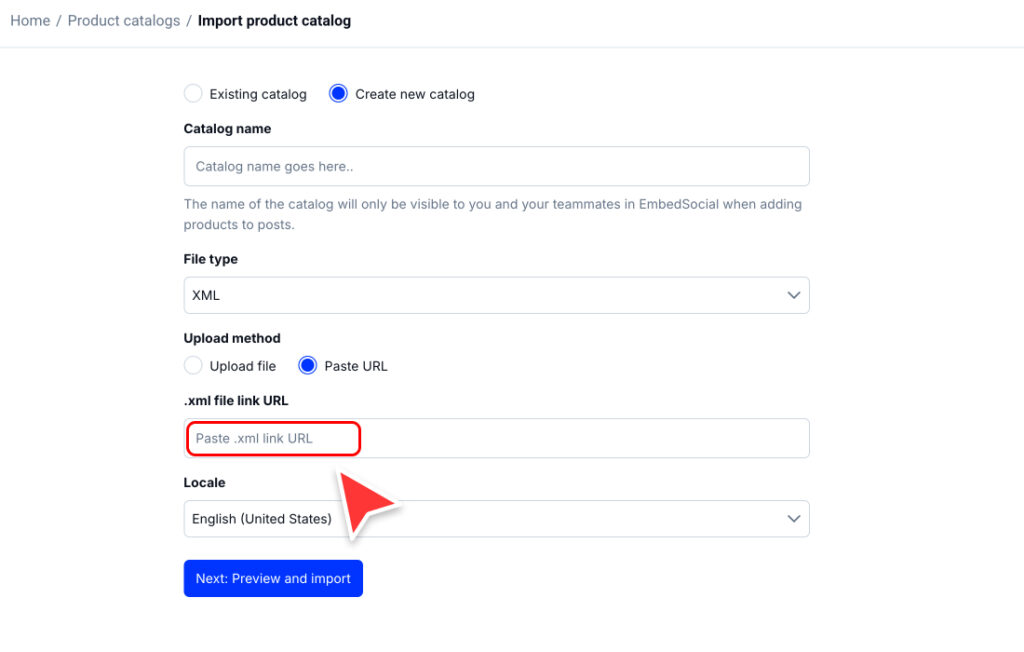
Both options keep your products in sync, so when you add, edit, or remove products in Shopify, the catalog updates automatically in EmbedSocial.
How the XML file works
How it works
- Shopify generates a product feed Url (xml) that contains your product data (Product id, title, Url, images, price, availability, variants, etc.)
- In EmbedSocial, you paste that xml feed Url to import your catalog
- EmbedSocial re syncs the feed automatically, so changes in Shopify (new products, edits, removals) are reflected in EmbedSocial after the next sync
When to use the xml option
- You do not want to manage extra apps in Shopify admin
- You want a quick catalog import without theme changes
- You only need product data for tagging and dynamic widgets (not deeper Shopify actions)
One line copy you can use in the Ui
Connect via Shopify xml feed to import and auto sync your products without installing a Shopify app.
FAQ: How to find the xml URL in Shopify?
How To find your Shopify product xml feed link
Option 1: Google and YouTube sales channel feed (Most common)
- In Shopify admin, go to Settings → Apps and sales channels
- Open Google and YouTube
- Go to Product feed (or Feed settings)
- Copy the xml feed Url
This is usually the cleanest xml feed because it is made for product catalogs.
Option 2: Use a feed generator app
If you do not have a built in feed available, install a product feed app (search Shopify App Store for “product feed xml” or “google merchant feed”).
After setup, the app will provide a public xml feed Url you can copy.
Option 3: Ask your developer for the store feed Url
Some stores have a custom xml endpoint (for example generated by a theme or middleware). If this exists, your developer can share the exact Url.
Tip: The xml link should open in the browser and show structured xml content (not a normal product page).
2. Create a widget and tag your posts with products
In EmbedSocial, go to Widgets and create your UGC widget and tag each image or video with the product it features. A post can be tagged with one or multiple products.
3 Copy and paste a dynamic embed code into Shopify
Go to Embed, select Dynamic code and paste it into your Shopify product page file.
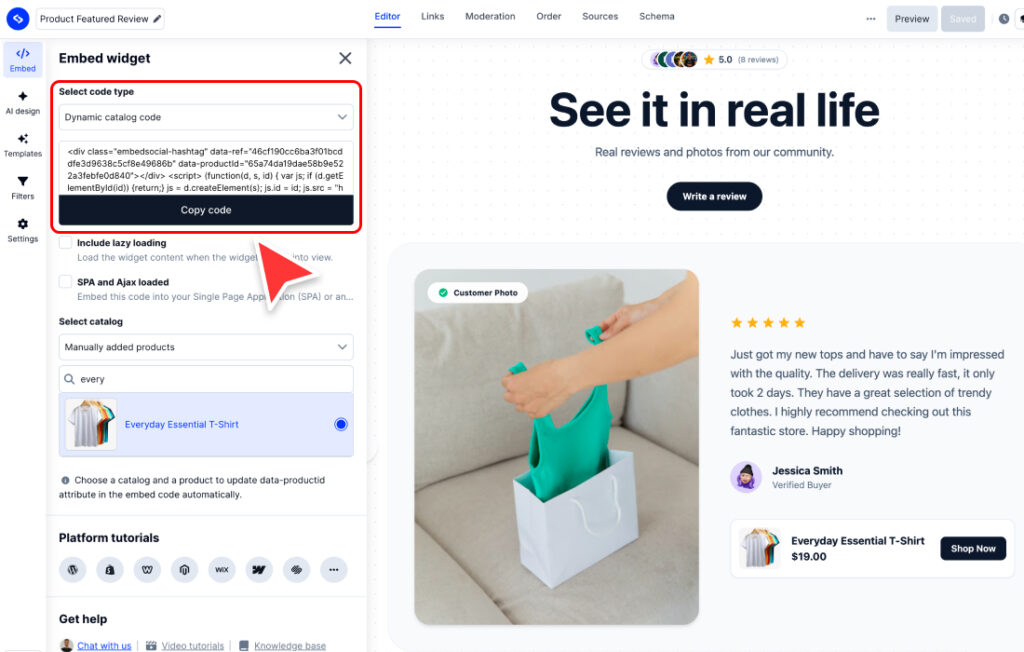
data-productId="{{ product_id }}" is the dynamic part – The ecommerce platform injects the current product’s id at render time (for example on Shopify product templates)
- Go to Online store → Themes → Edit code
- Open:
templates/product.json - That file usually loads a main product section, most commonly:
sections/main-product.liquid - Paste the dynamic embed code inside
sections/main-product.liquidwhere you want the widget to appear (for example under the product description)
Note: To show this widget only on specific product pages, open the Select catalog dropdown and choose the products you want. The widget will appear only on those selected product pages.
5 Done: The widget updates per product page
When a customer opens a product page, the widget detects that product id and shows only the posts tagged with that product in EmbedSocial.
Once published, your shoppable widget for Shopify can start turning social proof and UGC into product discovery, clicks, and purchases.
Getting Started
Turn your social proof into a sales channel.
Install EmbedSocial: Shoppable UGC and launch a shoppable widget for Shopify that helps you collect, curate, and convert with real customer content.
More UGC widgets for Shopify




FAQs about shoppable widgets for Shopify
Have a specific question about setting up a shoppable widget for Shopify? Review the FAQ below or contact our team to confirm setup, plan, and source availability.
1. Connect supported sources or upload content
2. Customize the widget and tag products
3. Add the widget to your Shopify theme and publish