Social Media Slideshow

Use this template

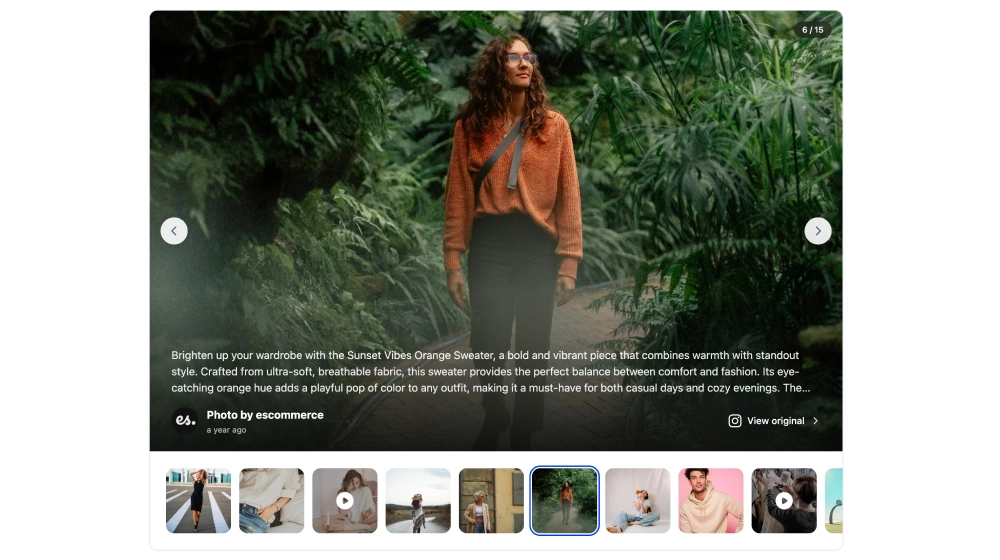
This social media slideshow turns a feed into a more focused viewing experience, with one featured post shown large and the rest available as a thumbnail strip below. Instead of asking visitors to scan a full grid, it lets them move through social content one moment at a time, with captions, source details, navigation arrows, and a direct link back to the original post.What makes it workLarge featured slide: The active post gets the most space, making each photo or video feel more intentional and easier to view.Overlay caption area: Text appears directly over the media, so visitors can understand the story without leaving the slideshow.Thumbnail navigation: The strip below the main image makes it easy to jump between posts instead of moving only one by one.Slide counter: The 6 / 15 indicator helps visitors understand where they are in the collection.Previous and next controls: Side arrows keep browsing simple without cluttering the main visual.Source and author details: The profile name and platform cue make the content feel connected to the original social post.Original-post link: The View original action gives visitors a clear path back to the source when they want more context.Best fit forFashion and lifestyle galleriesUGC campaign showcasesEvent recap pagesProduct storytelling sectionsBrand homepages that need a more polished social media displayHow to embed itConnect your social media source in EmbedSocial.Choose the Social Media Slideshow Widget template.Customize the caption display, author details, thumbnail strip, and original-post link.Set how many posts should appear and how visitors should move through the slideshow.Copy the embed code.Paste it into your website, landing page, or CMS and publish.Give your social posts a cleaner, more immersive place on your website with a slideshow built for visual browsing.

About this template

This social media slideshow turns a feed into a more focused viewing experience, with one featured post shown large and the rest available as a thumbnail strip below. Instead of asking visitors to scan a full grid, it lets them move through social content one moment at a time, with captions, source details, navigation arrows, and a direct link back to the original post.

What makes it work

  • Large featured slide: The active post gets the most space, making each photo or video feel more intentional and easier to view.

  • Overlay caption area: Text appears directly over the media, so visitors can understand the story without leaving the slideshow.

  • Thumbnail navigation: The strip below the main image makes it easy to jump between posts instead of moving only one by one.

  • Slide counter: The 6 / 15 indicator helps visitors understand where they are in the collection.

  • Previous and next controls: Side arrows keep browsing simple without cluttering the main visual.

  • Source and author details: The profile name and platform cue make the content feel connected to the original social post.

  • Original-post link: The View original action gives visitors a clear path back to the source when they want more context.

Best fit for

  • Fashion and lifestyle galleries

  • UGC campaign showcases

  • Event recap pages

  • Product storytelling sections

  • Brand homepages that need a more polished social media display

How to embed it

  1. Connect your social media source in EmbedSocial.

  2. Choose the Social Media Slideshow Widget template.

  3. Customize the caption display, author details, thumbnail strip, and original-post link.

  4. Set how many posts should appear and how visitors should move through the slideshow.

  5. Copy the embed code.

  6. Paste it into your website, landing page, or CMS and publish.

Give your social posts a cleaner, more immersive place on your website with a slideshow built for visual browsing.
Features

  • Moderation options
  • Customizable settings
  • Fast loading speed
  • Mobile-friendly and responsive
  • Multiple widgets for multiple websites
  • Auto-sync with social platforms
  • Custom styling options
  • Analytics and insights