


What is a Webflow testimonial widget?
A Webflow testimonial widget helps you publish customer feedback on your site using a simple embed — no manual copy‑pasting and no coding headaches. Connect your review sources (or add custom testimonials), choose a layout, and paste the code into Webflow. Your testimonials stay fresh thanks to automatic syncing, and you can enable schema markup (aggregate rating) when applicable to help your pages stand out in search.

The testimonials widget can be customized to seamlessly blend with your website’s design, ensuring a cohesive look and feel. Additionally, it can aggregate reviews from multiple locations, providing a comprehensive view of customer satisfaction across different branches or services. This makes it an invaluable asset for businesses looking to leverage the power of customer reviews.
About our testimonials widget for Webflow
The easiest way to generate, manage, and display your testimonials on Webflow with just one line of code is by using testimonial widgets. These widgets enhance credibility, attract new customers, and improve user engagement by prominently displaying real user experiences and ratings.
Are you looking for a solution that helps you showcase photos, reviews, or feeds from social networks right on your website?
EmbedSocial is an advanced review management tool that helps you grow your customer reviews and acquire new buyers thanks to the power of reviews.
EmbedSocial works with a lightweight embed code, so you can use all of our tools on Webflow without installing or maintaining extra apps.
Collect, filter, and display testimonials on your Webflow website using modern, fully customizable widgets—perfect for local businesses, creators, and eCommerce stores.
With EmbedSocial, you can add your testimonials to your Webflow site in a few clicks—just copy and paste the embed code.
Publish your best customer feedback on Webflow and give visitors instant social proof that boosts trust and conversions.
Display your best reviews with a 5-star rating only, sort out the positives, and leave out the negative reviews at the bottom of the widget or hide them. It’s up to you. And no matter if you have received short or long reviews, they will all fit perfectly in our review widgets.
Note: you can enable aggregate rating schema (where applicable) so your markup stays updated when new reviews come in.
With EmbedSocial, you don’t need any coding skills to create lovely widgets on your website.
Benefits of testimonials for Webflow websites
It’s more than a basic testimonials section. With EmbedSocial, you can combine reviews from multiple sources and publish them as a single, polished widget on your Webflow site—without relying on plugins.
Some of the best benefits you’ll get include:
- Boost your search engine ranking
- Show instant social proof and build trust
- Show your product reviews in an engaging way
- Improve the average time visitors spend on your website
- Increase your conversion rate
- Save the time of manually adding customer reviews
- Encourage new review posting
Testimonials Widget features for Webflow

- Reviews management – Don’t run back and forth. Manage and respond to your testimonials from one dashboard, then publish them on Webflow with one embed.
- Photo reviews – A photo tells a thousand words. Let your customers share your products from Google Places in action.
- Unlimited widgets – Show your reviews from all sources in one place. Combine your Google, Facebook, and other business reviews in a single widget.
- Reviews generator – No more manual copy-pasting of long reviews. Just provide simple permissions to your social media and review site accounts and let the system fetch all your reviews.
- Review request – Send review requests via email and SMS to get feedback and earn your customer’s trust with customer interactions.
- Google rich snippets – Enable aggregate rating schema (where applicable) to help your star rating appear in search results and improve click-through.
- Moderation – Handpick the negative reviews and leave them aside. Fetch the positive reviews you want to appear on your website.
- Customization options – Choose from 10+ layouts and templates, or use custom CSS to match your Webflow styles perfectly.
- Web collection forms – Create unlimited testimonial collection forms. Embed a ‘Leave a review’ button and start getting more reviews from your website.
- Notifications – Don’t look for your Google business reviews on your sidebar. Get alerts every time someone writes a review.
Besides the many features, the plug-in offers you a wide arrangement of settings:
- Set the number of Reviews per page and Number of pages.
- Create combo widgets.
- Choose from 10+ different templates (carousel, WP testimonial slider, grid, etc.)
- Create a Webflow testimonials widget to showcase customer feedback attractively.
- Display reviews with a Minimum rating from 1 to 5.
- Set your reviews on the Webflow plugin for your eCommerce store.
- Set Google places API key.
- Sort by Likes, Comments, and Rating.
How to add testimonials to Webflow?
Here are the steps to embed the testimonials widget in Webflow:
Step 1: Create your EmbedSocial account
Create a free EmbedSocial account and choose a testimonials template (or use AI vibe editor for a custom layout).
Step 2: Import your testimonials (or connect review sources)
Connect your review sources from the Sources tab or add custom testimonials via a form.
Step 3: Customize your testimonial widget
Select your layout (slider, grid, wall), set filters, and match typography and spacing so it blends with your Webflow design system.
Step 4: Copy the embed code
Copy the JavaScript embed code from the Embed tab.
Step 5: Add the widget to Webflow
In Webflow Designer, add an Embed element where you want testimonials → paste the code → publish. For global placement, add the code in Project Settings → Custom Code (Head/Before ) depending on your use case.
If you find yourself struggling with some part of the setup, feel free to reach out to our customer support team and we will be happy to help you. Please note: When you set an account for EmbedSocial, you get the free version of this tool for 7 days.
Please note: With the PRO version and Premium version of EmbedSocial, you get numerous features like pulling online reviews from up to 15 sources, creating an unlimited number of reviews feeds and widgets, etc. For more detailed instructions on how to embed your Google business reviews, check the link below for a complete testimonials guide on creating and embedding the widgets.
For more detailed instructions on how to embed your Google business reviews, check the link below for a complete testimonials guide on creating and embedding the widgets.
EmbedSocial vs. other Webflow testimonial apps
| Feature | EmbedSocial | Competition |
|---|---|---|
| Works with Webflow (no installs) | ✅ Copy/paste embed | ✅ |
| Webflow embed block support | ✅ | ✅ |
| Auto-sync new reviews | ✅ Real-time | ✅ |
| AI vibe editor | ✅ | ❌ |
| Multi-source (Facebook, Yelp, Trustpilot) | ✅ | ✅ |
| Schema / aggregate star rating | ✅ | ✅ |
| AI review moderation | ✅ | ❌ | /tr>
| AI reply assistant | ✅ | ❌ |
| Free plan | ✅ | ✅ |




Browse Google reviews widgets
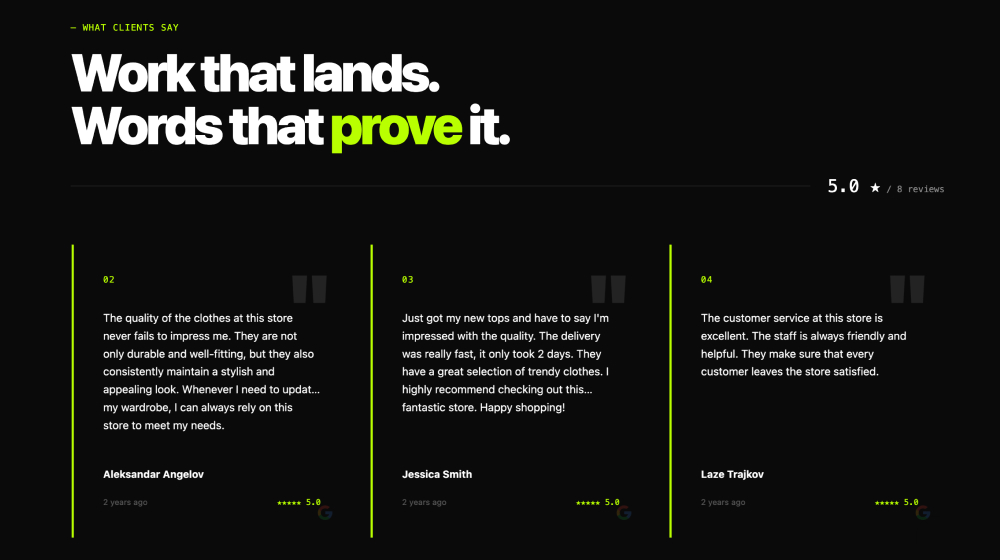

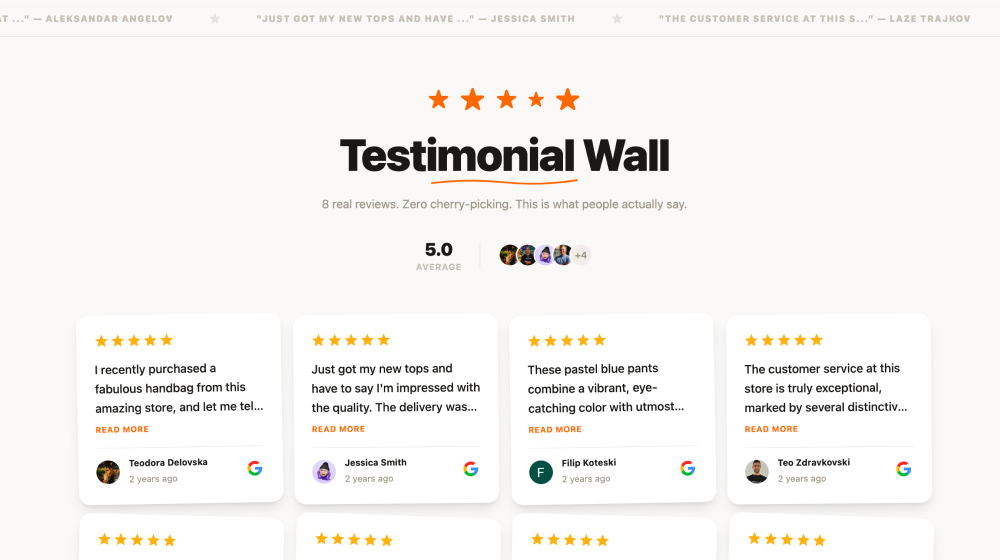





Embed testimonials on any web platform in seconds




Frequently asked questions
Have a specific question about our Google review widget?
Check these FAQs or click the bottom right chat icon and talk with us.
Create your widget in EmbedSocial, copy the generated embed code, then paste it into a Webflow embed/code block on the page where you want testimonials to appear. The widget loads instantly and keeps updating as you collect new testimonials.
Yes. You can import reviews and testimonials from multiple sources (Google Business Profile, Facebook, Yelp, and more) and also add custom testimonials via forms—then display them in a single widget.
Yes. Once your sources are connected, your widget stays in sync automatically—no manual copy‑pasting.
It can. Fresh user-generated content helps pages stay relevant, and you can enable aggregate rating schema when applicable to improve how your site appears in search results.
No. EmbedSocial works with a simple embed code, so there’s nothing to install or maintain on Webflow.
Absolutely. Pick from multiple layouts (slider, grid, carousel, wall), then customize fonts, spacing, colors, and filters—or use the AI vibe editor to generate a design from a short prompt.
Yes. You can start with a free trial and upgrade only if you need advanced features like multiple sources, more widgets, or premium customization.