Orbital Google Testimonials

Use this template

The Google Reviews Avatar Orbit is a story-driven testimonial slider that showcases one featured Google review while surrounding it with a “community orbit” of customer avatars. The dotted path and floating profile circles create a light, friendly sense of motion—making reviews feel like real people, not just text on a page.FeaturesAvatar orbit layout: Customer profile circles arranged along a dotted path to visualize community and momentumSingle review spotlight: One long-form review displayed at a time for maximum readabilityGoogle attribution: Star rating and Google icon under the testimonial for instant trustCTA-ready header: Big section title (e.g., “What Our Customers Say”) with optional subtitlePrimary action button: Prominent CTA like Book Now to drive conversions from the sectionCarousel navigation: Left/right arrows + dot indicators for browsing multiple reviewsHuman-first design: Avatars/initials add authenticity and help the section feel personalResponsive layout: Orbit compresses gracefully on smaller screens while keeping the review readableUse casesService businesses: Booking-focused pages (salons, clinics, fitness, home services) where trust drives calls/appointmentsSaaS & agencies: Highlight client quotes in a clean, story-like layoutEcommerce “Customer stories” section: Show longer reviews with a community feelLanding pages: Pair social proof with a strong CTA (book, demo, consult) to reduce hesitationAbout / testimonials pages: Turn standard reviews into a more engaging narrative sectionHow to embedConnect your Google Reviews source in EmbedSocial (Google Business Profile).Select the template from the templates library.Customize the header text and set your main CTA button (e.g., Book Now) with your destination link.Choose how reviews rotate (latest, best, or pinned—if available) and adjust excerpt length.Copy the embed code (JavaScript or iFrame).Paste it into your website (Webflow, WordPress, Shopify, Wix, Squarespace, or custom HTML) and publish.Make your reviews feel like a community.Embed the Google Reviews Avatar Orbit to spotlight real customer stories and drive more bookings with a clear, conversion-focused CTA.
About this template

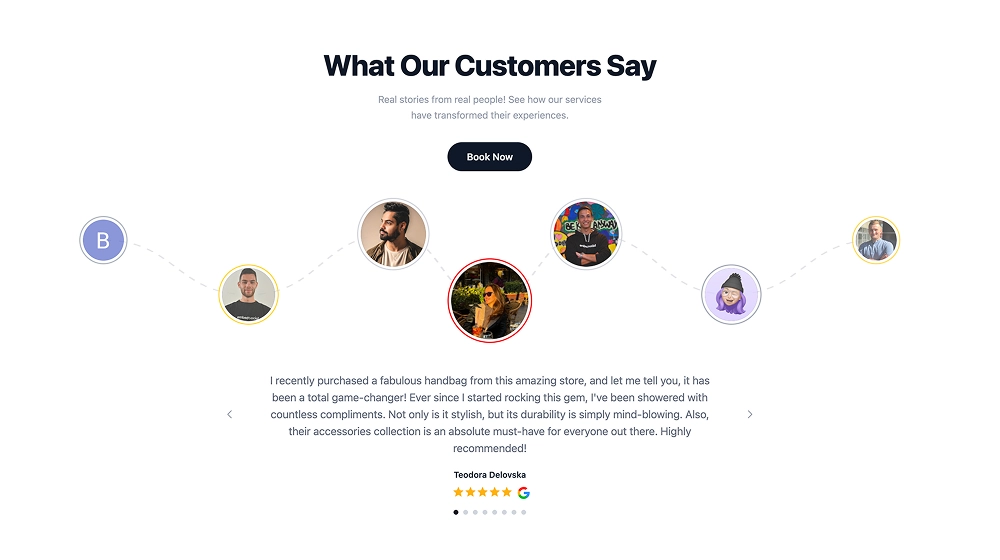
The Google Reviews Avatar Orbit is a story-driven testimonial slider that showcases one featured Google review while surrounding it with a “community orbit” of customer avatars. The dotted path and floating profile circles create a light, friendly sense of motion—making reviews feel like real people, not just text on a page.

Features

  • Avatar orbit layout: Customer profile circles arranged along a dotted path to visualize community and momentum

  • Single review spotlight: One long-form review displayed at a time for maximum readability

  • Google attribution: Star rating and Google icon under the testimonial for instant trust

  • CTA-ready header: Big section title (e.g., “What Our Customers Say”) with optional subtitle

  • Primary action button: Prominent CTA like Book Now to drive conversions from the section

  • Carousel navigation: Left/right arrows + dot indicators for browsing multiple reviews

  • Human-first design: Avatars/initials add authenticity and help the section feel personal

  • Responsive layout: Orbit compresses gracefully on smaller screens while keeping the review readable

Use cases

  • Service businesses: Booking-focused pages (salons, clinics, fitness, home services) where trust drives calls/appointments

  • SaaS & agencies: Highlight client quotes in a clean, story-like layout

  • Ecommerce “Customer stories” section: Show longer reviews with a community feel

  • Landing pages: Pair social proof with a strong CTA (book, demo, consult) to reduce hesitation

  • About / testimonials pages: Turn standard reviews into a more engaging narrative section

How to embed

  1. Connect your Google Reviews source in EmbedSocial (Google Business Profile).

  2. Select the template from the templates library.

  3. Customize the header text and set your main CTA button (e.g., Book Now) with your destination link.

  4. Choose how reviews rotate (latest, best, or pinned—if available) and adjust excerpt length.

  5. Copy the embed code (JavaScript or iFrame).

  6. Paste it into your website (Webflow, WordPress, Shopify, Wix, Squarespace, or custom HTML) and publish.

Make your reviews feel like a community.

Embed the Google Reviews Avatar Orbit to spotlight real customer stories and drive more bookings with a clear, conversion-focused CTA.

Features

  • Moderation options
  • Customizable settings
  • Fast loading speed
  • Mobile-friendly and responsive
  • Multiple widgets for multiple websites
  • Auto-sync with social platforms
  • Custom styling options
  • Analytics and insights

Related resources

Categories