Modern YouTube Playlist Widget

Use this template

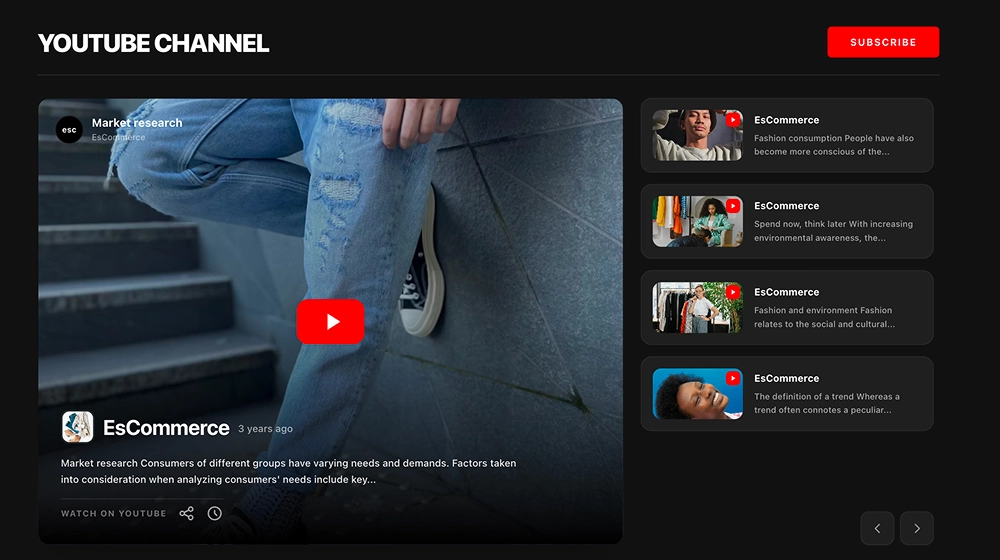
Turn your YouTube playlist into a proper viewing hub on your website, not just another embedded video. This widget puts one video front and center, then keeps the rest of the playlist visible in an Up Next panel, so visitors can keep watching, jump between episodes, and explore more content without leaving the page.Why this widget worksFeatured video player: Gives the current video a larger, more premium presence instead of hiding it inside a small embed.Up Next playlist panel: Keeps the next videos visible at all times, with thumbnails, titles, numbering, and dates.Playlist-style structure: Makes the content feel like a series, course, or content library rather than a random group of videos.Clear active state: The selected video stands out in the queue, which makes navigation easier.Strong dark layout: Fits creator sites, product pages, membership content, and modern brand websites.Best fit forOnline courses and masterclassesProduct demo collectionsPodcasts, interviews, and episodic video seriesHelp centers and onboarding pagesCreator or personal brand websitesHow to embed itConnect your YouTube playlist inside EmbedSocial.Select the YouTube Playlist Widget template.Customize the playlist title and decide how the video list should appear.Keep the playlist order or adjust how many videos to show.Copy the embed code.Paste it into your website, landing page, or CMS and publish.Embed your YouTube playlist on your website in a way that feels organized, bingeable, and easier to keep watching.
About this template

Turn your YouTube playlist into a proper viewing hub on your website, not just another embedded video. This widget puts one video front and center, then keeps the rest of the playlist visible in an Up Next panel, so visitors can keep watching, jump between episodes, and explore more content without leaving the page.

Why this widget works

  • Featured video player: Gives the current video a larger, more premium presence instead of hiding it inside a small embed.

  • Up Next playlist panel: Keeps the next videos visible at all times, with thumbnails, titles, numbering, and dates.

  • Playlist-style structure: Makes the content feel like a series, course, or content library rather than a random group of videos.

  • Clear active state: The selected video stands out in the queue, which makes navigation easier.

  • Strong dark layout: Fits creator sites, product pages, membership content, and modern brand websites.

Best fit for

  • Online courses and masterclasses

  • Product demo collections

  • Podcasts, interviews, and episodic video series

  • Help centers and onboarding pages

  • Creator or personal brand websites

How to embed it

  1. Connect your YouTube playlist inside EmbedSocial.

  2. Select the YouTube Playlist Widget template.

  3. Customize the playlist title and decide how the video list should appear.

  4. Keep the playlist order or adjust how many videos to show.

  5. Copy the embed code.

  6. Paste it into your website, landing page, or CMS and publish.


Embed your YouTube playlist on your website in a way that feels organized, bingeable, and easier to keep watching.
Features

  • Moderation options
  • Customizable settings
  • Fast loading speed
  • Mobile-friendly and responsive
  • Multiple widgets for multiple websites
  • Auto-sync with social platforms
  • Custom styling options
  • Analytics and insights

Categories