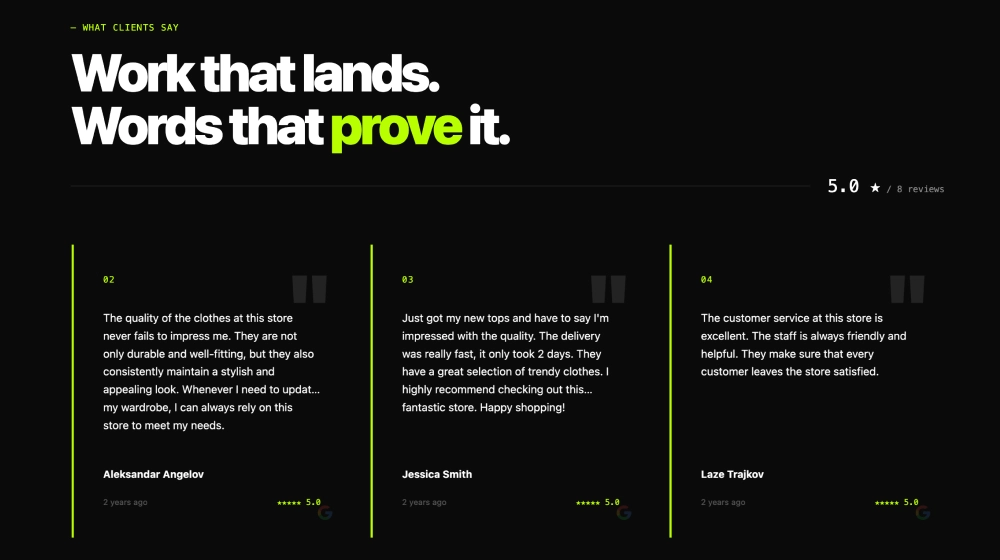
This wall of love template gives your SaaS a ready section for customer praise: a hero block, featured reviews, rating filters and a Review us button. You can embed it in any page or run a dedicated wall of love page. For layout ideas, see these wall of love examples.
What the wall of love template shows and where to place it
A wall of love template is a ready layout that collects your best customer reviews and testimonials in one place on your website. It shows prospects that real people use and like your product.
For SaaS teams, wall of love testimonials do work a feature list can’t. They show outcomes in your customers’ own words, which helps during trials and before a sales call.
This template pulls in Google reviews or another supported review source. It shows them as a featured reviews panel plus a filterable wall with tabs such as All ratings, 5 stars and 4 stars.
The Review us button turns the section into a collection point too. Happy users can leave a review without leaving your site.
- Homepage: a wall of love below the hero gives first time visitors quick proof that the product works.
- Pricing page: reviews next to plans ease doubts at the point where visitors decide to start a trial.
- Product pages: feature pages can show reviews that mention that exact feature or use case.
- Landing pages: campaign and comparison pages convert better when claims sit next to customer quotes.
How to add a wall of love template to your website
- Connect your Google reviews or supported review source in EmbedSocial.
- Choose the Wall of Love Widget template.
- Customize the hero title, featured reviews block, CTA button, and supporting section copy.
- Set the rating filters and decide how many review cards should appear in the lower wall.
- Copy the embed code.
- Paste it into your website, landing page, or CMS and publish.
WordPress
- Open the page in the block editor and add a Custom HTML block.
- Paste the EmbedSocial embed code into the block.
- Preview the page, then click Update or Publish.
Shopify
- In your Shopify admin, go to Online Store, then Themes, and click Customize.
- Open the page where the wall should appear and add a Custom Liquid section.
- Paste the embed code into the section and click Save.
Wix
- Open the Wix Editor and click Add Elements.
- Choose Embed Code, then Embed HTML, and place the element on the page.
- Click Enter Code, paste the embed code, click Update and publish the site.
Squarespace
- Edit the page and click Add Block where the wall should go.
- Choose Code and paste the embed code into the block.
- Save the page and check the result on the live site.
Wall of love vs other layouts
| Layout | Best for | Shows | Template |
|---|---|---|---|
| Wall of love | A full proof section or dedicated reviews page | Featured reviews, rating filters and a review button | Wall of Love Template for Testimonials |
| Bento grid | Highlighting a few standout quotes | Mixed size testimonial cards | Bento Testimonial Grid |
| Testimonial slider | Tight spaces near a CTA | A row of review cards with arrows | Testimonial Slider for Squarespace |