


What is a Trustpilot reviews widget for Shopify?
A Trustpilot reviews widget for Shopify connects your Trustpilot review content to your storefront and lets you display it in a polished, conversion-friendly layout. Instead of manually pasting testimonials into product pages, you can publish a live widget that stays current and easy to manage.

The widget can be adapted to match your Shopify theme so it feels native across product pages, landing pages, homepage sections, and collection pages. That makes it easier to add trust-building review content closer to the moments when shoppers decide to buy.
About our Trustpilot widget for Shopify
EmbedSocial gives Shopify brands an easy way to collect, manage, and display Trustpilot reviews with flexible on-site widgets. It helps turn customer feedback into storefront social proof that supports sales and strengthens brand credibility.
Looking for a simple way to show Trustpilot reviews, customer feedback, and social proof across your Shopify store?
EmbedSocial is a reviews platform that helps ecommerce teams manage customer feedback, turn it into storefront content, and create stronger buyer confidence with customizable review widgets.
The Shopify integration works alongside other EmbedSocial tools, so you can manage reviews, feeds, and social proof without stacking multiple apps for every display need.
Collect, filter, and display your Trustpilot reviews on Shopify in modern layouts built for storefronts, campaign pages, featured products, and conversion-focused landing pages.
With a simple embed code, EmbedSocial helps you add your best Trustpilot reviews widget to Shopify without rebuilding your theme.
Add live Trustpilot reviews to your Shopify store and give shoppers more confidence before they add products to their cart or complete checkout.
Feature your best ratings, highlight selected customer stories, and present review content in layouts designed to keep product pages more persuasive and easier to trust.
This Shopify Trustpilot widget can also support structured review presentation and a consistently fresh display of recent customer feedback.
With EmbedSocial, you can launch branded review widgets on Shopify without custom development.
Benefits of a Trustpilot widget for Shopify websites
It is more than a simple Trustpilot embed. A Shopify Trustpilot widget helps you strengthen your storefront with trusted social proof, reuse customer feedback in multiple sections, and combine reviews from several sources when needed.
Key benefits for Shopify merchants include:
- Increase buyer trust with visible third-party reviews
- Add stronger social proof to product and landing pages
- Display reviews in layouts built for e-commerce conversion
- Keep shoppers engaged with recent customer feedback
- Support higher conversion rates near the add-to-cart sections
- Reduce manual work by syncing reviews automatically
- Encourage more customers to leave post-purchase feedback
Trustpilot widget features for Shopify
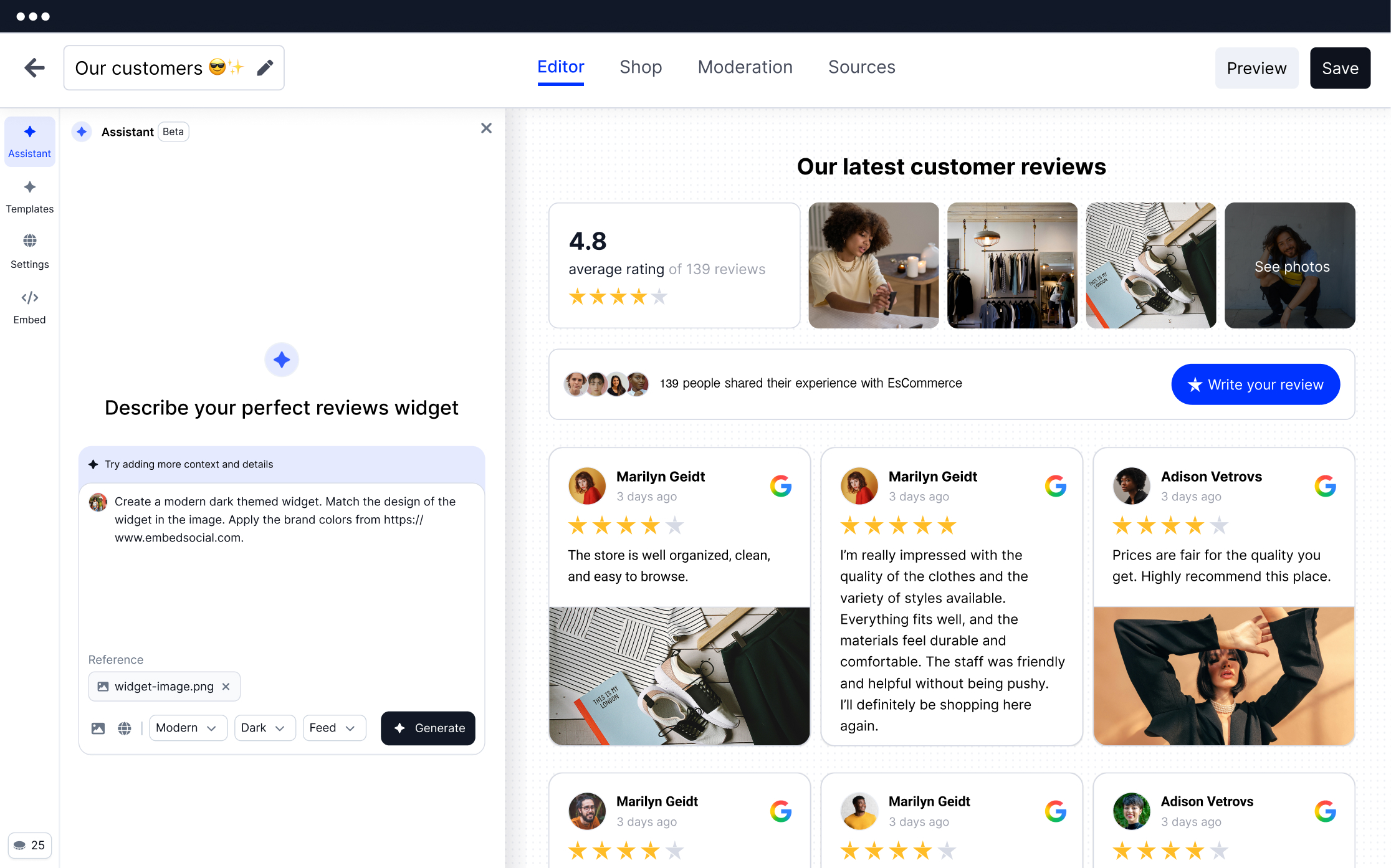
- Review management – Organize your Trustpilot reviews from one dashboard and decide exactly what appears in your Shopify store.
- Featured reviews – Surface your best customer stories on product pages, bundles, and sales pages.
- Unlimited widgets – Create multiple review widgets for different collections, products, and campaigns.
- Reviews sync – Keep your storefront current with automatically synced Trustpilot reviews.
- Review requests – Support your feedback collection flow with review request tools via email and SMS.
- Storefront-ready layouts – Use layouts that fit product-focused sections, promotional blocks, and landing pages.
- Moderation – Filter by keywords, rating, or manual selection before a review appears on your storefront.
- Customization options – Adjust colors, spacing, card design, and review length to match your Shopify theme.
- Web collection forms – Add more ways to collect customer feedback through on-site forms when needed.
- Notifications – Receive alerts when new reviews arrive so your team can respond quickly.
Alongside its layouts, the widget gives you flexible controls for moderation, filtering, and storefront presentation:
- Set the number of reviews and pages to display.
- Create combined social proof widgets from multiple sources.
- Choose from 10+ layouts, including carousel, slider, grid, and badge.
- Create a Trustpilot reviews widget for product pages or landing pages.
- Filter by minimum star rating from 1 to 5.
- Place widgets in Shopify theme sections and custom liquid blocks.
- Customize styling without editing core theme files.
- Sort reviews by recency, rating, and other display options.
How to add a Trustpilot reviews widget to Shopify?
Here are the steps to embed the Trustpilot reviews widget in Shopify:
Step 1: Create your EmbedSocial account
Create your EmbedSocial account and start with a free trial. Pick a ready-made review layout or use the AI vibe editor to generate a design that suits your storefront.
Step 2: Connect your Trustpilot source
In the Sources tab, connect Trustpilot and import the reviews you want to display. Once connected, the source can keep syncing your newest Trustpilot reviews automatically.
At this point, you can either connect a public Trustpilot profile URL, which pulls the latest 200 reviews, or you can add your Trustpilot API key to access all of them.
Step 3: Customize your Shopify review widget
Choose the layout that fits your store best, such as a review slider, product-page testimonial block, grid, badge, or wall. Then adjust colors, spacing, review length, and filtering so the widget matches your Shopify theme.
Step 4: Copy your embed code or shortcode
When the widget is ready, open the Embed tab and copy the widget code generated for your Trustpilot reviews widget.
Step 5: Add the widget code to Shopify
In Shopify, open Online Store → Themes → Customize, then add a Custom Liquid block or section where you want the widget to appear. Paste the embed code, save the theme, and publish your Trustpilot reviews on product pages, the homepage, or custom landing pages.
If you need help with the setup, our support team can walk you through the publishing process. New accounts can test the platform during the trial before upgrading.
Please note: Paid EmbedSocial plans unlock more review sources, advanced moderation, unlimited widgets, and additional publishing options. That makes it easier to scale your Trustpilot review strategy across multiple pages and campaigns.
For a more detailed walkthrough on connecting Trustpilot and placing the widget in Shopify, use the tutorial below:




Embed Trustpilot reviews on any web platform in seconds




Frequently asked questions
Have a specific question about our Trustpilot widget?
Check these FAQs or click the bottom right chat icon and talk with us.
Create your EmbedSocial account, connect to Trustpilot, design the widget, and copy the embed code. Then place it in a Shopify custom liquid block, section, or app embed area so your Trustpilot reviews appear on the storefront.
Yes. You can add the widget to product templates, featured sections, homepages, collection pages, and custom landing pages to strengthen purchase confidence where it matters most.
Yes. After the Trustpilot source is connected, newly collected reviews can sync to the widget automatically, so your storefront stays current without manual editing.
Yes. You can moderate the feed, highlight selected reviews, filter by rating or keywords, and create widgets tailored to different product categories or campaigns.
No. Shopify supports simple embed placements through the theme editor, custom liquid sections, and app embed-style placements, so most stores can publish the widget without custom development.
It often does. Showing recent customer feedback close to add-to-cart buttons, featured products, and product bundles helps reduce hesitation and reinforces trust during purchase decisions.
Yes. The widget can be added to Online Store 2.0 themes through theme sections and custom liquid blocks, making it easy to place on modern Shopify storefronts.
Yes. You can combine Trustpilot with reviews and user-generated content from other channels to create richer social proof sections for your Shopify store.
The widget is designed to load asynchronously, which helps keep the main storefront content loading first while the review content appears smoothly after.
Yes. You can customize layouts, spacing, card presentation, fonts, and visual settings so the widget feels native to your Shopify brand.