


What is a Google reviews widget Elementor plugin?
A Google reviews widget Elementor plugin connects your Google Business Profile to your website and displays reviews in a customizable widget without manual copy-pasting. In Elementor, you can place the widget with the HTML element, and the feed keeps updating automatically as new reviews are published.

You can match the widget to your design, use filters to control what appears, and pull reviews from multiple Google locations when needed. This gives Elementor pages always-on trust proof that supports both local SEO and conversion goals.
Why use EmbedSocial for Google reviews in Elementor?
EmbedSocial gives you an end-to-end flow for Google reviews in Elementor, from source connection to publish-ready widgets. Once connected, reviews are checked and updated every 10 minutes, and new reviews appear on your site in roughly 10 to 15 minutes.
Setup is simple: generate the widget, copy the embed code, open Elementor, add an HTML widget, and paste the code.
EmbedSocial is a review management platform with AI-powered design and moderation workflows, built for teams that want faster publishing and cleaner social proof blocks.
You can use Elementor without maintaining multiple widget plugins. One EmbedSocial account can power multiple widgets and placements across your site.
Collect, filter, and display Google reviews in modern layouts such as slider, carousel, grid, and wall formats, then publish them where trust matters most.
For implementation details, follow the official guide: How to embed reviews in Elementor.
For source connection and widget generation steps, use: How to generate and embed Google reviews.
You control quality and brand fit with moderation settings, keyword filters, and rating rules before reviews go live in your Elementor page sections.
If you need schema markup, EmbedSocial provides a dedicated Schema tab for eligible plans so your rating markup can be managed from one place.
No coding is required beyond copy-paste in Elementor.
Why this Google reviews widget Elementor setup converts
The top conversion benefit is trust at the decision point. BrightLocal reports that 91% of consumers use reviews to evaluate local businesses, and 81% use Google to read local business reviews. Adding a live review block on your Elementor landing pages helps visitors validate your offer faster.
Core outcomes you get from this setup include:
- Fresh on-page UGC that supports local SEO relevance
- Trust signals directly on the page where users are deciding
- Flexible layouts for product pages, service pages, and homepages
- Higher engagement from interactive review widgets
- Better conversion support through visible customer proof
- Less manual work with auto-sync and reusable widget templates
- Faster publishing across multiple Elementor sections
Google reviews widget Elementor features

- Automatic Google sync – New Google reviews are checked every 10 minutes, and updates typically appear on your site in about 10 to 15 minutes.
- Elementor-ready embed flow – Copy your widget code, drag the Elementor HTML element, paste, and publish.
- AI editor and templates – Use ready templates or prompt-based styling to generate layouts faster.
- AI moderation and tagging – Filter and organize reviews so only the right content is visible in each widget.
- Multiple Google locations – Connect as many Google locations as needed and build one combined widget or separate widgets per location.
- Review analytics – Track views, clicks, and engagement from the Analytics tab after enabling Reviews analytics.
- Schema markup option – Schema code is available in the widget Schema tab on eligible plans.
- Custom CSS and responsive control – Fine tune design details to match your Elementor layout and brand system.
- UGC rights workflow – Rights request automation is available in the platform for teams publishing customer content at scale.
- Shoppable content support – Product tagging is available for supported mixed UGC widgets. Verify source and plan availability for your use case.
Supporting capabilities available for advanced page setups:
- Unlimited widget creation in one account
- Filters by rating, keywords, and content type
- Multiple sources per widget
- Embeddable JavaScript or iframe code
- Localization and translation options
- Responsive design for mobile and desktop
- Manual custom post support where needed
- ISO certified infrastructure and account controls
How to add a Google reviews widget to Elementor
Follow these steps to set up your Google reviews widget Elementor flow:
Step 1: Create your EmbedSocial account
Sign up and open EmbedReviews. Create your first widget from a ready template or use the AI editor for faster styling.
Step 2: Connect your Google Business Profile
Open Sources, click Add Source, choose Google, connect your account, and select your location. Reviews are imported into your widget.
Step 3: Customize your widget
Pick your layout, apply filters, and adjust branding options. If needed, disable Auto add new posts and approve reviews in the Moderation tab before publishing.
Step 4: Copy your embed code
In the widget editor, click Embed and copy code.
Step 5: Add the widget in Elementor
Open the target page in Elementor, drag the HTML element into your section, paste the code in the HTML field, and click Update. Your live Google reviews widget appears immediately.
If you need help during setup, contact support via live chat or email.
Please note: The free plan supports Google Maps source with a generated badge and currently shows 5 random Google reviews. If you need all reviews and advanced controls, use a paid plan after the free trial.
For full screenshots and click-by-click setup, use the official Elementor help tutorial below.
See the full Elementor tutorial →
EmbedSocial vs. other Google reviews widget Elementor tools
| Feature | EmbedSocial | Competition |
|---|---|---|
| Elementor setup | ✅ HTML element + paste code | ✅ Varies by plugin |
| Auto-sync cadence | ✅ Autonomous after new reviews | ⚠️ Varies |
| Manual moderation controls | ✅ Moderation tab + approval flow | ⚠️ Varies |
| Multiple Google locations | ✅ Supported | ⚠️ Varies |
| AI editor and templates | ✅ Full vibe coding tool | ❌ |
| Schema markup | ✅ Available on eligible plans | ❌ |
| Widget analytics | ✅ Premium and Enterprise | ❌ |
| Free entry option | ✅ Google Maps source with free plan | ✅ |




Browse Google reviews widgets
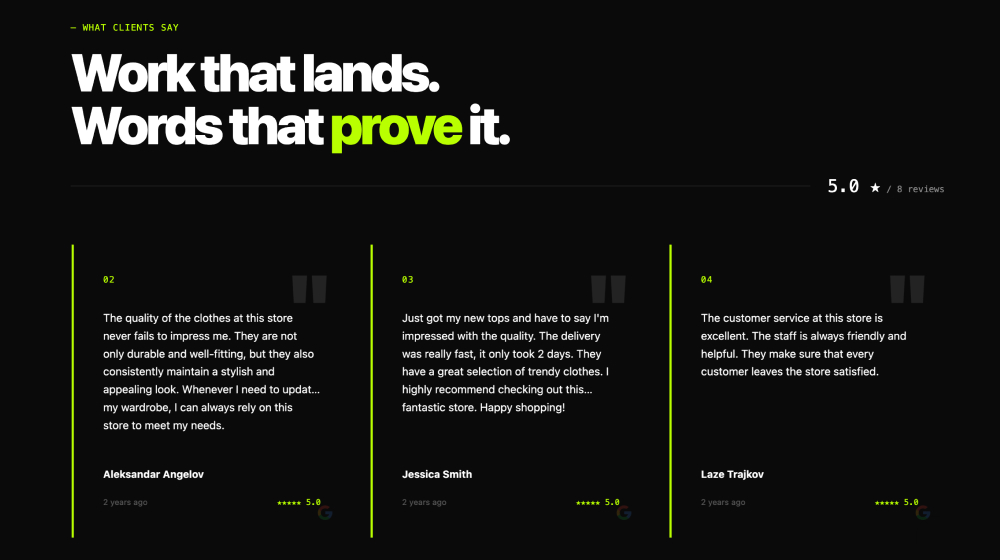







Embed Google reviews in Elementor and any web platform in seconds




Frequently asked questions
Have a specific question about our Google review widget?
Check these FAQs or click the bottom right chat icon and talk with us.
Create or open your reviews widget in EmbedSocial and copy the embed code. In Elementor, open the page editor, drag the HTML widget, paste the code, and click Update. Official guide: https://embedsocial.com/help/en/articles/8015956-how-to-embed-reviews-in-elementor
EmbedSocial checks for new Google reviews every 10 minutes, and new reviews usually appear on your website in about 10 to 15 minutes.
Yes. In your widget settings, disable Auto add new posts and use the Moderation tab to approve reviews before they appear on your live Elementor page.
Yes. You can connect multiple Google locations, then show them in one combined widget or create separate widgets per location and page.
Yes. The free plan supports a Google Maps source with a generated badge and currently 5 random Google reviews. For full review import and advanced options, check current plan limits on https://embedsocial.com/pricing/feed/ and https://embedsocial.com/help/en/articles/8616634-how-to-display-your-google-reviews-with-the-free-plan
Yes. Schema code is available in the Schema tab of the reviews widget. According to the help documentation, this option requires a Pro Plus plan.
Yes. Enable Reviews analytics in the widget General tab, then use the Analytics tab to track views, clicks, and engagement. Help docs note this is available on Premium or Enterprise plans.
No. The same widget can also be embedded on WordPress, Wix, Squarespace, Shopify, Webflow, and other websites that accept embed code.