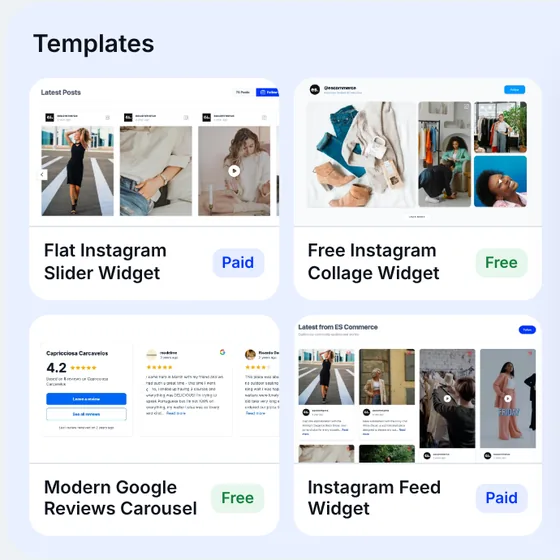
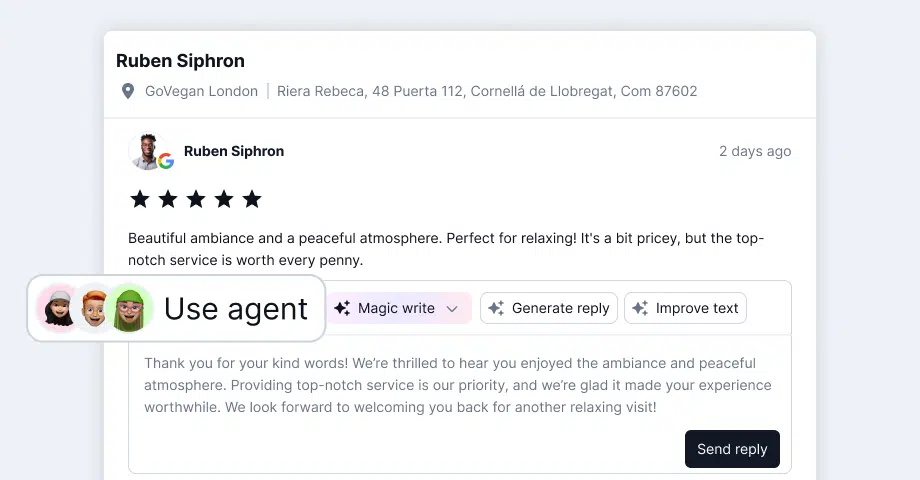
Someone asks ChatGPT: “Is Acme Dental in Austin any good?” ChatGPT visits acmedental.com to check. The homepage has a reviews widget with 120 Google reviews. ChatGPT sees an empty box.
Acme Dental is a made-up example. The empty box isn’t. Most AI agents and crawlers don’t run JavaScript or read iframes, and that’s how embedded review and social proof widgets usually load. Your customers see the reviews. The AI sees nothing.
AI-readable widgets fix that. An AI-readable widget is an EmbedSocial widget whose content is also printed into your page as plain HTML, so AI agents and crawlers can read your reviews and posts without running any scripts. You turn it on with the AI readable content option in the Embed widget window of EmbedSocial reviews.
The result: your reviews and UGC are now readable by AI agents and crawlers, not just human visitors. Below you’ll see why widgets look empty to AI, how AI readable content works, how to set it up and where it works.
What are AI-readable widgets?
AI-readable widgets are regular EmbedSocial widgets with one addition: a plain-HTML copy of their content inside the page itself. Visitors keep seeing the same widget, with the same design. AI agents, crawlers and screen readers get a text version they can read without JavaScript.
Three terms you’ll see in this guide:
-
AI-readable widgets: the result. A widget whose content AI agents can read.
-
AI readable content: the EmbedSocial option that does it. It’s the button under the embed code in the Embed widget window.
-
AI readable reviews: the most common use. Review text, ratings and sources become LLM readable content on your page.
It’s not limited to reviews. It works for any widget you build, whether you display reviews from Google or a Trustpilot reviews widget, or show UGC from a social media aggregator feed.
AI-readable UGC and social feed widgets
For UGC and social media feed widgets, the HTML lists posts instead of reviews. Each post includes its author, date, source, caption text and a link to the original post. Ratings and titles appear only when an item has them.
That matters because UGC carries details a product description often misses: how customers use a product, what they wear it with, where they took it. It’s the same reason UGC in the age of AI and UGC for SEO get so much attention. AI readable content makes those posts part of your page’s text instead of pixels a script draws later.
Can AI crawlers execute JavaScript?
No, the major AI crawlers don’t. Vercel tested this across its network and published the results in December 2024: “none of the major AI crawlers currently render JavaScript.”
| Crawler | Company | Renders JavaScript? |
|---|---|---|
| GPTBot | OpenAI | No |
| OAI-SearchBot | OpenAI | No |
| ChatGPT-User | OpenAI | No |
| ClaudeBot | Anthropic | No |
| PerplexityBot | Perplexity | No |
| Meta-ExternalAgent | Meta | No |
| Googlebot (also used for Gemini) | Yes | |
| AppleBot | Apple | Yes |
Source: Vercel, “The rise of the AI crawler”, December 2024.
The ChatGPT crawler and Claude’s crawler do download JavaScript files (11.50% and 23.84% of their requests), but they don’t execute them. They read the raw HTML your server sends and move on.
These aren’t niche bots, either. In one month on Vercel’s network, GPTBot made 569 million requests and Claude 370 million. Together with AppleBot and PerplexityBot, that’s about 28% of Googlebot’s volume.

For years, javascript seo meant one thing: making sure Googlebot could render your pages. Google does render JavaScript, so most sites stopped worrying. AI crawlability is a different problem. An AI crawler or other LLM crawlers that skip JavaScript only see what’s in the HTML on arrival.
What an AI crawler sees on a page with a widget
Here’s the standard EmbedSocial JavaScript embed code:
<div class="embedsocial-hashtag" data-ref="9241f586cd15fab7f7079258a4641fedbe84df6e"></div><script>(function(d, s, id){ ... js.src = "https://embedsocial.com/cdn/ht.js"; ... })</script>A browser runs the script and builds the widget. An AI crawler gets an empty div and a script it won’t run. That’s the whole widget, from its point of view.

Iframe SEO and AI crawlers: JavaScript vs iFrame embeds
EmbedSocial gives you four ways to embed a widget: JavaScript, iFrame, URL and WordPress shortcode. JavaScript is the default. The iFrame option helps when a site builder strips scripts. (If you’re still choosing a tool, here are the best Google reviews widgets compared.)

Most iframe seo guides answer one question: does Google index iframe content? For AI crawlers, the answer is simpler. An iframe loads its content from another URL, so a crawler reading your page’s HTML only sees the frame, not the reviews inside it. A JavaScript embed builds its content in the browser, so the crawler sees an empty container.
Are iframes bad for SEO? Not by default, but neither a JavaScript nor an iFrame review widget puts the content into your page’s own HTML. That’s the gap AI readable content fills, and the fix is the same for both: your server prints the widget’s content right after the embed code. If you’re planning other widgets, see these website widget examples.
How AI readable content works (server-side rendering for AI crawlers)
Every widget made in the current EmbedSocial editor now has its own public fragment URL (a widget built in an older editor has none and its URL returns 404):
https://embedsocial.com/api/widgets/{widget-ref}/fragmentThe {widget-ref} is the same value as data-ref in your embed code. It’s a public GET request with no authentication or API key, and it returns the widget’s content as plain HTML.
Your website’s server requests that URL while it renders the page and prints the HTML right after the widget embed code. When an AI agent or crawler arrives, the reviews or posts are already part of the page. In short, it’s server-side rendering for AI crawlers, applied to one widget.

The HTML is visually hidden with an inline style. Visitors see the regular widget, while crawlers and screen readers read the text version. It adds no JavaScript.
What the fragment contains
The fragment is a single <section class="es-text-version"> element with:
-
Up to 20 items from the widget’s first page
-
A summary with the widget’s total item count, average rating and source names
-
For each item: author, rating, date, source, title, text and a link to the original review or post (each appears only when the item has it)
Reviews widgets say “reviews”. Other widgets say “posts”. A trimmed example:
<section class="es-text-version" aria-label="Widget name" style="..."> <h3 class="es-text-version-title">Widget name</h3> <p class="es-text-version-summary">120 reviews. Average rating 4.8/5. Sources: Acme Store, Acme on Facebook.</p> <article class="es-text-version-item"> <h4 class="es-text-version-author">Jane Doe - 5/5</h4> <p class="es-text-version-meta"><time datetime="2026-10-10">2026-10-10</time> - google</p> <blockquote class="es-text-version-caption">Friendly staff.<br />Fast delivery.</blockquote> </article></section>Speed and caching
-
The fragment adds about 10 to 20 KB of HTML and no JavaScript.
-
A fresh request adds about 200 to 300 ms to the page response, with a 2-second timeout as the maximum.
-
Page views served from your cache add nothing. Cache the result on your server for 5 minutes.
-
EmbedSocial caches the fragment too, so new items can take up to about 10 minutes to appear, plus your own cache time.
Responses: 200 and 404
-
200: the body is the HTML fragment. It’s cached for 5 minutes.
-
404: an empty body. You get it when the ref is not a widget made in the current editor, the widget is turned off, “Show widget on website” is disabled, the account has no active subscription or reached its view limit (see pricing), or the widget has no items yet. A widget you just published can return 404 for a few minutes.
Every response also sends X-Robots-Tag: noindex. That applies to the fragment URL only, not to the page you print the fragment into.
How to set up AI readable content in EmbedSocial
AI readable content is available on every EmbedSocial plan. Be clear about one thing first: it’s a server-side setup with ready-to-copy code, not a no-code toggle. You or your developer need access to the page template.
-
Create an account and a widget. Set up your EmbedSocial account, connect a source like Google reviews or Instagram, and build your widget with the AI widget builder (docs). If you’re starting with reviews, the Google reviews widget is the quickest route, and here’s how to embed Google reviews on your website.
-
Open the Embed widget window and click AI readable content. It’s under the embed code options (embed docs).

- Click Copy URL. The URL already contains your widget’s ref. The window also explains the endpoint, the responses and the implementation rules.

- Add the server-side snippet to your page template, right after the widget embed code. The window has ready-to-copy code for PHP, Node.js, Next.js and cURL. The PHP and Node.js examples cache empty results too. The Next.js example caches successful responses.

- Check it. View the page source (not the browser inspector, which shows the page after JavaScript runs) and search for
es-text-version. You can also request the fragment directly:
curl https://embedsocial.com/api/widgets/{widget-ref}/fragmentWant to try it on your own widget? Start your 7-day free trial and open AI readable content from the Embed widget window.
Developer handoff checklist
If someone else manages your website, forward them this:
-
Fetch the fragment on the server, while rendering the page. Never load it with browser JavaScript, or crawlers that skip JavaScript will never see it.
-
Print the response body as-is, inside
<body>, right after the widget embed code. Don’t escape, encode or edit it. -
Don’t hide it with
display: noneor the hidden attribute. It’s already visually hidden with an inline style, and AI agents skip content hidden the other ways. -
Print nothing when the status isn’t 200, the body is empty or the request fails.
-
Use a 2-second timeout and cache the result for 5 minutes.
Where AI-readable widgets work
AI readable content needs a server that can fetch a URL while it renders the page. Here’s how that maps to common setups:
| Platform | Works directly? | How |
|---|---|---|
| Custom PHP or Node.js sites | Yes | Add the snippet to the page template. See how to embed Google reviews on an HTML website. |
| WordPress | Yes | Add the PHP snippet to your theme template. See embed Google reviews on WordPress and the Google reviews plugin for WordPress. |
| Next.js (including v0) | Yes | Use the Next.js example. See the Google reviews widget on v0. |
| Static sites | With extra steps | Fetch at build time and rebuild regularly, or inject at the edge. |
| Shopify, Wix, Squarespace, Webflow | Not directly | Edge injection only (Cloudflare Worker, Vercel or Netlify edge middleware). |
| Single-page apps (common Lovable and Bolt output) | Not directly | Edge injection only. See live social media feeds in Lovable. |
Hosted site builders usually don’t let you request a URL while a page renders, so the fragment can’t be added there directly. Edge injection works because it adds the HTML between your host and the visitor, before the page arrives.
Use AI readable content responsibly
Hidden text is a sensitive topic in search, so the rules are strict:
-
Only add the fragment where the visible widget shows the same content. Search engines can treat hidden text that differs from what visitors see as spam.
-
Don’t edit the fragment. Print it exactly as EmbedSocial returns it.
-
Don’t add rating schema for content that isn’t visible. Review schema for star ratings is a separate feature: the Schema tab in the Embed widget window (docs) and the SEO snippet. Use it for the visible widget. Here’s how to get Google star ratings in search results.
-
Not every AI agent is guaranteed to use it. AI readable content makes your reviews readable. What an AI does with them is up to the AI.
Following the display Google reviews best practices helps here too: if the visible widget is good, the text version is good.
Who else benefits from AI-readable widgets
The main use case is AI assistants answering questions about a business. A few more:
AI shopping agents on product pages
AI shopping assistants visit product pages to compare options. With AI readable content, they can read the reviews and UGC next to the product, not just the product description. Picture an Instagram feed of customers wearing a jacket on its product page: the captions become readable text. Pair it with a shoppable widget or a shoppable Google reviews widget on custom, WooCommerce or Next.js stores. Shopify stores need edge injection.
AI crawlers beyond Google
Google already renders JavaScript, so the gain is mainly with AI crawlers. GPTBot, ClaudeBot and PerplexityBot now get your review text as part of the page. If you’re working on ai search optimization, this is one technical piece of it: an AI readable website starts with content in the HTML. For the classic search side, see do Google reviews help SEO. For reviews on other sites, see review syndication.
Screen readers and AI crawler accessibility
The fragment is a labeled section that screen readers can read. It’s a secondary benefit, but AI crawler accessibility and human accessibility point the same way: content in the HTML is content everyone can reach.
Agencies: a new AI-visibility service
“Make your clients’ reviews readable by AI” is a clear, billable service. Agencies already managing widgets for clients can add AI readable content to every client site with a custom or WordPress setup. See EmbedSocial for agencies and reviews software for agencies.
Conclusion: Make your widget readable before the next AI visit
AI agents are already visiting your website. Most of them don’t run JavaScript or read iframes, so the reviews and UGC in your widget look like an empty box to them.
AI-readable widgets fix that with one server-side snippet. Copy the fragment URL from AI readable content, print it right after the embed code, cache it for 5 minutes, and keep the visible widget and the hidden text the same. It won’t guarantee a mention in any AI answer, but it makes sure that when an AI checks your page, it finds your reviews.
If you don’t manage the site yourself, forward the developer handoff checklist above.
Make your reviews widget readable by AI agents. Start your 7-day free trial, then turn on AI readable content from the Embed widget window.