The embed code is what puts a widget on your website. Every widget generates its own, in four formats, so there is a version that works whatever your site is built on.
It lives in the 'Embed' tab, first in the left rail of the 'Editor'. The panel has three tabs of its own: 'Home' for the standard widget code, 'Product' for a product-page variant, and 'Schema' for the review structured data behind star snippets.
How to embed a widget
Open the Embed tab. In the widget editor, click 'Embed' in the left rail.
Select the code type. Pick 'JavaScript', 'iFrame', 'URL', or 'WordPress shortcode' from the dropdown. JavaScript is the default.

Copy the code. Click 'Copy code'.

Paste it into your site. Place it where the widget should render. The 'Platform tutorials' row below the code links the step-by-step guide for your builder.


You embed once. Design changes, new posts, and moderation all reach the live widget through the same code, so you never re-embed after editing.
Which code type to pick
- JavaScript. The default, and the right choice almost everywhere. It renders the widget directly in your page, sized to its container.
- iFrame. Renders the widget inside its own frame. Use it when your website builder strips script tags from embedded code.
- URL. A direct link to the widget as its own hosted page. Use it where you can only place a link, or to share the widget without embedding it.
- WordPress shortcode. A shortcode to paste into a WordPress page or post. It works with our free official WordPress plugin.
Two options sit under the code for the cases that need them: 'Include lazy loading' loads the widget content only when it comes into view, and 'SPA and Ajax loaded' is for single-page applications where content loads without a full page reload.
The Product tab
'Product' generates a product-page version of the code. Pick a 'catalog' and optionally a 'product', and the code carries that product's id, so a product page shows the posts tagged with that product rather than the whole feed.

Tag the products on your posts first, in the 'Links' tab. See Shoppable Widgets.
The Schema tab: star ratings in Google Search
Create a reviews widget and EmbedSocial generates a second code alongside the embed code: the review schema, the aggregated structured data built from the reviews in that widget. Search engines read it to show your rating as star snippets next to your page in Google Search results.
It sits on the 'Schema' tab, beside 'Home' and 'Product'. See the pricing page for the plans that include the schema code.
Switch to the Schema tab. In the 'Embed widget' panel, select 'Schema'. The panel shows the aggregated schema code for the reviews in this widget.

Copy the schema code. Click 'Copy code'.
Paste it into your page. Place the code inside the
<head>section of the page where the stars should appear.Request indexing. In Google Search Console, click 'URL inspection', paste the URL where you placed the code, then click 'Request indexing'.
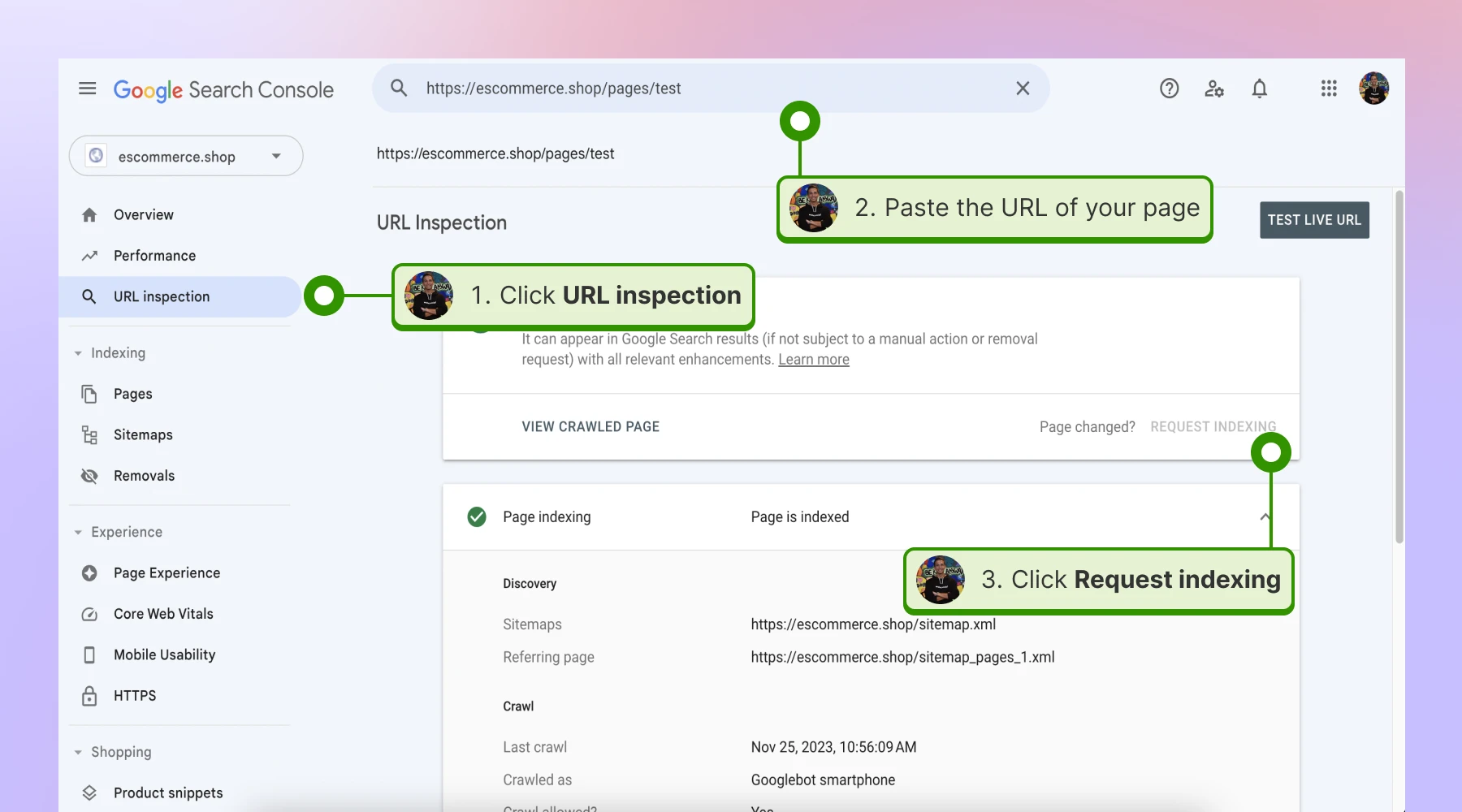


Google recommends putting the schema code on specific product and service pages. Home pages and landing pages do not show star ratings.
When the stars appear
Requesting indexing adds your URL to a priority crawl queue. From there it can take a few days to a few weeks for the stars to appear in Google Search results, and the timing is Google's call, not ours. Submitting the same page several times does not change its queue position, so one request is enough.
The schema code updates automatically as new reviews come in, so you paste it once and never refresh it by hand. Google decides when to pick the new reviews up, and that can lag behind your widget by a while.
Ready to put a widget on your site? See what the widgets can do, add a countdown timer widget to a timed campaign, or start your free trial.
FAQ
Which code type should I use?
JavaScript, unless your platform blocks it. Switch to iFrame when your builder strips scripts, use the URL where only links are allowed, and use the shortcode on WordPress.
Do I have to re-embed after changing the widget?
No. The code stays the same, and every design or content change reaches the embedded widget automatically.
Can I use the same widget on more than one page?
Yes. Paste the same code on as many pages as you like.
What does 'Include lazy loading' do?
It loads the widget content only when the widget scrolls into view, which keeps it off the page's initial load.
What is the Product code for?
Product pages. It carries a product id, so the page shows the posts tagged with that product instead of the full feed.
Which plan do I need for the schema code?
See the pricing page, which lists what each plan includes.
Where exactly do I paste the schema code?
Inside the head section of the page where you want the stars to show. Put it on the specific product or service page rather than your home page.
Does the schema code auto-update?
Yes. It updates automatically as your widget receives new reviews. It is up to Google to include them in search results, and that sometimes takes longer.
How long does it take for the stars to appear?
Anywhere from a few days to a few weeks after you paste the code and request indexing.
Do I need to request indexing every time I get a new review?
No. Request indexing once, when you first add the code. After that the schema keeps itself current.
What's next
If your site runs on a specific builder, the 'Platform tutorials' row links the exact walkthrough, or start with WordPress. For the product-page flow, see Shoppable Widgets.
If you have any questions, click the bottom right chat icon to talk with our customer success team or send us an email at support@embedsocial.com We're here for you 🙏