Online reviews have a significant and proven impact on a business’s reputation and success.
When it comes to collecting customer feedback, you should first and foremost turn to your Google Business Profile, as it’s by far the biggest and most impactful platform for customer reviews.
So, if you are a business owner or website administrator, think about embedding a Google reviews badge on your website that will both showcase your current rating and collect more reviews.
But, there are more benefits if you add Google reviews to website, and I cover them all below, plus I show you how to vibe code your own unique Google review badge with a simple prompt.
Keep reading to find out how to make the most out of your Google reviews!
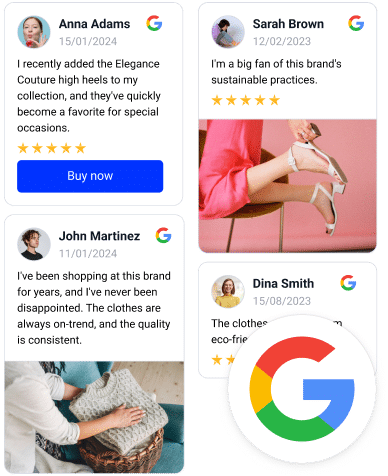
FYI: You can automatically embed Google reviews widget on your website and show authentic user-generated reviews, increasing trust for more sales. Try it now.
What is a Google reviews badge?
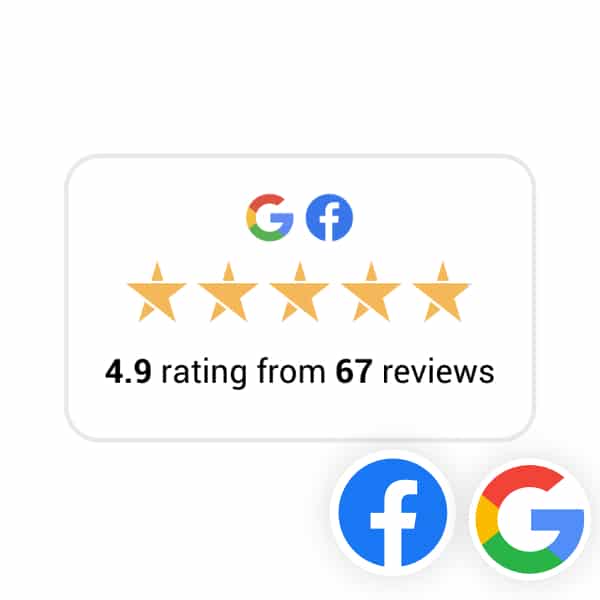
A Google reviews badge is a visual trust element that displays your Google star rating and review count on your website.
‘Google reviews badge’ definition
Google review badges act as instant social proof, showing visitors that real customers have reviewed your business on Google. As such, it holds immense value in attracting potential customers and building trust in your products and services, which eventually boosts your bottom line.
By looking at the badge, your website visitors won’t have to leave your site, as they can check your Google star rating and online reviews at a simple glance, which signals trust and reliability.
From a conversion standpoint, the badge reduces doubt at the moment a visitor is deciding whether to trust you. That’s why businesses often add Google reviews to website near crucial conversion points, including CTAs, product pages, or booking forms.
Modern Google reviews badges (like EmbedSocial’s) update automatically with new reviews via an official GBP API connection. Plus, they can be created as AI UGC widgets from simple prompts.
Once embedded, here’s what your Google reviews badge can look like:

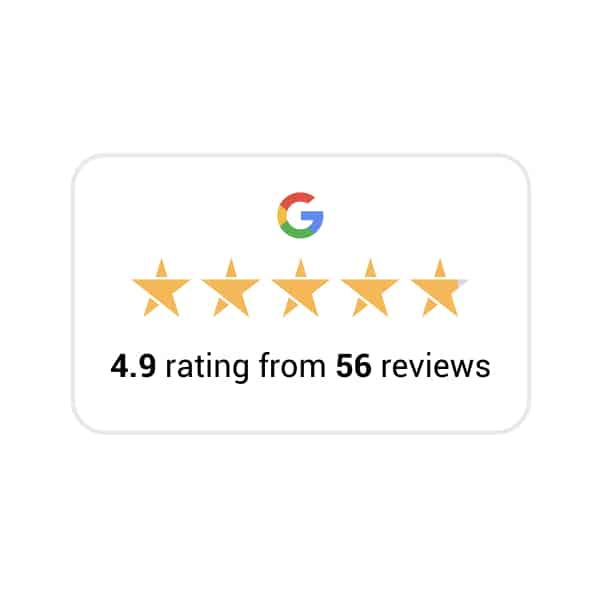
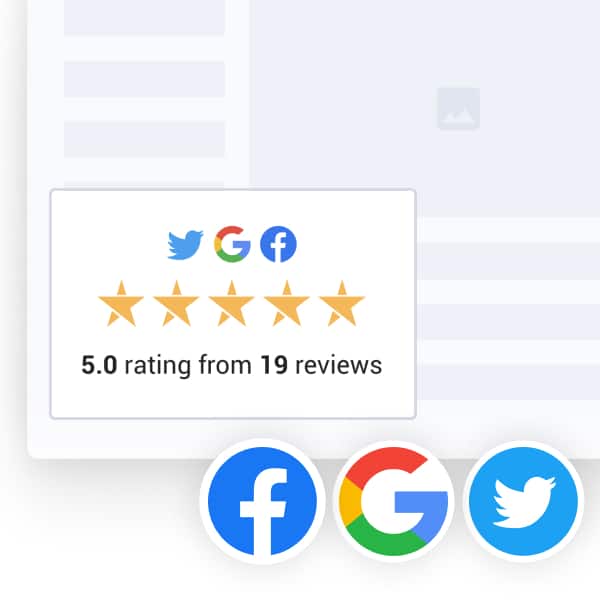
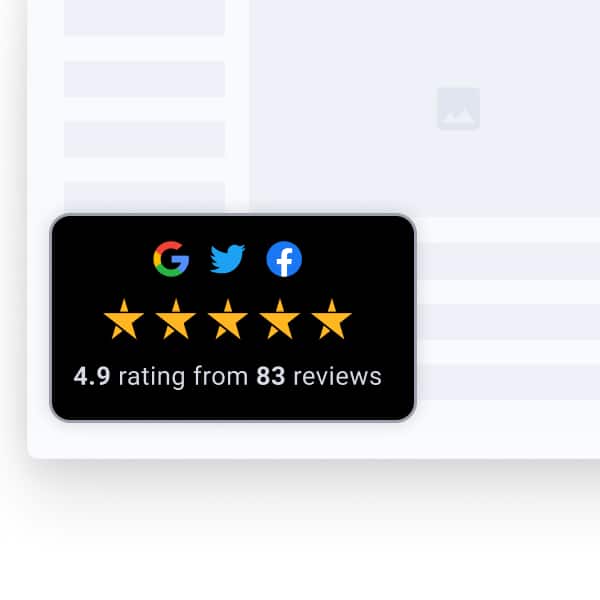
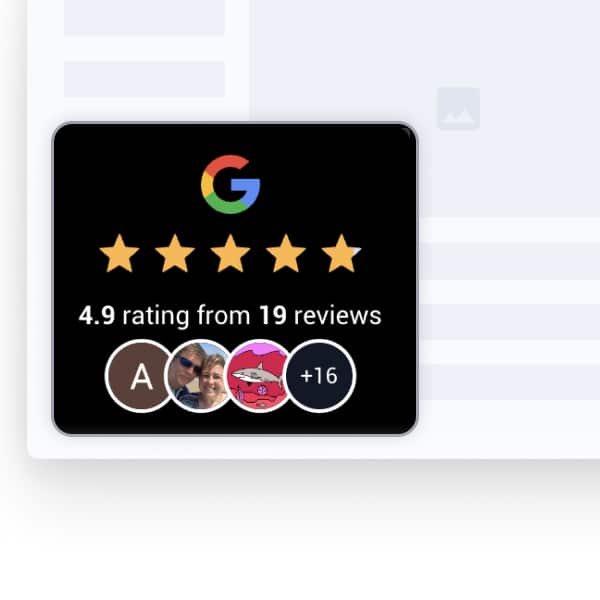
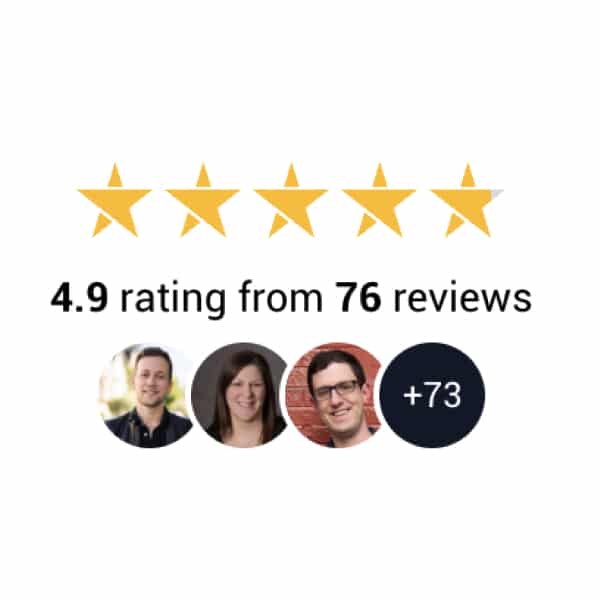
5 benefits of using a Google reviews badge
Imagine a visitor interested in purchasing a particular product or service from you. When they notice your Google reviews badge, they are intrigued by the positive average star rating.
Then, they click the badge to check out the individual reviews that contributed to your star rating. That way, they gain both valuable insights and the confidence they needed to go for it.
Here’s how you boost your conversions when you embed Google reviews:
- Shows ratings clearly: Displays your Google 5-star rating and review count, helping website visitors quickly see how good your products or services are.
- Builds trust and social proof: New visitors feel more confident about the quality of your products and services when they see genuine, positive ratings.
- Grabs attention: The badge stands out on your website, drawing visitors’ eyes to your positive customer feedback and real impact in your niche.
- Provides real feedback: Visitors can click the badge to read customer feedback, giving them a real feel for your offerings and post-purchase dedication.
- Helps get more customers: Good reviews and clear ratings can convince more visitors to buy from you, as they are a huge factor in the decision-making journey.
Full guide: How to embed Google reviews on website via a badge widget?
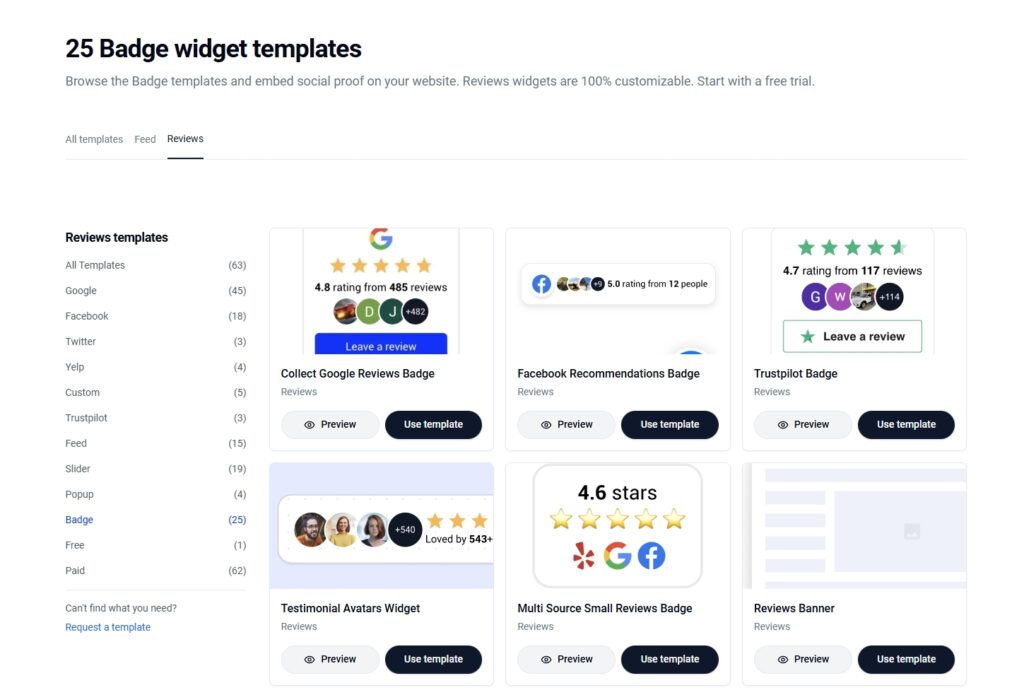
We got around 25 ready-to-go Google review badges for you in our template library, and using them is extremely simple. You just have to follow these simple steps:
- Choose one of our review badge templates
- Start your EmbedSocial free trial
- Connect your Google Business Profile
- Customize your Google reviews badge
- Copy the widget embed code
- Paste the widget code on your website
Note: We also offer an advanced AI UGC widget workflow that will help you create just the badge you’ve imagined using simple AI prompts. I also cover that process after this one.
1. Choose one of our review badge templates
First, check out all our ready-to-go Google reviews badge templates and choose one:
2. Start your EmbedSocial free trial
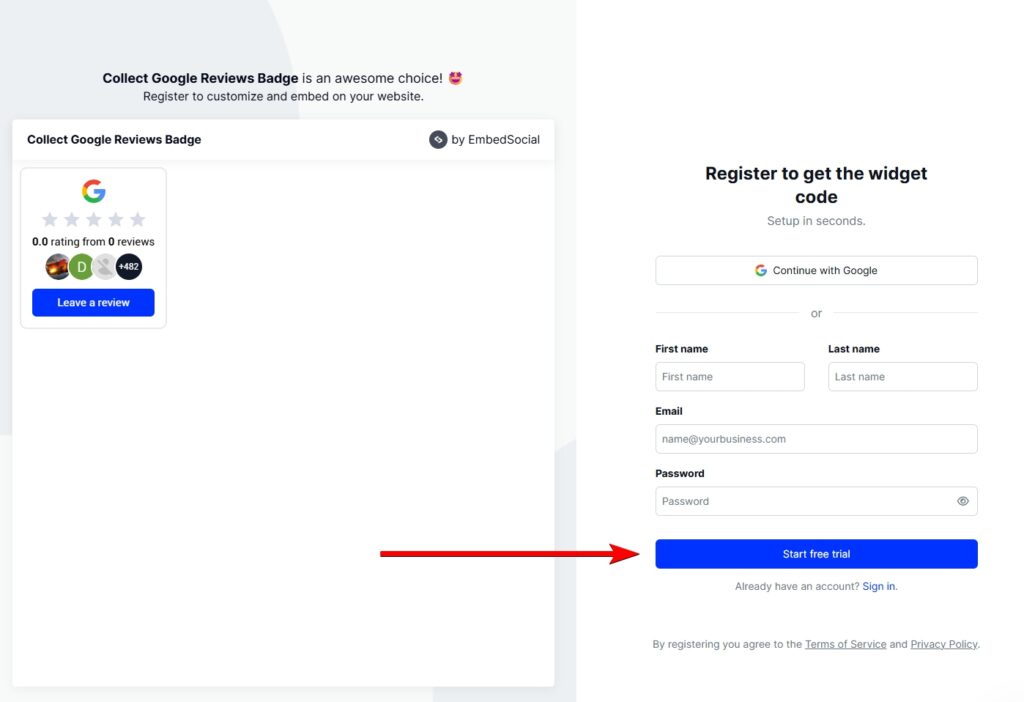
Once you tap ‘Use template’, you’ll be prompted to register for an EmbedSocial account. You’ll be asked to provide your name, email, password, and payment information. Don’t worry about a thing, though, as you won’t get charged if you cancel before the 7-day trial period ends:
3. Connect your Google Business Profile
After logging in to your account, you will have to connect your Google Business Profile. You will first be taken straight to the widget editor, after which you can tap ‘Connect with Google’ at the top:
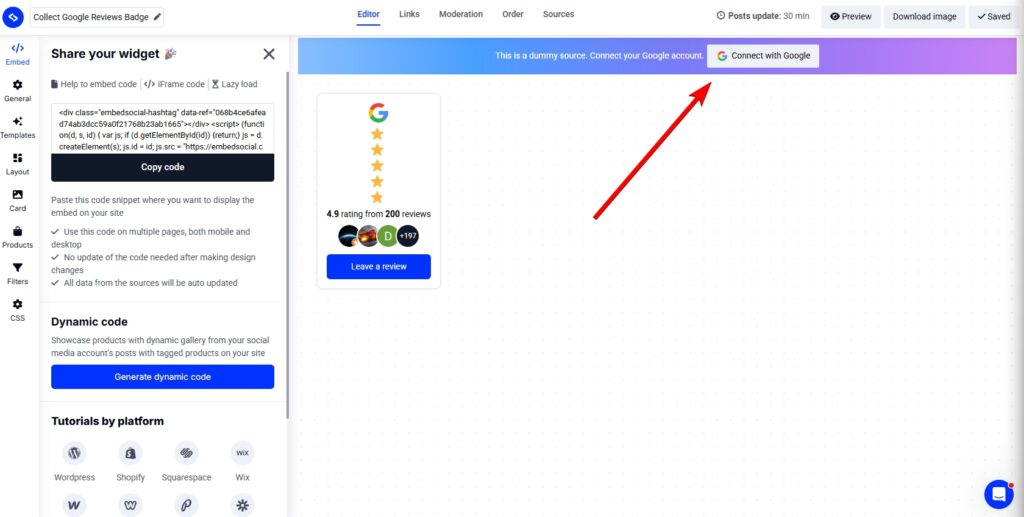
You will be prompted to complete a few steps, such as choosing the type of Google content you want, and signing into your Google account to authorize EmbedSocial to access it.
4. Customize your Google reviews badge
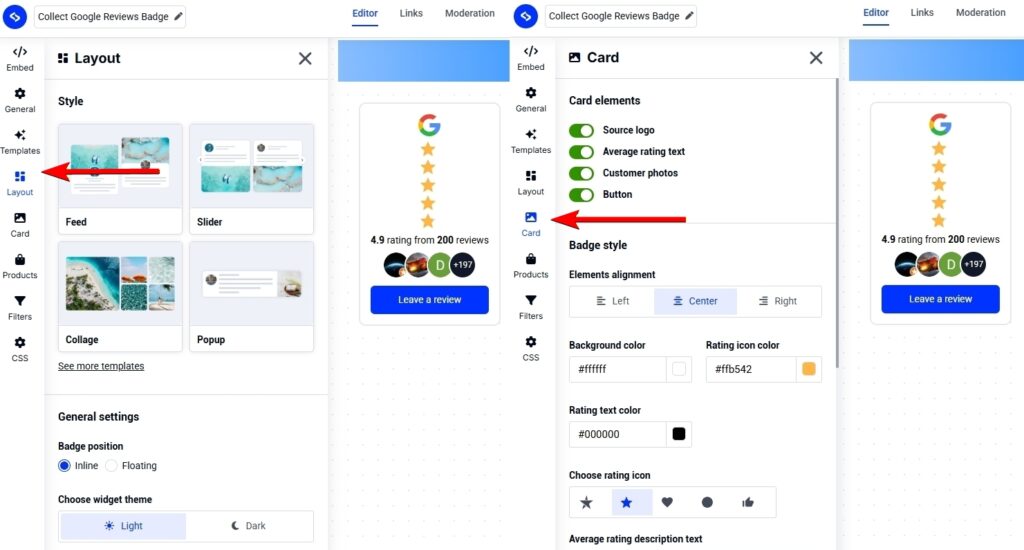
Once you’re done, you will effectively pull in all your reviews into your fresh, new widget, and you can start fiddling around with all the template settings, such as changing the widget layout, toggling on/off the different elements (logo, star rating, photos, buttons, etc.), and linking to your products:
5. Copy the widget embed code
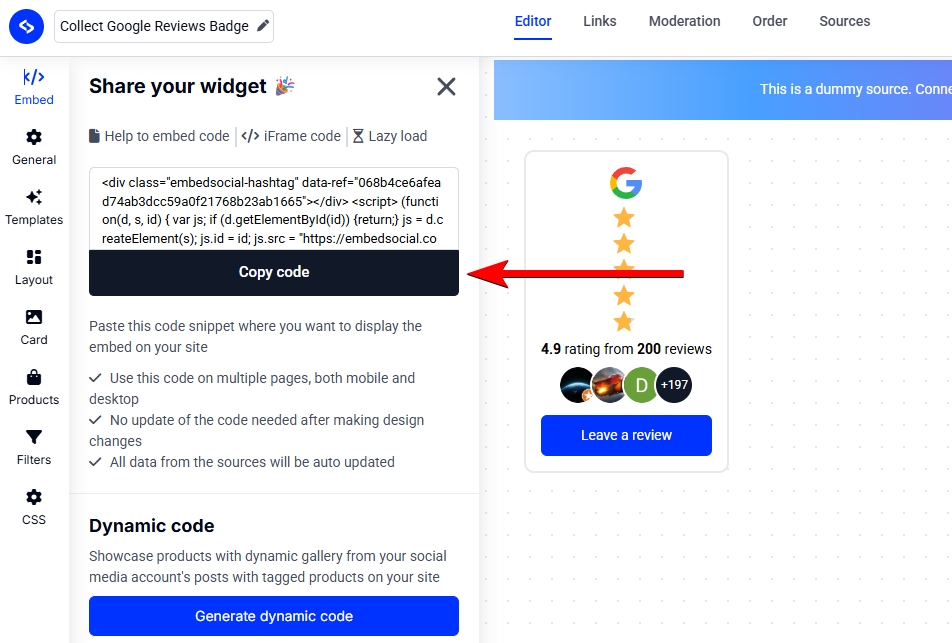
Once you’re happy with your widget’s look, simply navigate to the ‘Embed’ tab (top-left corner) and copy the embeddable widget code, which you can paste on any page you want:
6. Paste the widget code on your website
Last but not least, you need to paste the widget code into your specific website builder. Thankfully, EmbedSocial is compatible with all popular website builders out there, including:
How to embed UGC on WordPress?

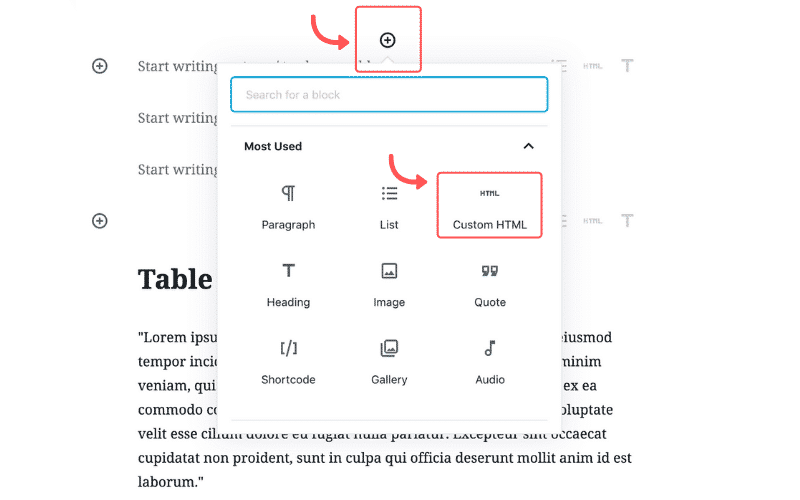
Here’s how to embed UGC on WordPress sites:
- Once you create your EmbedSocial widget, go to your WordPress admin page;
- Sign in to your account and open the page where you want to add the UGC widget;
- Click the + button in the editor and choose Custom HTML to paste the widget code;
- Click “Save” when you’re done.
How to embed UGC on Shopify?

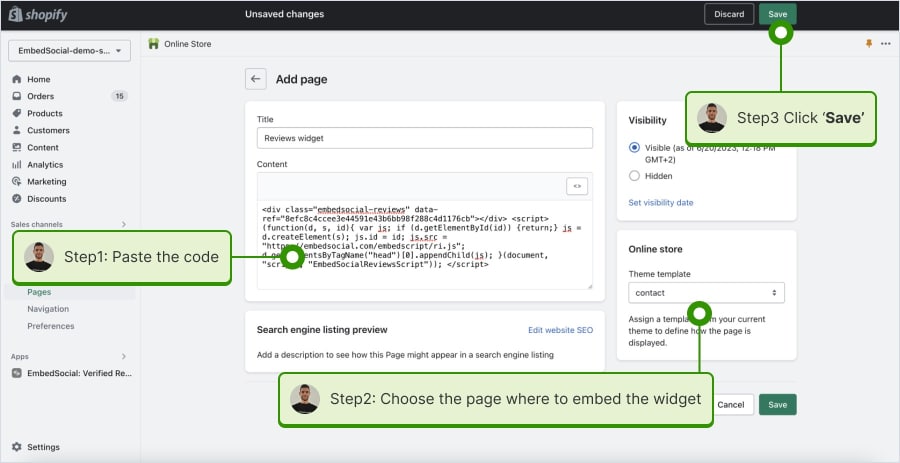
Here’s how to embed UGC on Shopify sites:
- Log into your Shopify account after copying the embeddable widget code in EmbedSocial;
- Navigate to the ‘Pages’ tab and click ‘Add page’;
- In the ‘Content’ field pages the embeddable code;
- Select the page where you want the code to appear and press ‘Save’.
How to embed UGC on Squarespace?

Here’s how to embed UGC on Squarespace sites:
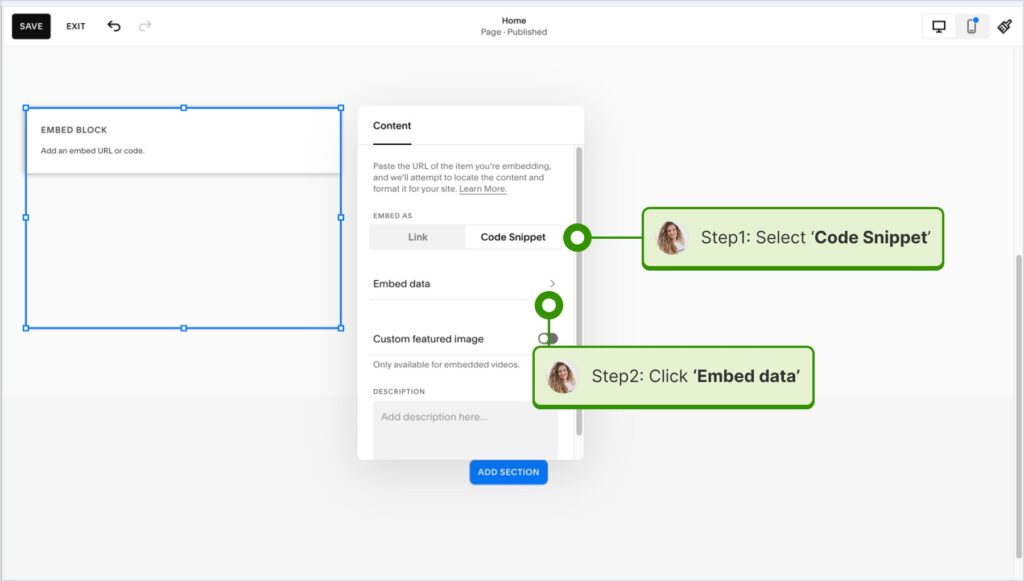
- Copy your EmbedSocial widget code and log into your Squarespace account;
- Choose the page where you want the reviews to appear;
- Click ‘Add new section’ and then ‘Add block’ where you want to display the widget;
- From the blocks list, choose ‘Embed‘;
- Click on the block, select ‘Code snippet’, and click ‘Embed data’;
- Finally, in the code box, paste the copied reviews code;
- Make sure to save and publish your changes on Squarespace.
How to embed UGC on Wix?

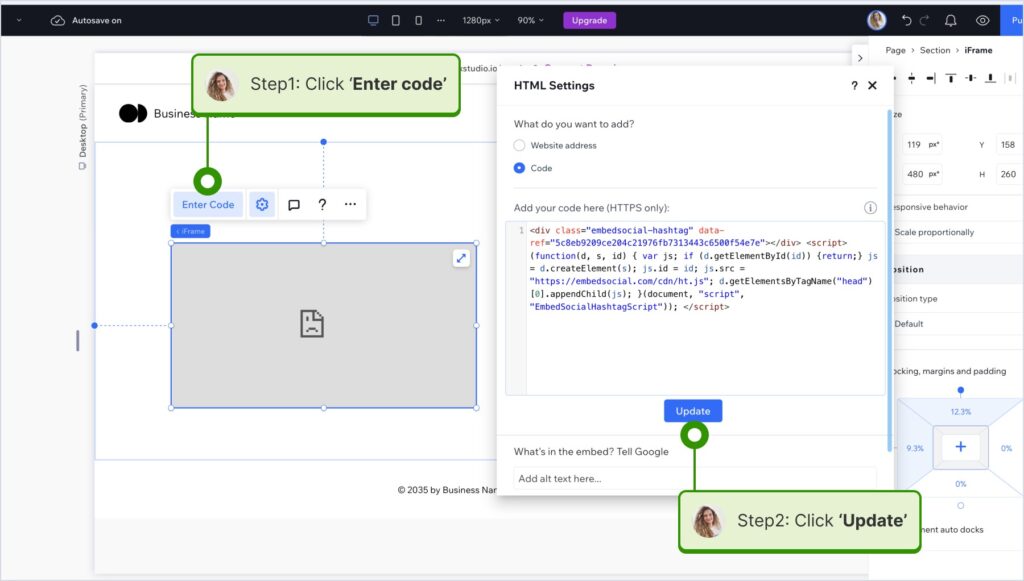
Here’s how to embed UGC on Wix sites:
- Log into your Wix editor and choose the page and location to add the widget;
- Click the “+” icon in the top-left corner to add a new element;
- Find the ‘Embed & Social’ section and tap ‘Embed Code’;
- Paste the code and tap ‘Update’.
How to embed UGC on Webflow?

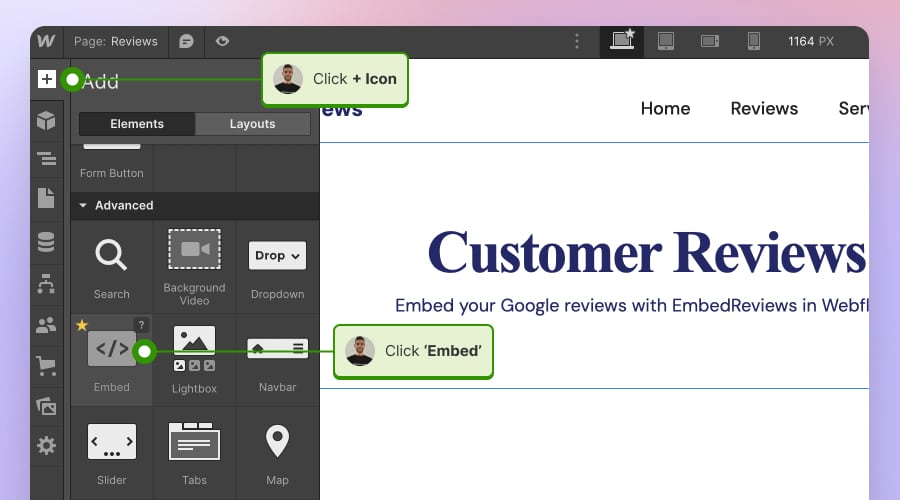
Here’s how to embed UGC on Webflow sites:
- After creating the widget in EmbedSocial, log in to your Webflow account;
- Go to the edit view of your website within Webflow;
- Choose to ‘Add element’ in Webflow and select the ‘Embed’ element;
- Drag and drop it where you want your reviews to appear;
- In the input field, paste the copied EmbedSocial code.
How to embed UGC on Pagecloud?

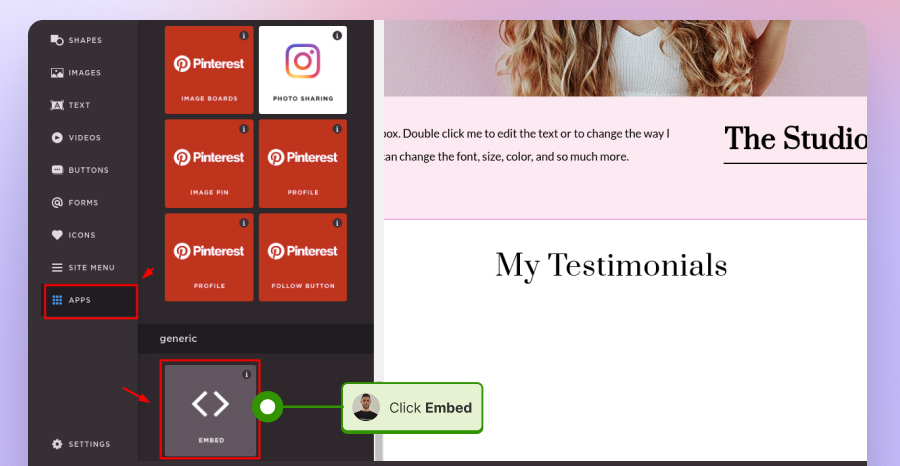
Here’s how to embed UGC on Pagecloud sites:
- After copying the EmbedSocial code, log in to your Pagecloud account;
- Start editing the webpage where you want the reviews to appear;
- Tap on ‘Apps’ from the left ribbon menu and select ‘Embed’;
- Paste the EmbedSocial code into the popup field and click ‘Ok’ to complete the process.
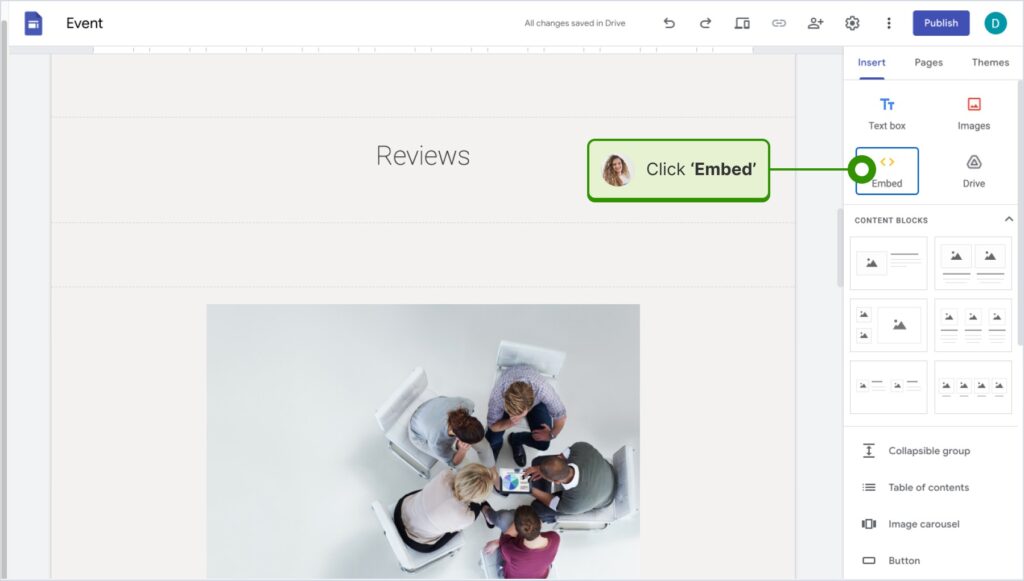
How to embed UGC on Google Sites?

Here’s how to embed UGC on Google Sites:
- Once you copy your embeddable widget code in EmbedSocial, log in to your Google Sites account;
- Navigate to the page where you want to embed the widget;
- Use the ‘Insert’ tab in Google Sites and choose where you want to place the widget;
- Choose ‘Embed‘ from the menu and paste the copied code in the dialog box;
- Click ‘Next‘ and then ‘Insert‘ to finalize the embedding.
How to embed UGC on Elementor?

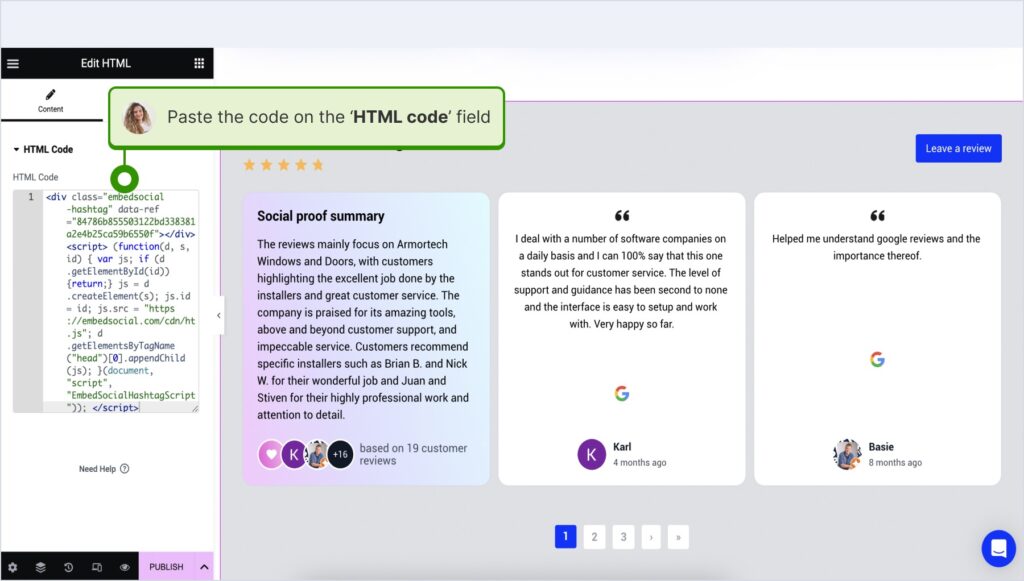
Here’s how to embed UGC in Elementor:
- Log in and navigate to the page where you want to add the reviews;
- Tap an empty section and choose the ‘HTML’ block from the left ribbon section;
- Drag and drop it on the page and paste the widget code in the empty field;
- Update and publish the page to see the live widget.
How to embed UGC in Notion?

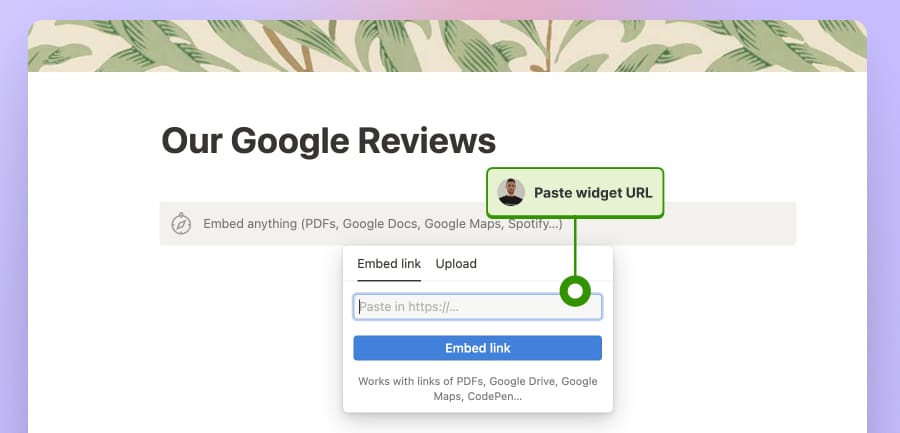
Here’s how to embed UGC in Notion:
- After copying the widget code, log in to Notion, and go to the relevant page;
- Type the /embed command, and from the dropdown, choose the ‘Embed’ option;
- Paste the URL and click the ‘Embed link’ button to add your reviews to Notion.
How to embed UGC on HTML websites?

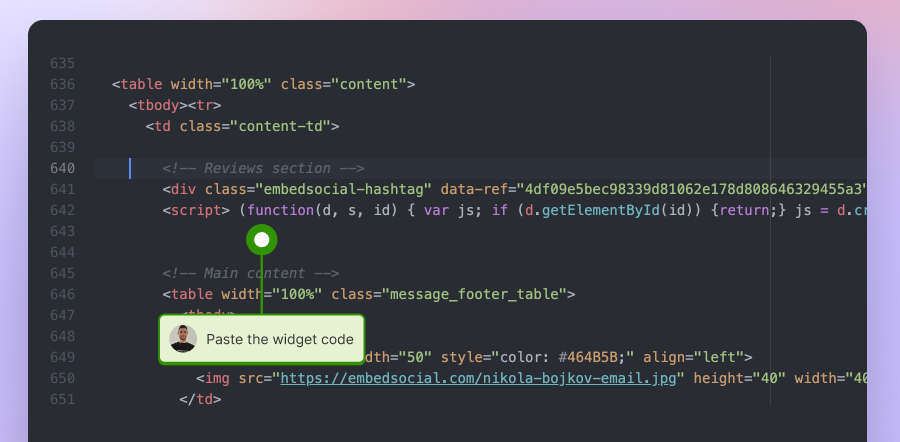
Here’s how to embed UGC on HTML sites
- Copy the EmbedSocial widget review from the ‘Embed’ tab in the top-left corner of the Editor;
- Open the HTML file of your website, which could be either a new page or an existing one;
- Paste the copied EmbedSocial embed code where you want the reviews to display.
Vibe code guide: How to create your AI Google reviews badge?
You don’t have to use the traditional method of using a ready-to-go Google reviews badge. You can now also utilize EmbedSocial’s advanced AI UGC widget workflow and create a badge widget from scratch by describing it. It’s extremely straightforward to do, as it only includes a few steps:
- Define your widget with AI prompts
- Connect your Google source
- Choose a different template if you wish
- Customize the template via AI prompts
- Copy the widget embed code
- Paste the code on your website
Don’t believe me? Check out this interactive video showing you how to do it:
Note: Before doing anything, you will have to create your EmbedSocial account.
How online reviews help businesses in 2026: 8 expert opinions
Here’s what 8 experts had to say about embedding reviews on your website:
Balanced Reviews Increase Conversions and Authenticity
Reviews on a website are a powerful form of social proof. We’ve A/B tested them multiple times, and conversion rates consistently increase when reviews are present on the page. It’s important to display all reviews, not just positive ones, since a perfect 5.0 rating can actually reduce trust. While it may seem counterintuitive, we’ve seen cases where a small number of negative reviews increased conversion rates by making the feedback feel more authentic. We work with all major review platforms and use their built-in tools, such as post-activation review widgets, to systematically collect reviews from active customers.
Yauhen Zaremba, VP of Marketing, MEDvidi
Third-Party Reviews Drive Discovery and Credibility
I mainly see online reviews as a credibility and discovery tool, not something that directly closes deals on its own.
At Percepto, we maintain profiles on third-party platforms like Clutch and ask clients to leave reviews there after our engagement/project is complete. That’s helped us in two clear ways. First, people find us more easily through those platforms, and the reviews immediately add trust. Second, during sales conversations, when someone asks to see reviews, I usually send them to those third-party profiles rather than testimonials on our own site. The fact that the feedback lives on a credible, independent platform makes it feel more authentic, and adds the trust factor.
We haven’t embedded individual reviews on our website yet, for now we just show their badges that include average star rating and link out to the profiles. Because of that, it’s hard to tie reviews directly to sales. That said, after we started actively collecting reviews, we did notice that more well-known companies and brands were willing to engage and sign with us, which tells me the credibility piece is definitely working.
Overall, I feel like reviews are an important piece of the puzzle (for us and for our clients) and provide a strong supporting layer in the sales process.
Nir Shafrir, Partner, Percepto
Authentic Reviews Create a Durable Trust Moat
As a business owner, we treat online reviews as operational trust signals, not marketing assets. We start by collecting reviews organically after transactions. They are never incentivized or gated. This way, the feedback shows real customer experiences.
For use, we focus on selective embedding rather than dumping testimonials everywhere. Platforms like Trustpilot make this easier than it used to be. They offer several widgets, but we’ve found that simpler implementations work best. We’ve added a Trustpilot badge to key pages. This helps users decide if they can trust us with their items, without cluttering the review feeds. The goal is reassurance, not distraction.
From a performance standpoint, this has provided significant benefits. Reviews help ease doubts, speed up decisions, and boost conversions. This is key when customers are sending valuable items, where trust is more important than price. Reviews also serve to safeguard us. They help ease doubts, lower support issues, and set customer expectations before anyone reaches out.
The biggest lesson is that how you present reviews matters as much as collecting them. We focus on authenticity, not volume. By avoiding gates or incentives, we’ve created a ‘trust moat’ that competitors with curated or incentivized feeds can’t match. A clean badge or summary score can boost competitiveness and sales more than filling a page with testimonials.
Brandon Perton, Owner, The Old School Game Vault
Results-Driven Reviews Cut CPL and Raise Closes
We don’t request reviews at all until a client has been with us at least for 90 days. Most agencies request them immediately at the time of onboarding, or after the first month, but that’s far too early in healthcare SEO. Real results take time to reflect in patient numbers and revenue and I’d rather have one review that is honest on actual results than five vague ones about how responsive we are.
The collection process itself is included in our quarterly business reviews. During those calls, we work through ranking improvements, traffic growth and lead increases. If the numbers indicate that there is real progress (which they usually do by month three or four), we ask right there on the call if they’d be willing to document that experience. The conversion rate on this approach is around 70% because we’re asking when they’re literally looking at proof that our work had results. We also provide them with the option of choosing which platform is important to their decision-making process when they hired us.
And with these reviews, we do not simply treat them as social proof, but as SEO content. Every review gets embedded on our website using proper schema markup to allow Google to read and index what services are mentioned and outcomes described. But more importantly, we mine the language that clients use to describe their problems before dealing with them. If a client says they “wasted six months with an agency that didn’t understand medical compliance,” the exact phrasing tells us how other prospects think about their pain points. So we incorporate that language in our service pages, case studies and even in our ad copy because it’s how healthcare providers talk about their marketing frustrations. This alone has cut our cost per lead by 40% and increased our close rate from around 25% to 42% over the past year.
Chris Kirksey, Founder & CEO, Direction.com
Contextual Reviews Answer Specific Buyer Questions
Our process has three parts: collect reviews at the right moment, format them so they’re usable, then embed them where they answer a specific buying question.
We collect reviews directly after a customer has completed a defined point of contact, typically after a marketing campaign has produced measurable results regarding lead quality, meeting volume, or changes in the sales pipeline. At this stage, clients have sufficient experience working with the leads generated to provide detailed, meaningful feedback on how the services provided met their needs.
Next, we prepare collected reviews to be used as evidence by tagging each review by service line (lead generation, appointment setting, and outbound), by industry, and by the outcome experienced by the client (such as quality, speed, consistency, support)
Finally, we place each reviewed comment on pages that specifically relate to the subject matter of the comment. If a page is describing your outbound lead generation services, we display reviews that discuss lead relevance and meeting quality. Similarly, if a page is explaining your onboarding process, we place comments that speak to the customer’s experience and their interaction with our service.
John Karsant, Founder and CEO, LevelUp Leads
Google Reviews Fuel Appointments for My IV Clinic
My perspective is really a unique one. I’m a nurse practitioner with 16 years of clinical experience in hospital setting. I decided to open my own mobile IV therapy clinic in NYC called VIP’s IV (vipsiv.com). I am literally doing everything myself. I literally had to learn how to set up a domain, DNS, hosting, and use WordPress and learn how to build websites. I set up my Google Business Profile (GBP) as well. This is all because I want to maintain a very lean budget. Also one of the best things about GBP is that it is super easy to use and it is free.
I collect reviews from all of my clients. I just sweet talk them into giving me a review after I provide them with services and portray on how important reviews are for business. They always give me one and never refused because I am so nice about it. I collect them right now only on Google Business Profile. To show them on my site I am using a WordPress plugin called “Trustindex.io Widgets for Google Reviews”. It has a free tier which is perfect for my budget right now. It is super easy to connect to my GBP to the plugin and the reviews pop up on my website. Super easy plugin to use even for a rookie like me.
I know having testimonials visible on my website and GBP is super important for conversion and yes they are super helpful to get new clients. I know this because a lot of my clients mention that the reason why they booked with me instead of my competitors is because they saw the great reviews, comments and mentions I got.
I used Yelp in the past and used to stress a lot about getting reviews for Yelp as well when getting them for GBP. The problem that Yelp gives business owners is that for the ratings and reviews to appear on top of my Yelp Business Profile I have to be a paying subscriber. If you use their free service Yelp demotes your reviews that you got organically and writes that they are “Not Recommended” which is super annoying. In my humble opinion, this is a very crooked tactic that Yelp uses. They basically hijack your data and extort your data. I do not recommend using Yelp.
Aleksey Aronov AGPCNP-BC, CEO, VIPs IV
Transparent Review Strategy Builds Trust and Loyalty
We use customer reviews as a strategy to maintain strong relationships with our customers by increasing trust and loyalty, so we are highly focused on gathering and analyzing reviews that our customers leave on social media and on review platforms. We use different monitoring tools, but found Mention.com to be the best since our customers primarily use X and Reddit and share their experiences. We also have a customer success team that ensures to reach out to customers for feedback, and some of them land on our homepage.
We evaluate and analyze the reviews received from various platforms to help us identify our strengths and weaknesses, in order to improve our processes and be able to provide excellent customer experiences. Additionally, we always publish customer reviews on our website to enhance the customer experience when visiting our website, and also to prove to new customers that they have positive feelings toward our brand.
Our field, public records/data sharing, is super niche and people need to trust you before they even consider using your tools. We believe that by being transparent with our customers, we will be better positioned in today’s competitive market. We demonstrate to a potential customer that we care about our customers by responding quickly and fairly to negative reviews. So, to conclude, using feedback from customers will significantly affect your brand reputation and improve sales if you use it correctly.
Levon Gasparian, CEO & Founder, EntityCheck
Client Video Stories Build Credibility and Conversions
Most of our clients are more than happy to share their experience, but they don’t always know how to put it into words, or they don’t want the extra hassle. Something we do, and something I think always works really well, is filming customer testimonials ourselves. We take the entire responsibility of documenting their story so they don’t have to do much, which also removes friction, if there was any. We guide the conversation so they can just talk honestly about what they went through and how we helped.
Embedding them on the website has been great for trust and conversion because people dealing with legal issues are already stressed and skeptical, and polished copy doesn’t always land. Hearing it directly from someone who’s been in that position makes a bigger impact.
And when we use them on our website, we don’t overproduce or dress them up. We pull out the most meaningful line from what they said and use that as the headline. Things like “They will fight for you” or “I was more than just another case.” It best reflects what we stand for and how we treat people, without them having to dig or read a long explanation.
Riley Beam, Managing Attorney, Douglas R. Beam, P.A.
Why choose EmbedSocial’s Google reviews badge?
EmbedSocial’s Google reviews badges have several key features to help you make the most out of your Google reviews, thanks to their direct API connection to your Google Business Profile.
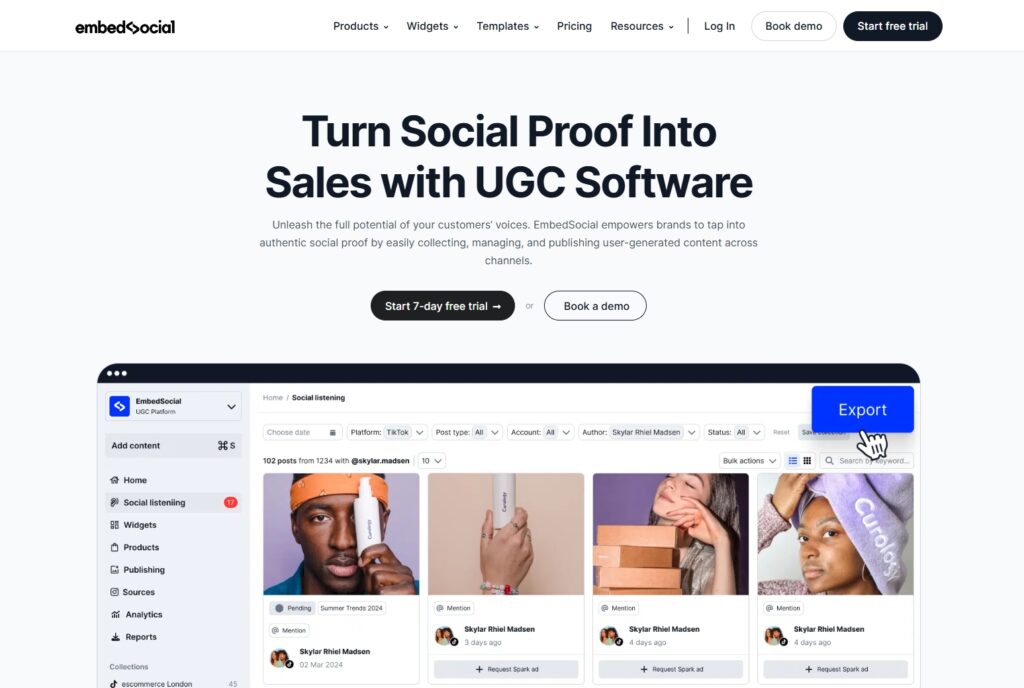
In addition to automatically syncing all new feedback you get, this is how our Google reviews badges actively support your brand’s trust, conversions, and long-term credibility:
- Instant trust at first glance—display your live Google star rating and review count exactly where visitors make decisions, reducing hesitation and bounce rates;
- Always up-to-date social proof—new Google reviews sync automatically, so your badge reflects your real reputation without manual updates;
- Flexible placement across key pages—add the badge to homepages, product pages, landing pages, or booking flows to reinforce trust at critical moments;
- Consistent brand presentation—customize layouts, colors, and styles to match your website without breaking design coherence;
- Verified data directly from Google—reviews are pulled via official GBP API connections, ensuring accuracy and credibility visitors can rely on;
- Scalable for multi-location businesses—manage and display reviews for multiple Google Business Profiles from a single dashboard.
This is how you turn passive feedback into an active conversion asset, as our Google reviews badges show more than just the feedback you receive; they put your Google reputation to work!
Conclusion: Instantly boost your online reputation with a Google reviews badge
You need an impactful website widget, like a Google reviews badge, since it functions as proof that you indeed offer the products and services you claim to.
This real customer sentiment is the best reputation booster you can get since it comes from impartial third parties that already trust your business to deliver. When embedded, Google reviews on website pages will showcase your strengths and tell visitors that they need your products.
As such, when your Google reviews badge is live, accurate, and placed strategically, it starts removing doubt, reinforces credibility, and shortens the path to conversion.
So, start using EmbedSocial’s Google reviews badge today to turn your reputation into a living trust signal that updates automatically and works across every key page!
FYI: You can automatically embed Google reviews widget on your website and show authentic user-generated reviews, increasing trust for more sales. Try it now.
FAQs about our Google reviews badges
What is a Google reviews badge?
A Google reviews badge is a visual element that displays your Google star rating and review count on your website to build instant trust.
Do Google reviews badges update automatically?
Yes, when powered by a platform like EmbedSocial, the badge updates in real time as new Google reviews are published.
Where should I place a Google reviews badge on my website?
High-impact areas include the homepage, product pages, landing pages, and near CTAs where trust influences decisions.
What are the best tools to create a Google review badge easily?
The easiest option is using a dedicated review platform like EmbedSocial, which pulls verified Google reviews automatically and turns them into live, customizable badges.
Is it allowed to display Google reviews on my website?
Yes, as long as reviews are pulled via approved methods and follow Google’s usage guidelines, which EmbedSocial handles for you.
Can I use a Google reviews badge for multiple locations?
Yes, EmbedSocial lets you manage and display review badges for multiple Google Business Profiles from one dashboard.
Do you get engagement by embedding Google reviews on your website?
Yes. Embedded Google reviews increase engagement by building trust, keeping users on the page longer, and reinforcing credibility near key actions.
What is the best way to get a live Google review widget?
The best way is to use a tool like EmbedSocial, which connects directly to Google and keeps your reviews live, accurate, and automatically updated.