If you run Instagram for clients, you know the weekly routine: check every client’s mentions, pick the best creator photos, ask for permission, repost, then build the report. More and more of that work now starts in a Claude or ChatGPT chat.
The missing piece is Instagram itself. Neither Claude nor ChatGPT can open your Instagram on its own, Meta does not publish an MCP server for it, and no major social network ships one.
This guide splits the work between two MCPs. The EmbedSocial Instagram MCP server handles listening. InvisibleAPI, a separate product for developers and agencies, handles publishing and insights. Full disclosure: our team built both.
I’ll show you what each one actually returned when I ran it, where each one stops, and the loop an agency can run from one chat.
Three Instagram jobs you can run from Claude or ChatGPT
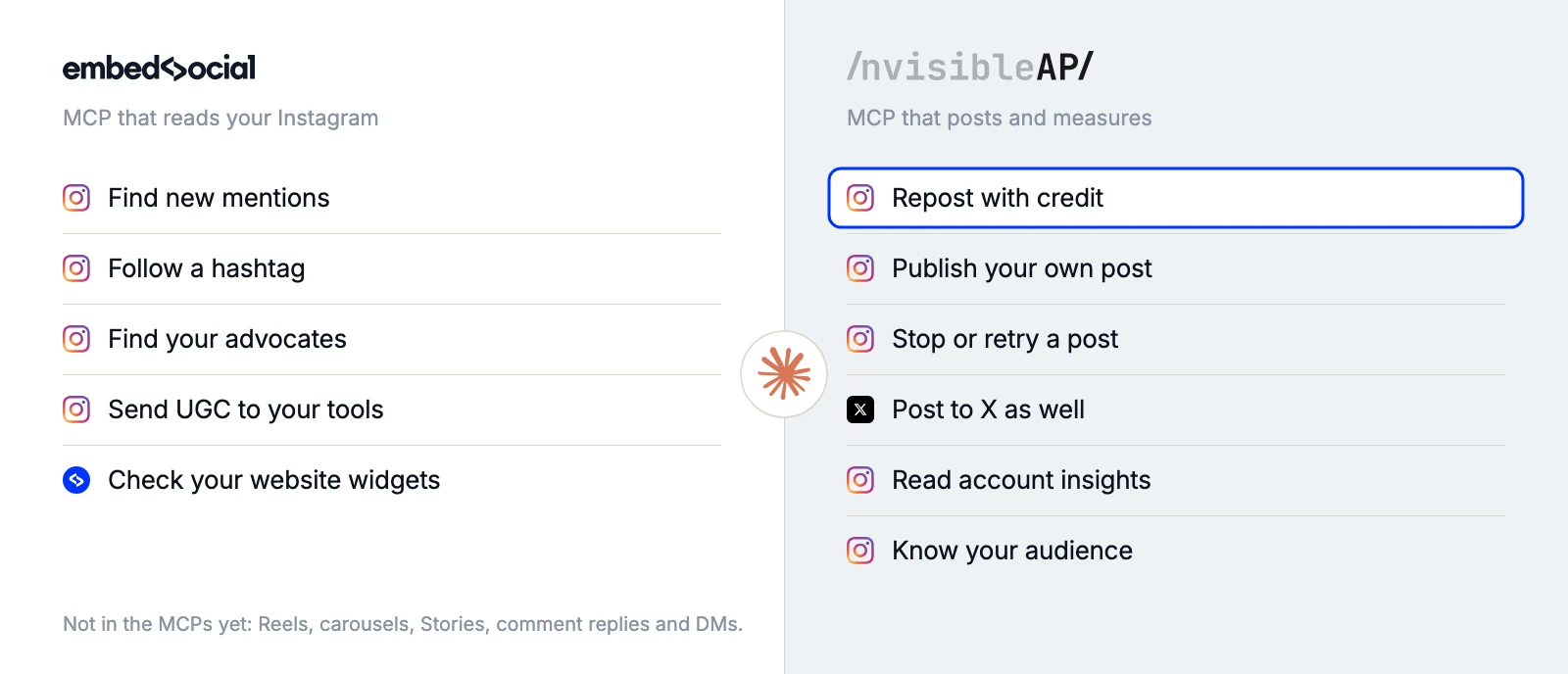
Before you install anything, decide which job you want done first. Hearing what people post about you is one job. Publishing and reporting on your own account is another. They need different access, so they live in different MCPs.
| What you want Claude or ChatGPT to do | MCP | Access it needs |
|---|---|---|
| Find who mentioned you, track competitor or event hashtags, pull that content into one place |  EmbedSocial MCP EmbedSocial MCP |
Read only. Reads the Instagram sources you connected in EmbedSocial |
| Publish posts and reposts with credit, across one account or many |  InvisibleAPI MCP InvisibleAPI MCP |
Write. Publishes to the professional accounts you connect |
| Report on how your posts and accounts performed, for you or for clients | InvisibleAPI MCP |
Read insights on accounts you connect |
Why not one MCP for everything? Because a tool that can only read is safe to leave connected all day. A tool that can publish to a client’s Instagram should sit behind its own keys and its own consent screen.
Keeping them apart means you can leave the read-only EmbedSocial connector on in every chat, and switch InvisibleAPI on only in the chats where you want Claude or ChatGPT to post.
How to connect Instagram to Claude or ChatGPT in 5 simple steps
Each MCP needs two connections: your Instagram account to the product, then the product to Claude or ChatGPT. You can set up one or both. They work independently.
Both MCPs run on Meta’s official Instagram Platform API with a consent screen you approve. Whatever else you connect should do the same. A tool that logs in as you or scrapes public pages breaks Meta’s terms and can get your account restricted.
Connect the EmbedSocial MCP to Claude (to listen)
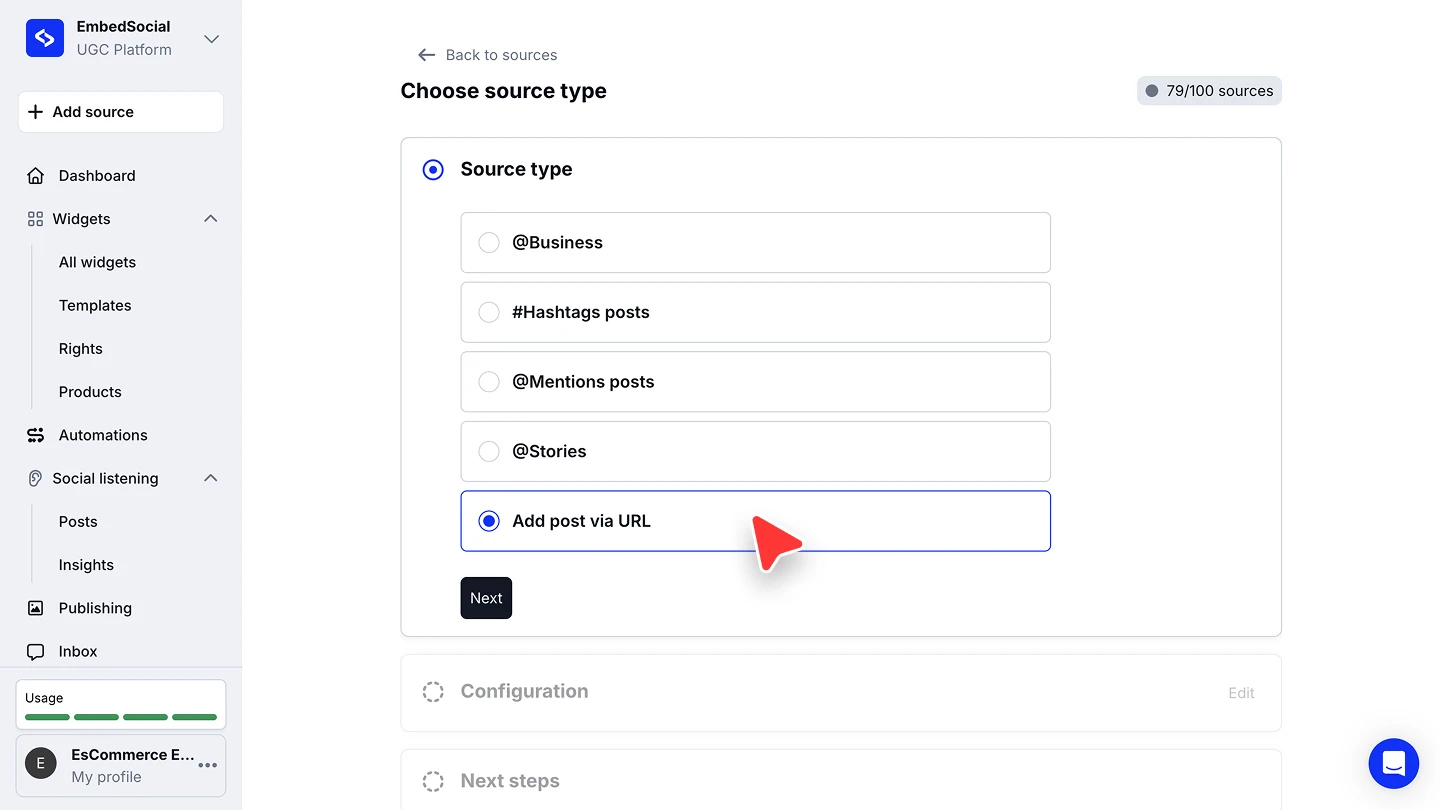
- Add your Instagram account as a source. Log in to EmbedSocial, click ‘+ Add source’, pick ‘Instagram’ and choose ‘Business account’. Continue with Facebook or Instagram, approve the permissions and click ‘Connect source’. Add ‘#Hashtags posts’ and ‘@Mentions posts’ sources the same way for anything you want to follow.
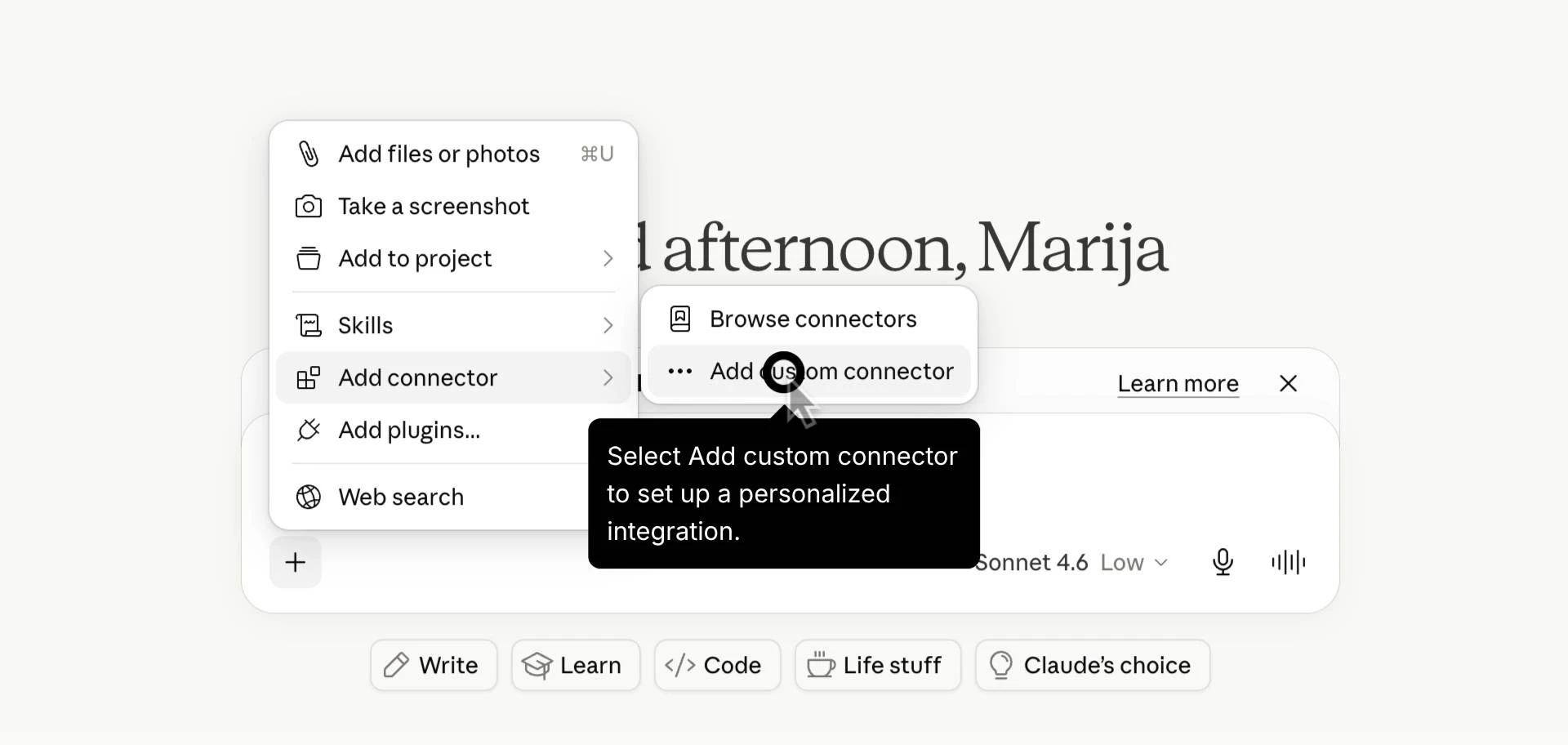
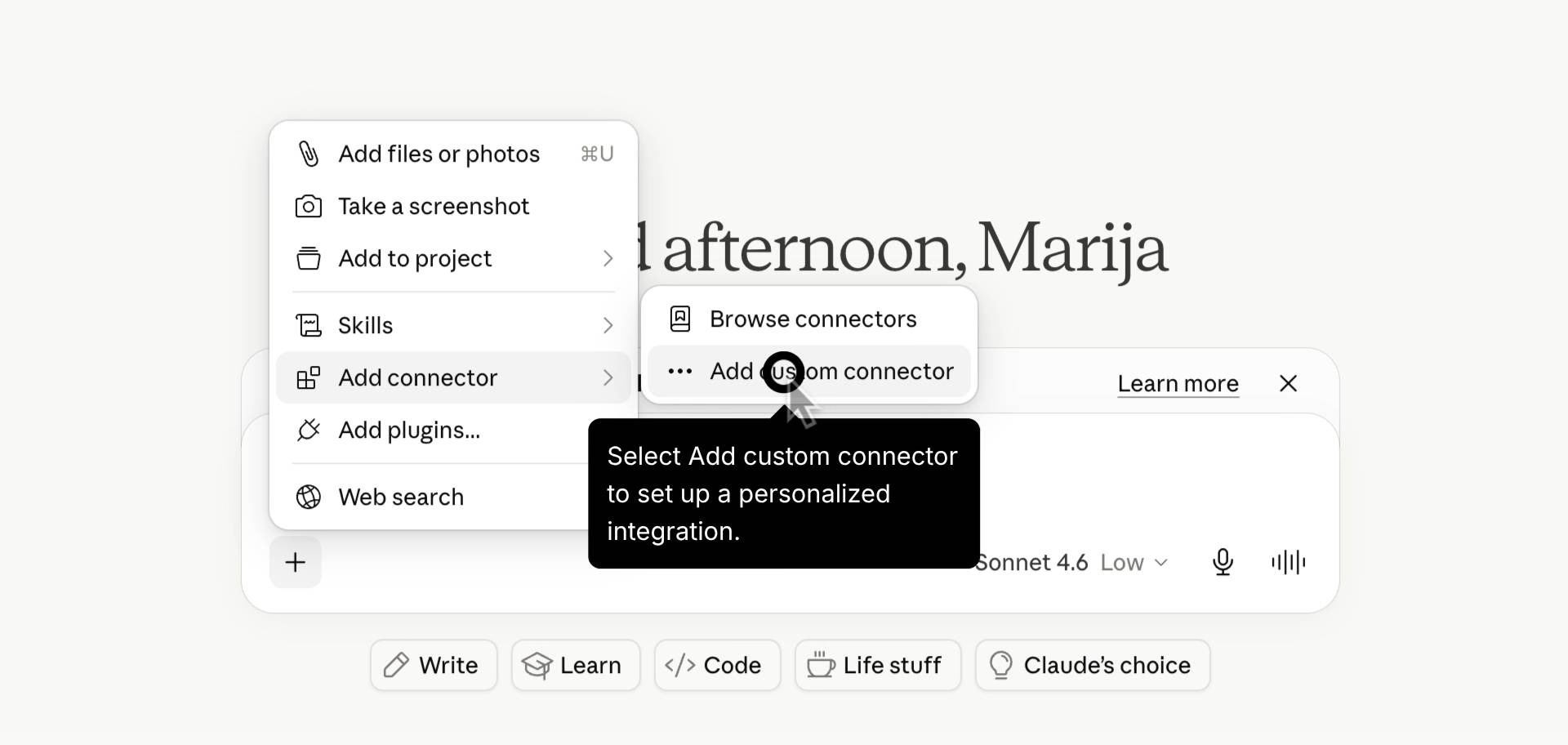
- Open the connector menu in Claude. Open claude.ai, click the plus (+) icon in the chat, go to ‘Add connector’ and select ‘Add custom connector’.
- Add the EmbedSocial details. Enter ‘EmbedSocial’ as the name, paste
https://embedsocial.com/admin/mcpas the server URL and click ‘Add’.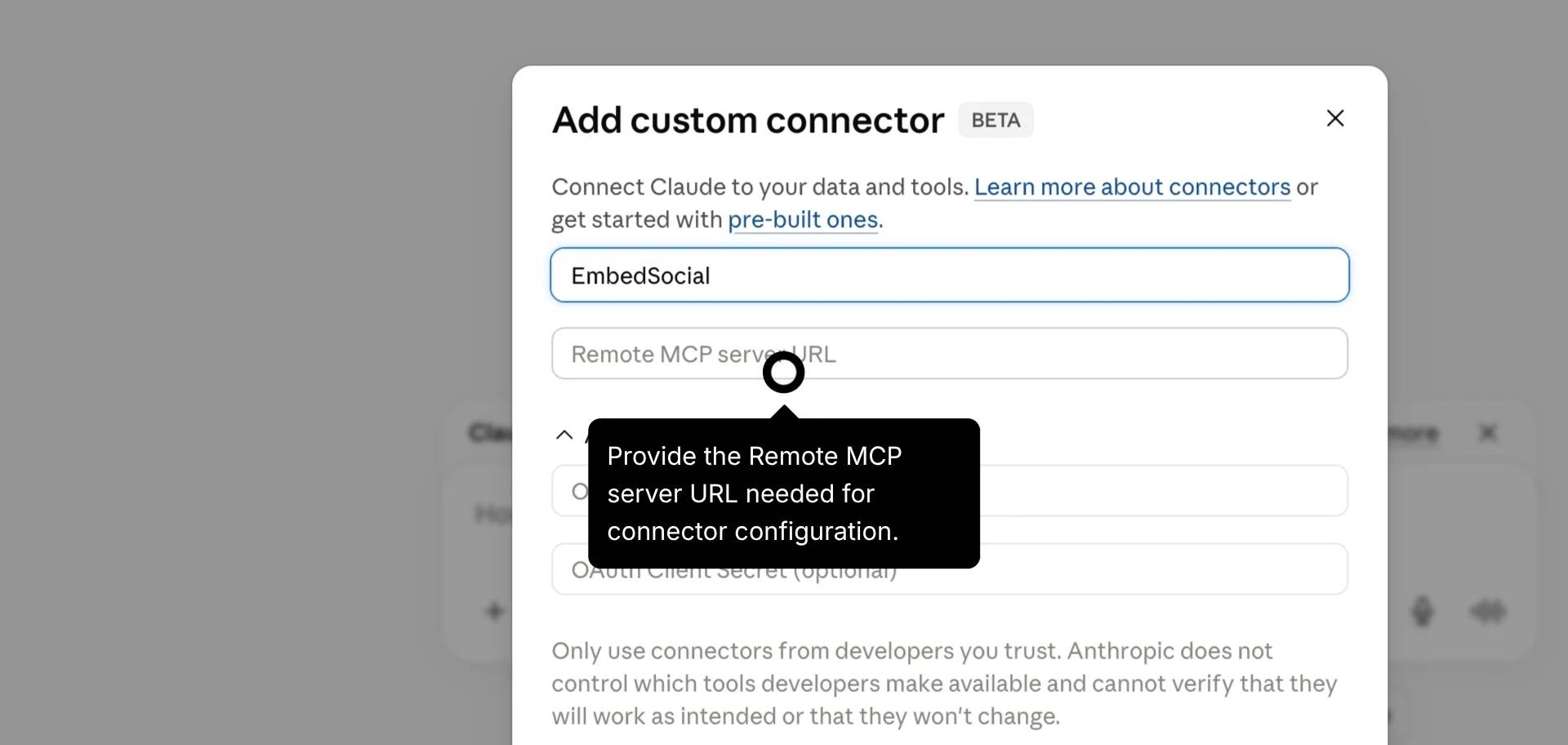
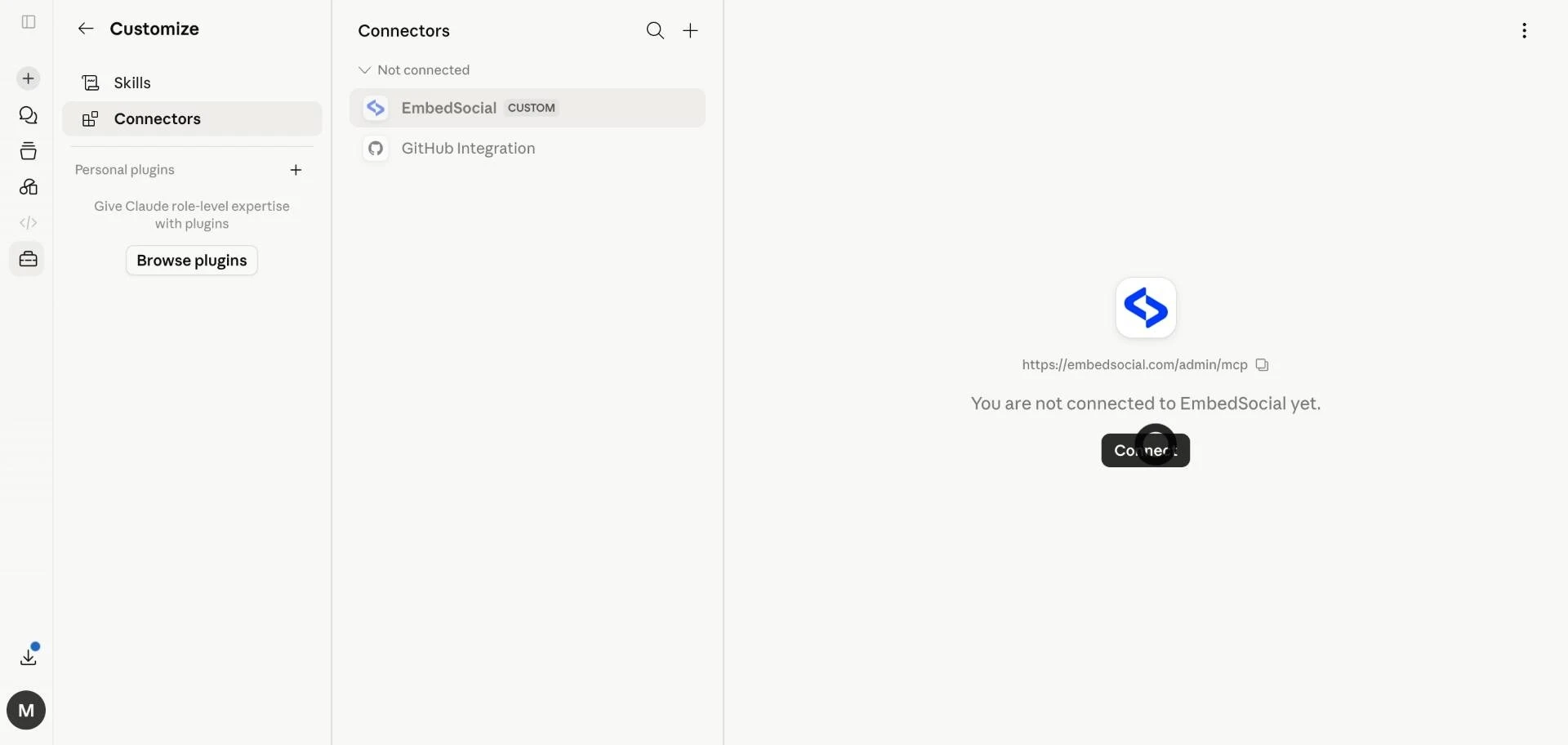
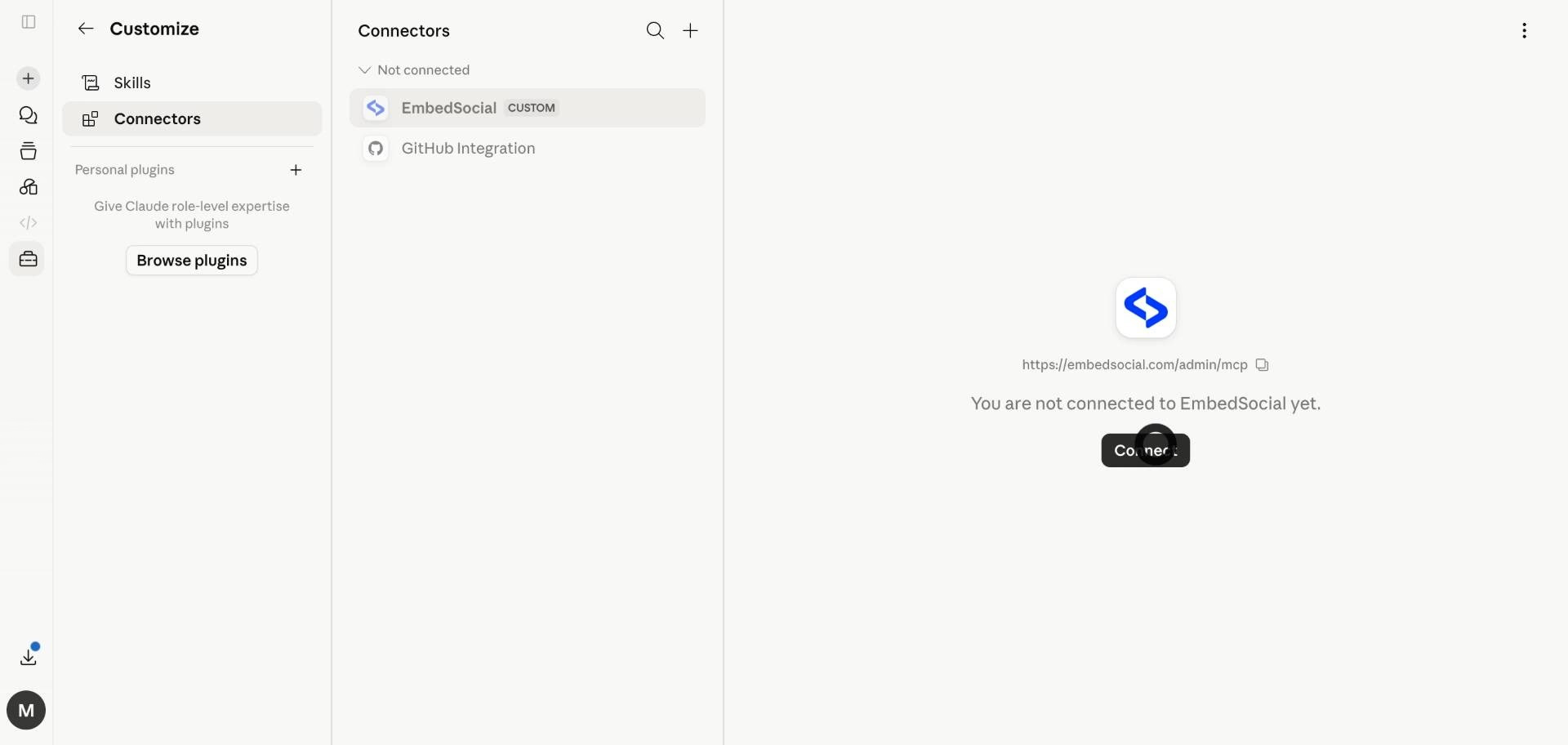
- Connect it. Open ‘Settings’ > ‘Connectors’, find EmbedSocial in the not connected list and click ‘Connect’.
- Test it. Ask Claude: “List my connected Instagram sources.”

Connect the EmbedSocial MCP to ChatGPT (to listen)
Custom connectors in ChatGPT need Developer mode, which you turn on once. Your Instagram sources are the ones you already added in EmbedSocial, so step 1 above covers both tools.
- Turn on Developer mode. In ChatGPT, open ‘Settings’, go to ‘Security’ (under Security and login) and enable ‘Developer mode’.
- Add a custom connector. Go to ‘Plugins’ and click the plus (+) button.
- Add the EmbedSocial details. Enter ‘EmbedSocial’ as the name, paste
https://embedsocial.com/admin/mcpand click ‘Create’. - Sign in. Log in with your EmbedSocial account to approve the connection.
- Test it. Ask ChatGPT: “List my connected Instagram sources.”
Official tutorial: Connect EmbedSocial to ChatGPT with MCP →
The same URL also works in Cursor and Claude Code, and you can try the Instagram MCP server on a free trial.
Connect the InvisibleAPI MCP to Claude (to publish and report)
- Connect your Instagram account. Sign up at invisibleapi.ai and create an organization. Open ‘Social accounts’, choose ‘Connect Instagram’ and approve the permissions on Meta’s screen. It needs a Business or Creator account, and the insights permissions if you want reports.
- Open the connector settings in Claude. Go to ‘Customize’ > ‘Connectors’, click ‘+ Add’, then ‘Add custom connector’.
- Add the InvisibleAPI details. Name it ‘InvisibleAPI’, paste
https://api.invisibleapi.ai/mcpand click ‘Continue’. Keep the detected sign-in settings and click ‘Add’.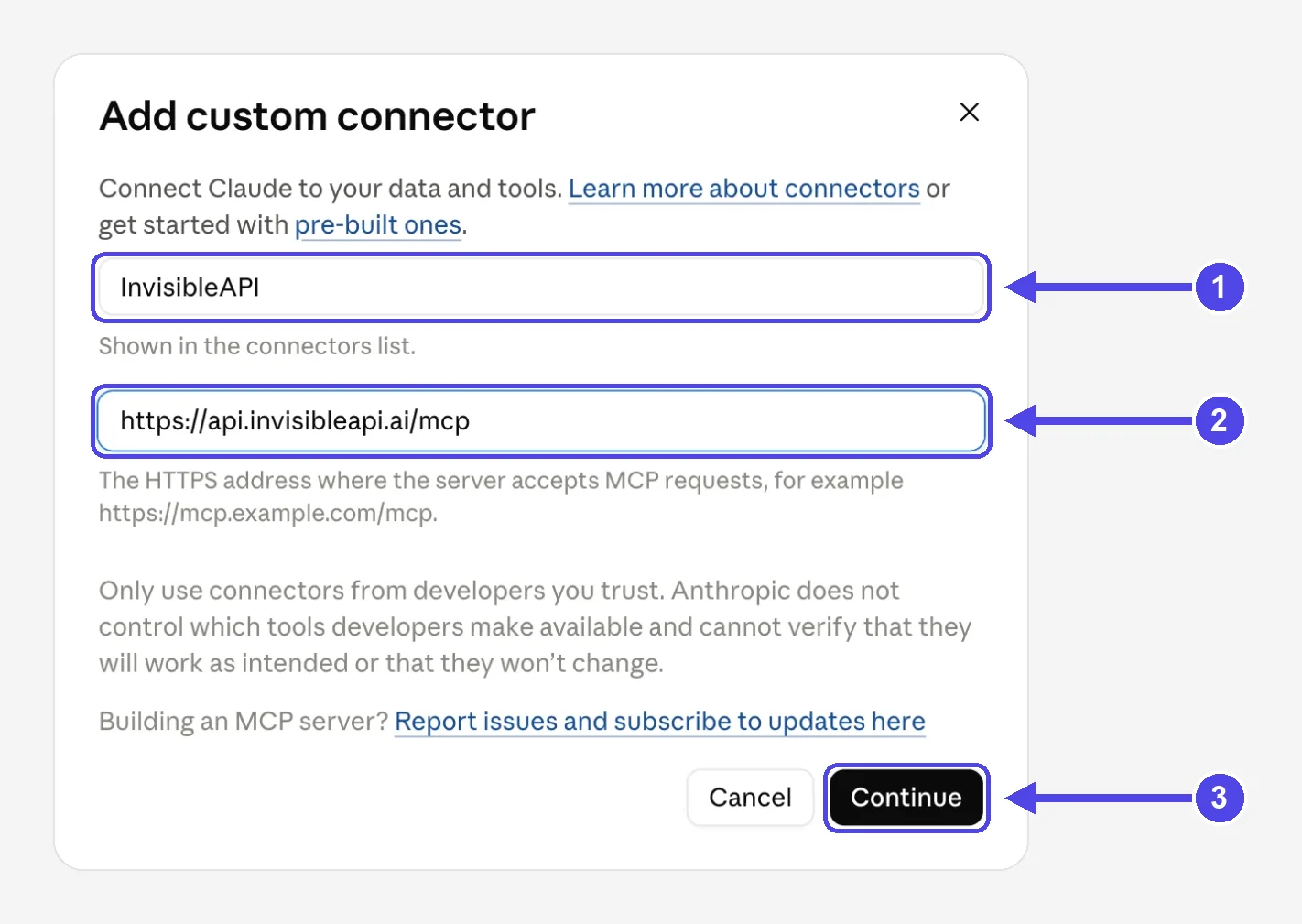
- Approve access. On the InvisibleAPI page that opens, pick the organization Claude may use and click ‘Approve’. There is no API key to copy.
- Test it. Ask Claude: “List my connected social accounts.”
Connect the InvisibleAPI MCP to ChatGPT (to publish and report)
InvisibleAPI lists ChatGPT among its MCP connections. If you already connected Instagram for Claude, skip step 1.
- Connect your Instagram account. Same as the Claude step 1: sign up at invisibleapi.ai, open ‘Social accounts’ and connect the account on Meta’s screen.
- Turn on Developer mode. In ChatGPT, open ‘Settings’, go to ‘Security’ (under Security and login) and enable ‘Developer mode’.
- Add the InvisibleAPI details. Go to ‘Plugins’, click the plus (+) button, name it ‘InvisibleAPI’, paste
https://api.invisibleapi.ai/mcpand click ‘Create’. - Approve access. On the InvisibleAPI page that opens, pick the organization ChatGPT may use and click ‘Approve’.
- Test it. Ask ChatGPT: “List my connected social accounts.”
The Claude steps come from the InvisibleAPI setup guide. InvisibleAPI is priced separately from EmbedSocial: $9 a month for your first 2 accounts, $5 for each extra one, with a 7-day free trial.
Job 1: Hear what people post about you (EmbedSocial MCP)
This is the listening side. Claude or ChatGPT reads the sources you connected in EmbedSocial: your own account, the mentions of your profile, and the hashtags you follow, whether that is a competitor’s brand tag or the event hashtag you use to collect UGC.
Your assistant gets five tools. It can search posts across your connected sources by date, keyword or source, pull everything under one tracked hashtag, open a single post with its caption and engagement details, and list your website widgets with their click analytics.
I connected the EmbedSocial MCP to Claude on our own team account and asked:
Show me every Instagram post collected from my sources since September 1, newest first.
One tool call came back with 14 posts from five sources: three business accounts we connect for demos, and two competitor brand hashtags we follow. Four of the 14 came from those competitor hashtags, and each post arrived with its caption, media, author, date and a link back to Instagram.
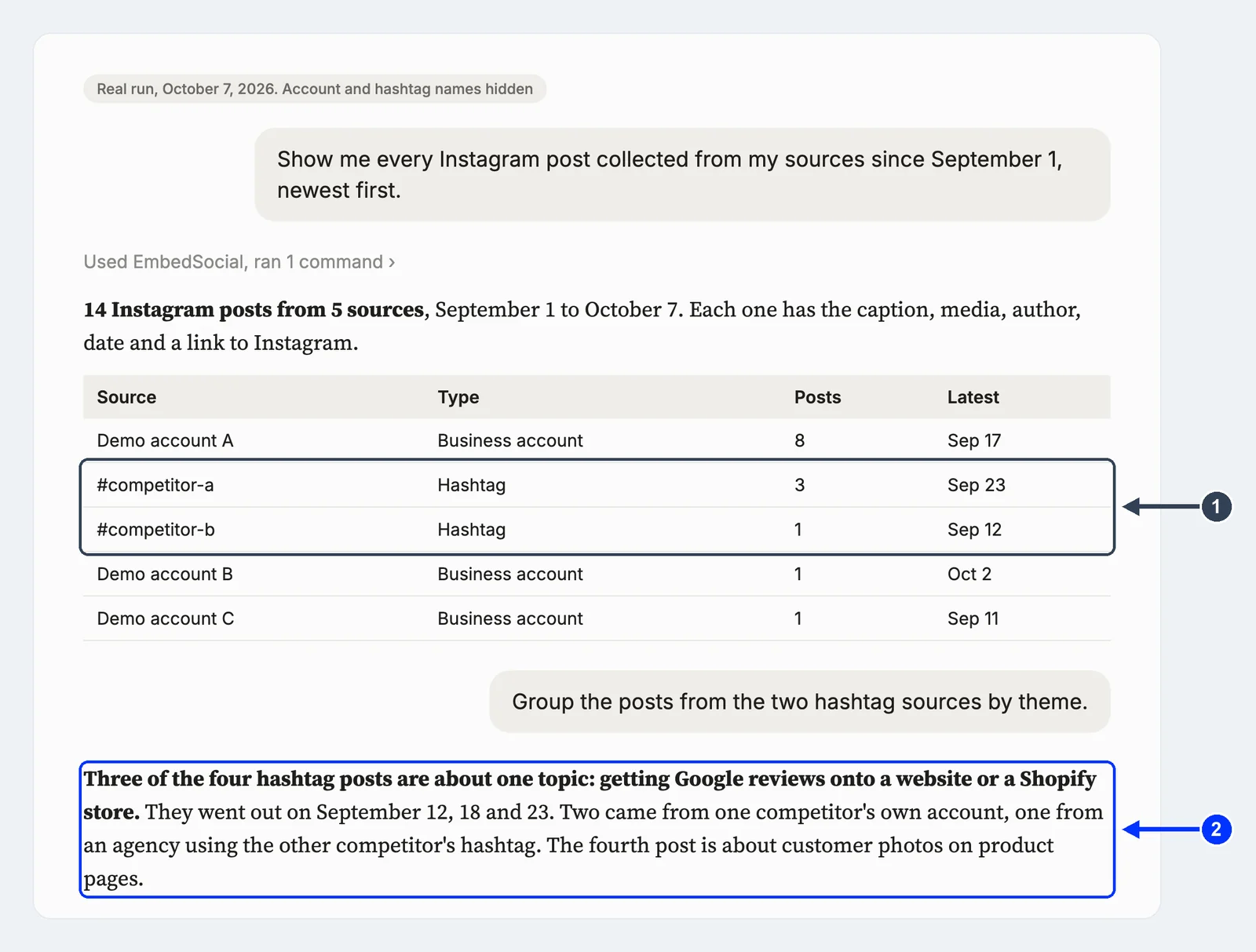
The useful part came next. I asked Claude to group the competitor hashtag posts by theme. It read the captions and found that three of the four were about one thing: getting Google reviews onto a website or a Shopify store, posted within the same two weeks.
Two came from one competitor’s own account, one from an agency using the other competitor’s hashtag. That’s a topic signal I’d have missed by scrolling, and the same data feeds a fuller competitor analysis with share of voice and sentiment. The same prompt in ChatGPT reads the same sources.
What it doesn’t do: it only sees sources you’ve connected in EmbedSocial, so it is not a search engine for all of Instagram. And it can’t post, like or reply. That’s on purpose.
Three prompts to start with, in Claude or ChatGPT:
- “List every Instagram post that mentioned us in the last 30 days and rank the accounts by how often they posted.”
- “Pull everything under #[your event hashtag] from this week and pick the 10 posts with the best photos for a recap.”
- “Compare what [competitor hashtag] posted this month with what we posted. What topics are they covering that we aren’t?”
Want these on autopilot? Track Instagram product mentions in Google Sheets or rank your Instagram brand advocates, or build an event hashtag recap.
Job 2: Publish from Claude or ChatGPT (InvisibleAPI MCP)
This is the side most people mean when they search for an Instagram MCP: “can Claude or ChatGPT just post this for me?”
InvisibleAPI publishes to Instagram professional accounts (Business or Creator) and to X. The InvisibleAPI MCP server comes with the plan, so Claude or ChatGPT can publish, schedule and manage posts with an OAuth consent, without you writing any code.
Through the MCP today, an Instagram post is one image with its caption, published right away or scheduled for later, and an X post is text or text with one image. Carousels and Reels go through the InvisibleAPI API, not the MCP yet.
Every post becomes a publish job. Your assistant can tell you its status, cancel it before it goes out (which is why scheduling a few minutes ahead makes a good safety window), or retry it if it failed, without posting it twice.
For an agency this is the part that changes the week. Ten client accounts, one chat: “Schedule the launch photo on Client A for Tuesday at 9:00 and the offer photo on Client B for Thursday at 18:00, then tell me when both are live.”
I tested it on our own launch in Claude. The InsightsAPI announcement creative and its approved caption were sitting in a folder Claude could read, and the InvisibleAPI connector was switched on in the chat. My whole prompt was one line:
Publish the InsightsAPI launch post on Instagram InvisibleAPI page now.
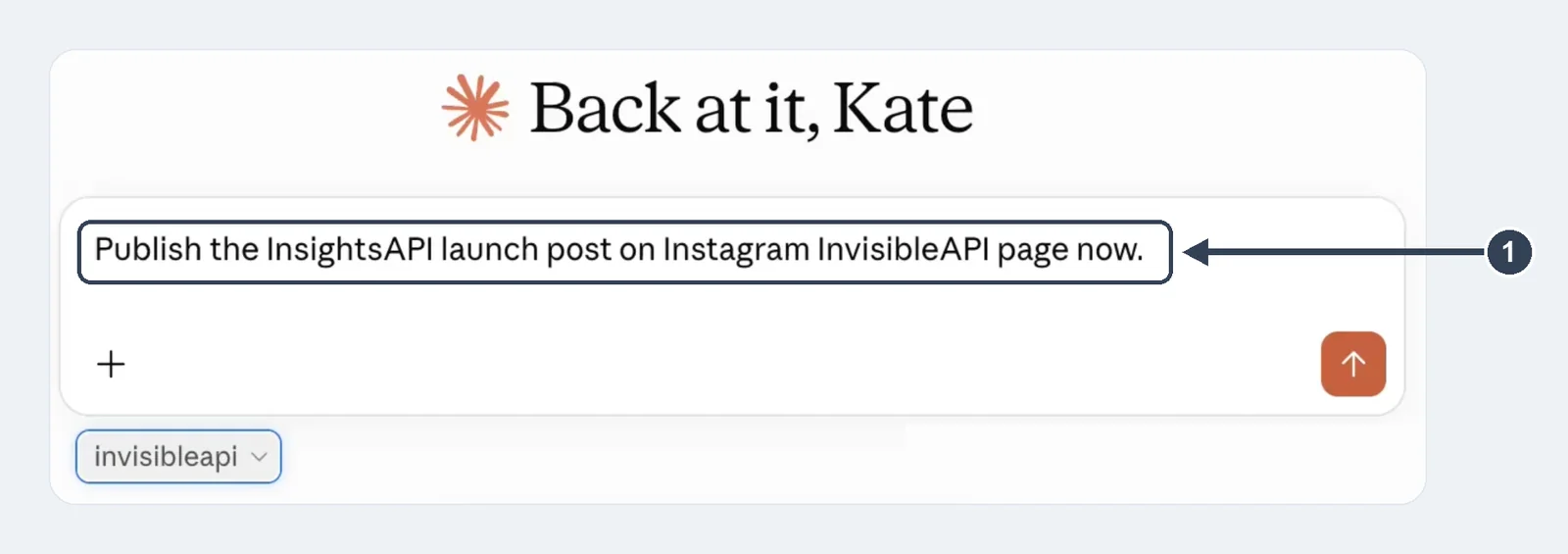
Claude found the image and the approved caption, checked that the image link worked, made sure the post had not gone out before, and published it. The answer told me it was live on @invisibleapi at 12:09 Lisbon time, with no errors.
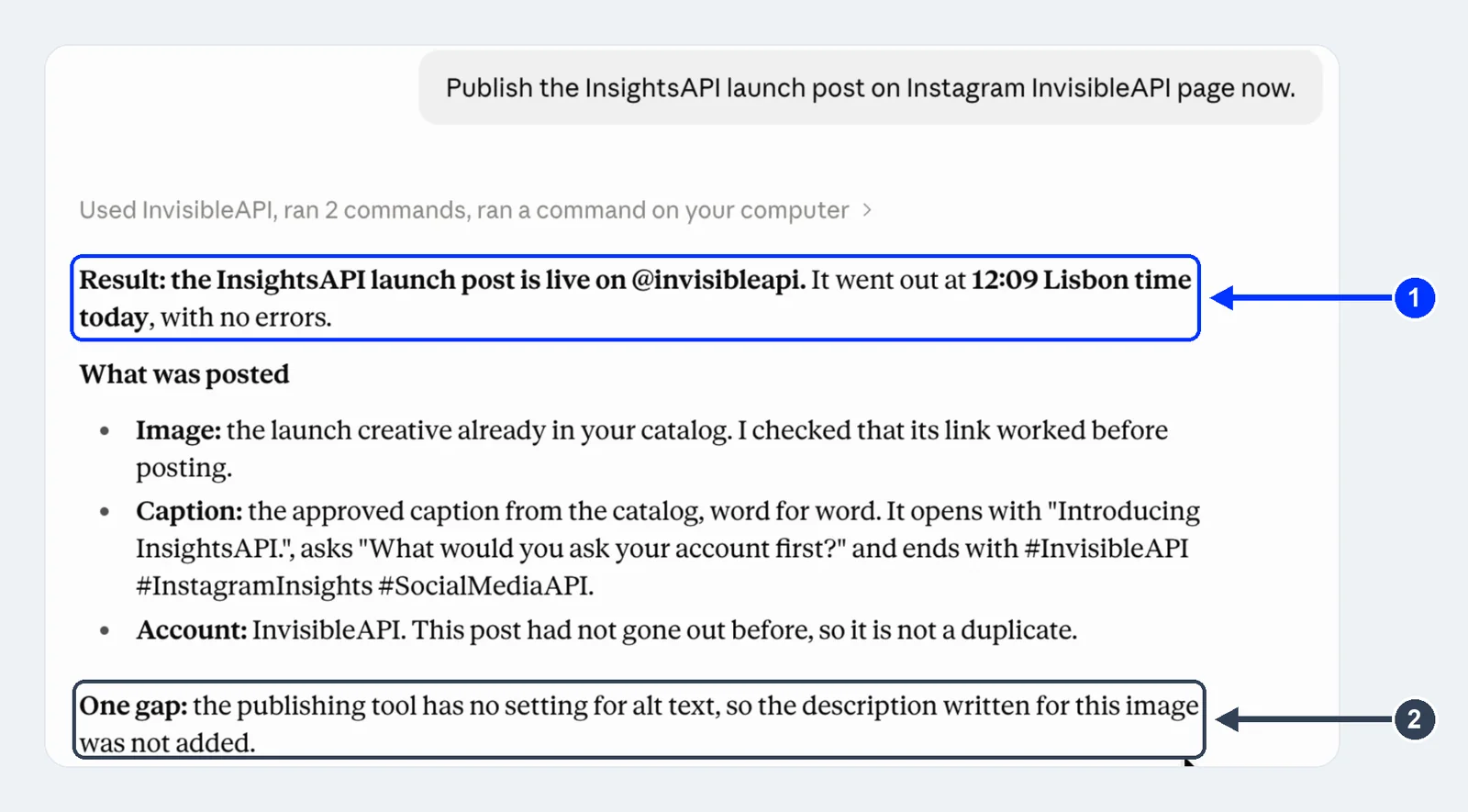
It also told me what it could not do: the publishing tool has no alt text setting, so the image description we had written was left off. I’d rather hear that in the chat than find out later.
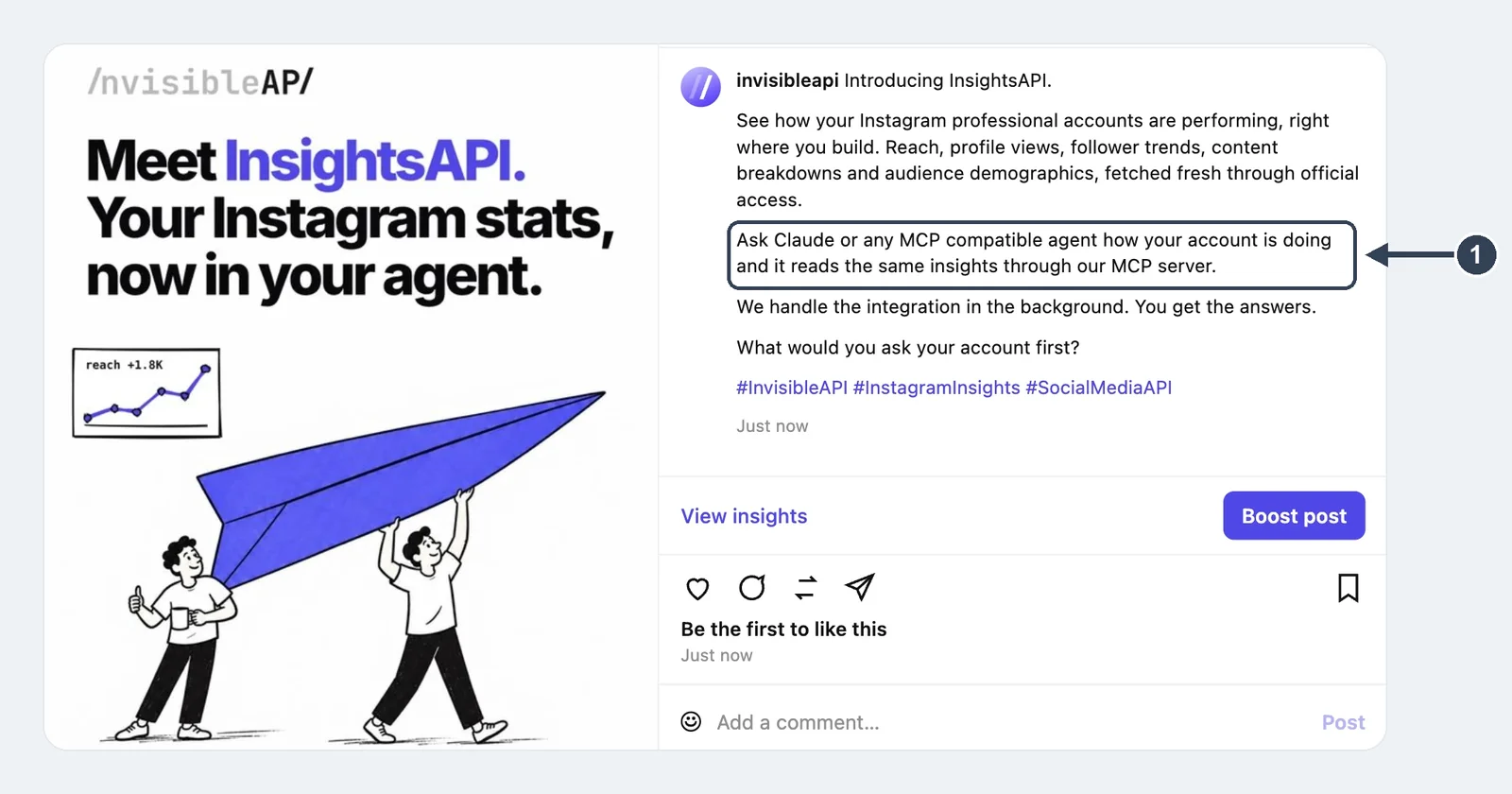
Here is the post on Instagram, exactly as Claude published it:
The prompt I’d use most is the one that closes the loop with listening: reposting a creator’s photo, with credit, once they said yes. Split it into two messages, so you see the caption before anything is created:
@creator said yes. Draft a caption that credits them for their photo. Don’t post anything yet.
Approved. Post it on our Instagram.
A created job is already on its way out, and if you set the connector to “Always allow”, neither Claude nor ChatGPT will stop to ask before it creates one. Keeping the draft and the publish in separate messages is what gives you the last word. InvisibleAPI’s setup guide recommends the same.
Four more prompts to start with:
- “Post this launch photo with the approved caption on all three of our regional accounts.”
- “Share the same news on our X account.”
- “Cancel the repost before it goes out.” or “Retry the post that failed.”
- “What is scheduled for next week, and on which accounts?”
Job 3: Report on what worked (InvisibleAPI MCP)
The same InvisibleAPI connection reads Instagram account insights in four groups: overview (the account numbers for a period), trends (how they move over time), breakdowns (the same metrics split by the dimensions Instagram reports) and audience demographics (who follows and reaches the account).
Demographics are the part a client report usually lacks. “Reach went up 20%” is a number. “Reach went up, mostly from women 25 to 34 in Madrid” (to pick an example) is something a client can act on.
Because Claude or ChatGPT does the writing, you choose the report format. A one-page summary in your agency’s template, a Slack message every Monday, a table in Google Sheets. You are building your own reporting tool out of a prompt.
Here is what that looks like for an agency with two accounts connected:
Pull the last 30 days of overview and trends for every connected Instagram account and summarize what changed.
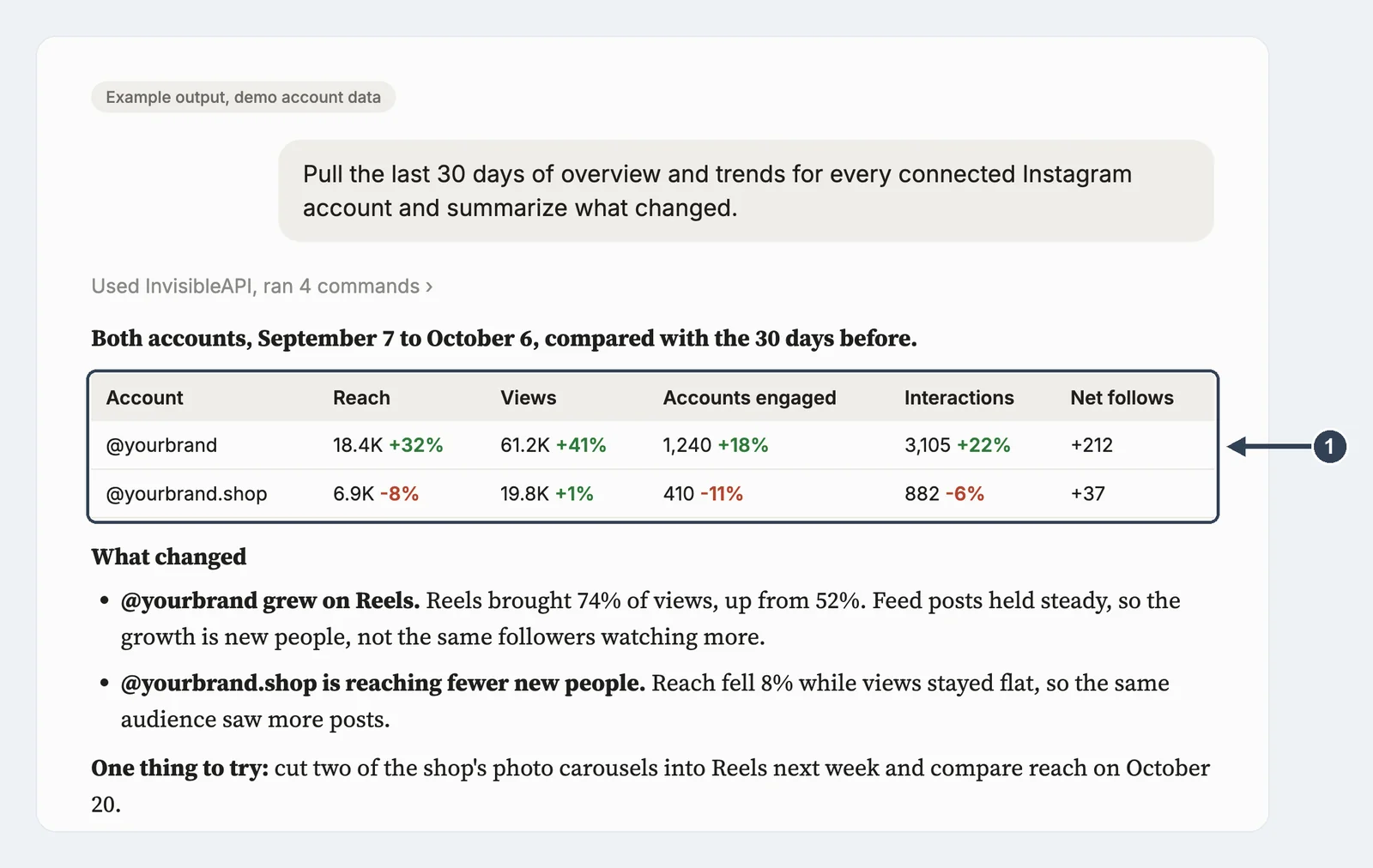
A fair warning from my own test: I ran the same report on @invisibleapi, an account we opened this month, and got 6 views and a reach of 1. Demographics came back empty, because Meta only shares them for accounts with at least 100 followers.
The MCP is only as interesting as the account behind it, so test it on an account with some history. The two illustrations here use demo numbers for that reason.
And the “who” question, with a posting time on top:
Show the audience demographics for our main account and suggest a posting time for that audience.
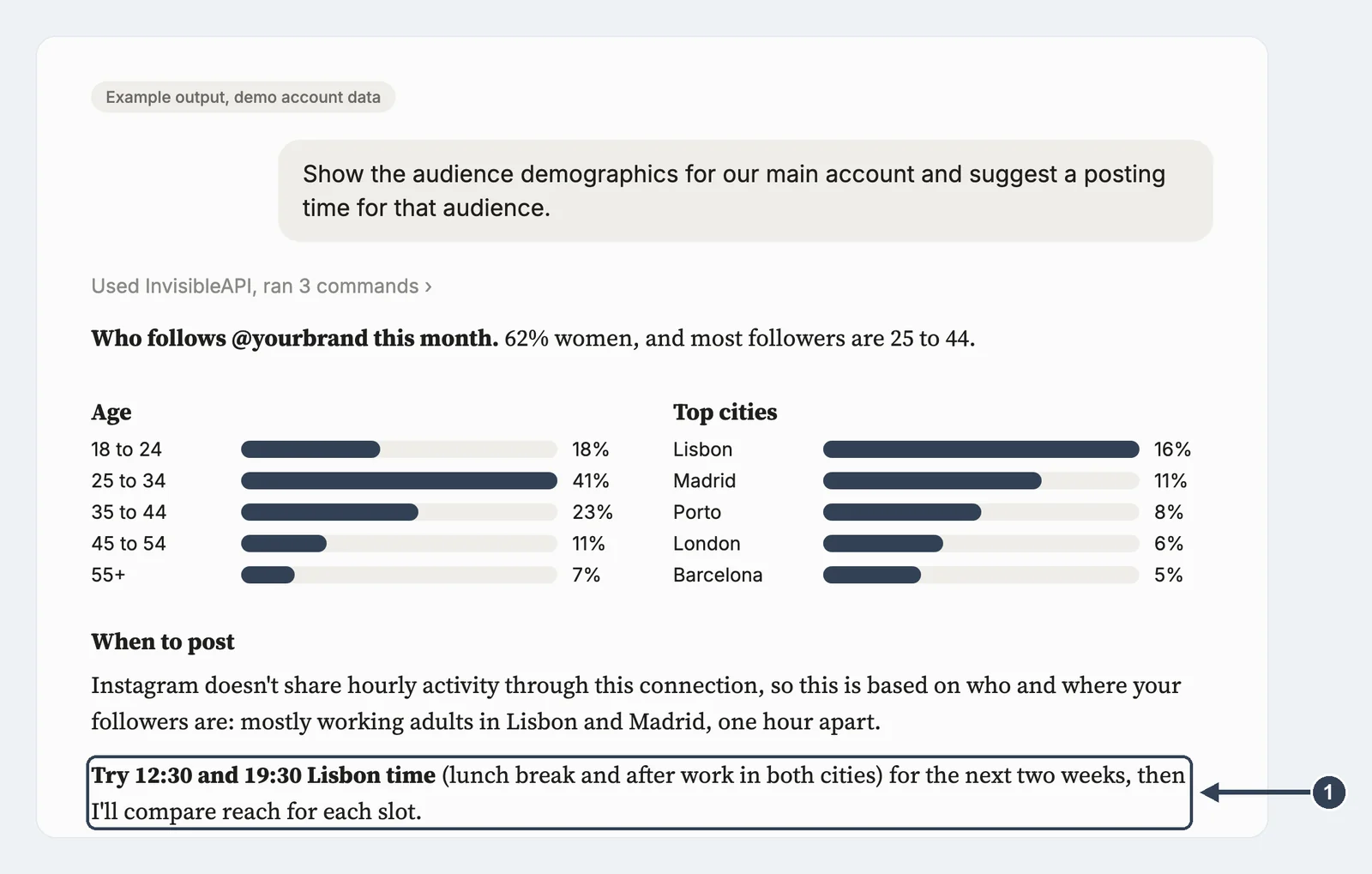
Notice what the assistant says about timing: Instagram does not share hourly activity through this connection, so the suggestion is based on where followers live, and it offers to check reach for each time slot after two weeks. That is the honest version of “best time to post.”
Two more prompts to try:
- “Compare reach from Reels and feed posts for the last 30 days and tell me which one to post more of.”
- “Write a one-page October report for [client]: reach, engagement, top three posts, and one thing to change in November.”
Run the Reels comparison as a ready-made template: compare Instagram Reels vs. feed reach.
One thing to keep straight: the EmbedSocial MCP also has analytics, but those measure clicks on the Instagram widgets on your website: posts, icons, lightbox and CTA. Instagram account performance comes from InvisibleAPI.
For a report on what people say about the brand, use monthly Instagram listening reports in Gamma or an Instagram competitor comparison report in Google Slides.
How the two MCPs work together: an agency with lots of mentions
Say you manage Instagram for several brands. Mentions pile up faster than anyone can read them. Here is the loop I’d run, one client at a time, in Claude or ChatGPT. Watch how the job passes from one MCP to the other.
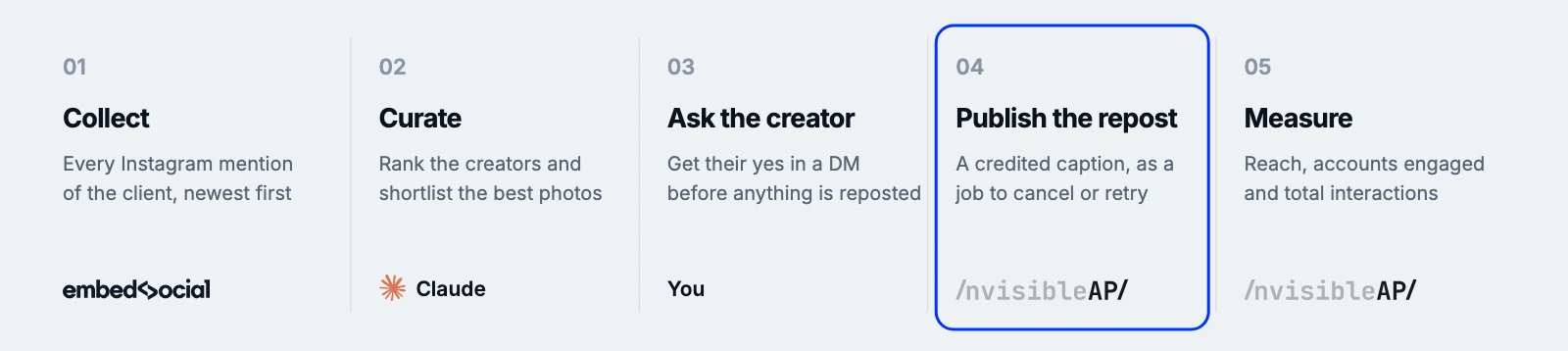
- Collect (EmbedSocial MCP). “Show me every Instagram mention of [client] from the last 7 days, newest first.” You get each post with the creator and the image.
- Curate (EmbedSocial MCP). “Rank them by how many times each creator tagged us and shortlist the five strongest photos.” You keep the ones that fit the brand.
- Ask the creator (you). Reposting someone’s photo needs their yes. Send the DM yourself and wait for the answer. This step stays human.
- Publish the repost (InvisibleAPI MCP). First: “@creator said yes. Draft a caption that credits them. Don’t post yet.” Read it, then in a new message: “Approved. Post it on [client]’s Instagram.” Nothing is created until you send the second message.
- Measure (InvisibleAPI MCP). “How did [client]’s Instagram do this week?” You get reach, accounts engaged and total interactions for the client report.
Then on to the next client.
Two ways to take it further: turn Instagram mentions into HubSpot leads, or find the creators behind your mentions and enrich them in Clay.
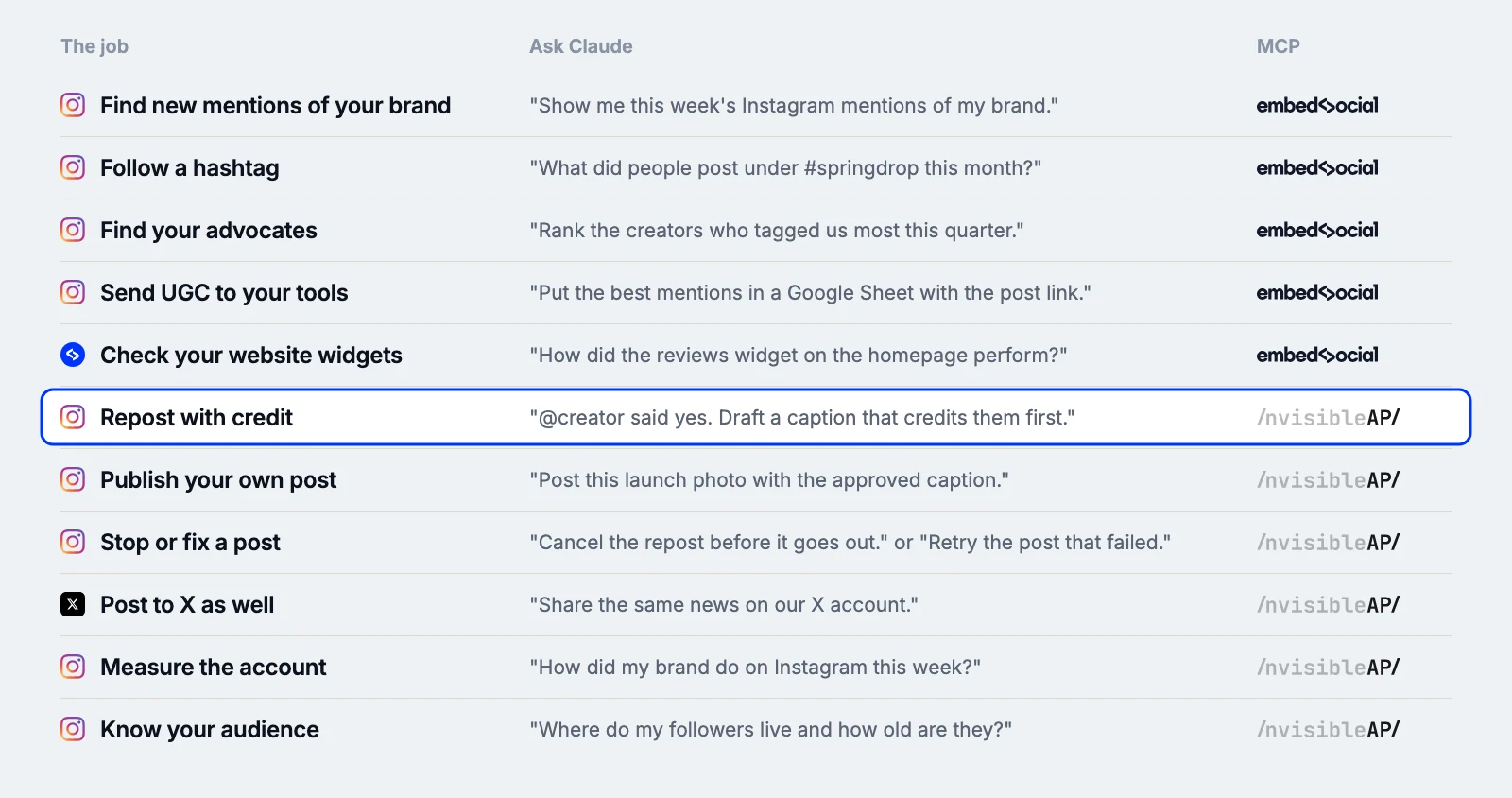
Which MCP does which job
Here is the whole split on one page, with what to ask Claude and ChatGPT for each job.
Before you install any other Instagram MCP
If you test a GitHub server or a directory listing, check these first:
- Does it use the official API? Look for a Meta app and a consent screen. If it asks for your Instagram password or session cookie, close the tab.
- Can it write? If you only want to read, pick a server that can’t post. Write access is where the real damage happens.
- Who holds the token? A self-hosted server means you store and refresh the token yourself. A hosted one means you trust the host. Know which one you picked.
- Is anyone maintaining it? Meta ships new API versions several times a year and retires old ones. A repo with no commits in six months is a risk.
- Business or Creator account? Meta’s API works with professional accounts. A personal account limits what any honest MCP can do.
Conclusion: Split the job, then run every client from one chat
Listening and publishing need different access, so give them different MCPs. The EmbedSocial MCP reads your clients’ mentions and hashtags and stays connected all day. The InvisibleAPI MCP publishes and reports, and you switch it on only when you mean to post.
Once both are connected, the weekly routine becomes a handful of prompts in Claude or ChatGPT: collect, curate, ask the creator, repost with credit, report. The one step that stays human is asking for permission.
Start with the listening side. Connect your Instagram sources, paste the Instagram MCP server URL into Claude or ChatGPT, and ask for last week’s mentions.
Connect your first client’s Instagram to EmbedSocial on a free trial and run your next mentions check from one chat.