At EmbedSocial, I see the same pattern again and again: Brands are surrounded by customer proof, yet their websites still rely on stale testimonials, manual screenshots, or outdated social media feeds that no longer reflect what customers are saying today.
That is why the web scraping vs API debate matters so much in my world.
On paper, both methods can collect online data. In practice, they create very different outcomes when your goal is to publish fresh reviews, UGC, and social proof on a live website.
I have seen teams start with a quick workaround, only to discover that the real challenge is not collecting user-generated content once.
The real challenge is aggregating and embedding social media posts reliably, moderating them properly, and using them to become more trustworthy.
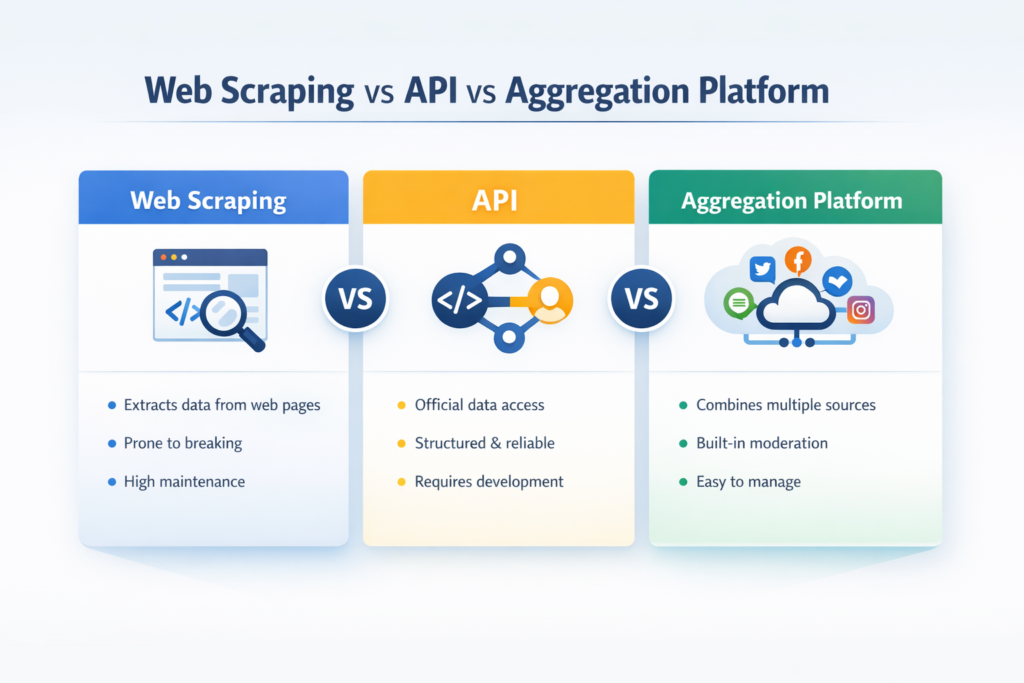
Well, below, I explain what is web scraping, show how web scraping works, break down the difference between web scraping and API, and explain why API-based social aggregation like EmbedSocial’s is usually the better long-term model for brands.
Before diving in, here’s the rundown:
What is web scraping?
If someone asks me what is web scraping, my simplest answer is this:
It’s the process of extracting visible information from a webpage and converting it into structured data. A scraper visits a page, reads what is displayed in the HTML or rendered interface, identifies the elements it wants, and saves that information in a more usable format.
‘Web scraping’ definition
That information can include review text, usernames, captions, ratings, product details, image URLs, timestamps, or other public-facing data access.
This is why scraping is popular in research-heavy workflows. Businesses can extract data for social listening use cases, such as competitor tracking, public review analysis, price monitoring, and, in some cases, web scraping social media data.
I want to be fair here: scraping is not inherently wrong or useless.
It can be practical when no suitable API exists, or when the goal is internal analysis rather than customer-facing publishing.
The problem starts when teams assume a method built for extraction is automatically good for ongoing website content operations.
From my experience, that is where things begin to break.
How web scraping works?
Most explanations of how web scraping works stay too abstract. I think it is much clearer when you look at it as a step-by-step process:
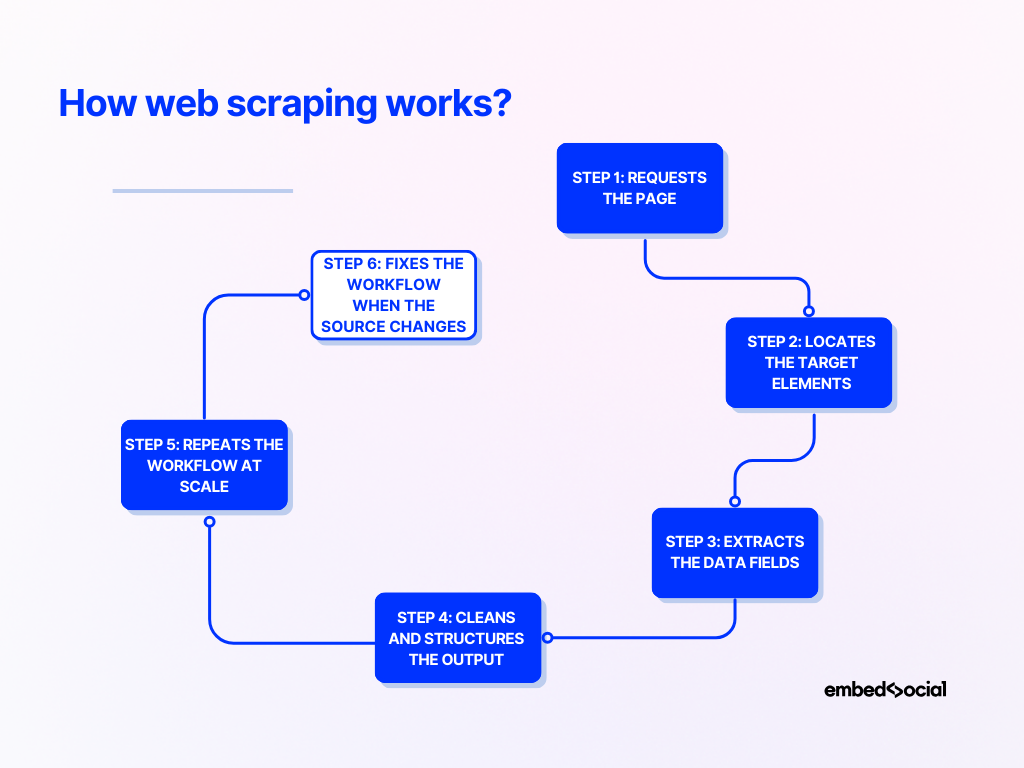
Step 1: Requests the page
A scraper first sends a request to the target website and retrieves the page content.
In simple cases, that means downloading raw HTML. In harder cases, it may need to render JavaScript or simulate a browser session.
Step 2: Locates the target elements
Next, the scraper scans the page structure for the data it needs.
It might rely on CSS selectors, class names, element IDs, XPath paths, or repeated components to find the right content blocks.
Step 3: Extracts the data fields
Once the target elements are located, the scraper pulls out the useful fields.
That may include captions, ratings, author names, hashtags, media links, dates, review text, or other visible attributes.
Step 4: Cleans and structures the output
Scraped data is often messy.
So the next step is to normalize dates, remove extra characters, reshape fields, and convert everything into a structured format like JSON or CSV.
Step 5: Repeats the workflow at scale
If the goal is ongoing collection, the scraper runs repeatedly across multiple pages, profiles, feeds, or source URLs. This is where the maintenance burden starts to show up.
Step 6: Fixes the workflow when the source changes
A scraper depends on page structure. If the source platform changes how captions, thumbnails, or page elements load, the workflow may fail. That failure may be minor in an internal report, but it is much more serious when the result appears on a public website.
In such a case, you have to adjust the scraper.
Real-life example:
I have seen a social content feed work perfectly in testing, then quietly degrade after a platform changed how media cards were rendered. The team did not just lose data quality. They ended up with a broken website experience.
What is an API?
An API, or application programming interface, is an official way for one system to request data from another in a structured format.
‘API’ definition
That definition sounds technical, but the practical difference is simple.
With scraping, you read what appears on the page. With an API, you request data through a channel built for software access.
Instead of parsing visible front-end content, you receive structured data directly from defined endpoints, often in JSON.
That usually makes the workflow easier to maintain.
The data is cleaner, the structure is more predictable, and the integration is less dependent on how a page looks in the browser.
Of course, APIs are not perfect. They can have limits, approvals, quotas, and provider-controlled rules about what data is available.
But for recurring workflows, especially ones tied to a live website, APIs are usually a much stronger operational foundation.
Web scraping vs API: the key differences at a glance
When people search API vs web scraping or web scraping vs. API, they usually want a fast, practical comparison. This is the framework I use most often:
| Web scraping | API | |
|---|---|---|
| Data source | Visible page content or rendered interface | Official structured endpoint |
| Data format | Raw or semi-structured | Structured and easier to integrate |
| Reliability | Vulnerable to layout and rendering changes | Usually more stable |
| Maintenance | Higher | Lower |
| Compliance clarity | Less predictable | Usually clearer |
| Flexibility | High for public pages | Limited to what the provider exposes |
| Best fit | Research, monitoring, one-off extraction | Repeatable integrations and publishing workflows |
| Fit for social proof on websites | Often fragile | Usually far better |
The real difference between web scraping and API is not just where the data comes from. It’s also how much effort comes after collection to keep the system usable, stable, and publish-ready.
Pros & cons of web scraping
Because one of the main supporting keywords here is pros and cons of web scraping, I want to show that tradeoff clearly rather than oversimplify it.
| Web scraping pros | Web scraping cons |
|---|---|
| Can collect public data even when no API exists | Breaks when layouts or rendering change |
| Highly flexible and customizable | Requires ongoing maintenance |
| Useful for monitoring, research, and social listening | Can face anti-bot systems and blocking |
| Less dependent on provider API availability | Data formatting is often inconsistent |
| Helpful for lightweight experiments | Can create policy or governance risk depending on use |
| Can capture visible fields APIs may not expose | Weak fit for polished, customer-facing website experiences |
My honest view is that scraping is often strongest when the output is internal. Once the output becomes public-facing and brand-sensitive, the weaknesses become evident.
Advantages of using APIs
If I had to summarize the main advantages of using APIs for this use case:
- Cleaner, structured data—for example, when a brand pulls and embeds Google reviews through an API, it can receive review text, star ratings, author names, and timestamps in a predictable format instead of piecing them together from messy page elements;
- Less dependence on front-end layouts—for example, if a social platform redesigns its feed cards, an API-based connection can keep working because it relies on the underlying data endpoint rather than the visible page structure;
- Better fit for repeatable workflows—for example, a multi-location business can automatically collect fresh reviews from dozens of locations into one dashboard instead of manually checking each page one by one;
- Stronger support for freshness and consistency—for example, an e-commerce brand can keep product-page review widgets updated with recent customer feedback instead of leaving the same static testimonials in place for months;
- Clearer governance and access rules—for example, a marketing team using official integrations has a much easier time explaining where the content comes from and how it is being used than a team relying on scraped public pages;
- Less cleanup and fewer repair jobs later—for example, developers do not have to keep fixing broken selectors every time a source site changes its HTML structure or media rendering;
- An easier path from collection to publishing—for example, a brand can move social proof from connected sources into a live homepage carousel or review widget without stitching together unreliable web scraping tools.
In short, APIs do not just help you collect data. They help you build a system around that data. Data extraction becomes a reliable process that provides structured data access.
Plus, APIs allows you to target website pages to to get specific data instead of scraping everything from said pages and then sifting through the contents.
Why social media data is different from general web data?
Most generic web scraping vs API articles treat all online data as if it belongs in the same bucket. From my experience, that is where the analysis gets too shallow.
Social media content stops being ‘just data’ the moment it appears on a homepage, product page, or review widget. At that point, it becomes trust-building content.
| General web data use case | Social media data use case |
|---|---|
| Often used for internal analysis | Often used for customer-facing proof |
| Minor formatting issues may be acceptable | Formatting directly affects perception |
| A temporary gap may be inconvenient | A broken feed can damage trust |
| Usually focused on retrieval | Requires retrieval, moderation, and publishing |
| Often lives in dashboards or reports | Lives on websites, widgets, and conversion pages |
| Lower brand-risk if internal only | Higher brand-risk because customers see it |
That is why I separate these use cases so strongly. A spreadsheet can tolerate messy output. A live UGC widget cannot. You don’t just extract data from web pages, you re-implement that data in trust-building, live website widgets that update automatically.
Web scraping social media data: Where it breaks down?
The appeal of web scraping social media data is obvious at first. Public content looks accessible, setup can feel fast, and teams may believe they have found a shortcut.
In practice, the model starts to break down in predictable ways:
Front-end changes create fragility
Social platforms change often.
A feed that depends on visible page structure can stop working when a caption loads differently, a media element is restructured, or the platform changes how the interface is rendered.
Pro tip:
Never build a customer-facing feed on top of page layout assumptions alone. If a platform changes how captions, cards, or media render, your feed can break overnight — which is why official API access is usually the safer foundation for anything public-facing.
Formatting quality becomes hard to control
Even when a scraper technically works, the output may not be fit for publishing.
I have seen scraped social content come through with missing captions, poor media rendering, uneven card layouts, and incomplete attribution.
Pro tip:
A feed that “technically works” is not the same as a feed that is publish-ready. Before content goes live, make sure you can reliably control captions, media quality, attribution, card consistency, and fallback behavior across every layout.
Moderation becomes a manual burden
Once content is collected, somebody still has to decide what should actually go live.
That means UGC management like filtering spam, removing irrelevant posts, excluding low-quality content, and checking whether the final result still feels on-brand.
Pro tip:
Content collection is only half the job. The real operational win comes from having built-in UGC management workflows for filtering spam, removing irrelevant posts, surfacing the best content, and keeping every widget aligned with your brand standards.
Scale multiplies the maintenance cost
One experimental feed is manageable.
Multiple feeds across product pages, campaigns, and client websites create a very different maintenance burden. Large scale data collection needs API access. If you want to obtain data, reliable data at scale, you need direct accesse to the data availability.
Pro tip:
One experimental feed might be manageable with scraping, but large-scale data collection is a different game. Once you need reliable content across multiple pages, campaigns, or client sites, direct access to stable data availability matters far more than short-term setup speed.
Governance gets harder to manage
Depending on the platform, content type, and use case, scraping can raise extra questions around terms, privacy, access, and brand risk.
For many teams, that uncertainty alone makes it a weak foundation for customer-facing proof.
Pro tip:
If the content will influence trust or purchase decisions, the collection method should be judged by reliability and governance, not just by whether it can pull the data once.
Direct API vs aggregation API: what’s the difference?
This is the distinction most API vs web scraping articles miss. Many teams think the choice is simply between scraping and using an API.
In reality, the more useful comparison is between scraping, direct API integration, and a managed social media aggregator layer.
| What you get | Main drawback | Best fit | |
|---|---|---|---|
| Web scraping | Flexible access to visible public content | Fragile, maintenance-heavy, messy for publishing | Research, monitoring, experiments |
| Direct API integration | Official structured access to source data | You still have to build moderation, syncing, formatting, and publishing logic | Technical teams with development resources |
| Aggregation API or platform | Official access plus workflow, moderation, organization, and publishing tools | Less raw control than fully custom systems | Brands, marketers, agencies, e-commerce teams |
Direct API access is powerful. But many teams underestimate what comes after connectivity. Once you have the data, you still need source management, moderation rules, transformation logic, refresh cycles, widget generation, layout control, and ongoing upkeep.
That is why I keep coming back to the same point: raw access is not the same as a working social proof pipeline. You need a social media aggregator like EmbedSocial.
When web scraping still makes sense?
I do not think a credible article on web scraping vs. API should pretend scraping has no place. It absolutely does. A good example is social listening.
If a team wants to monitor public conversations, explore visible discussions, or gather data for internal analysis, scraping can be practical and efficient.
Another example is niche public data collection.
Sometimes the needed information is public, but no useful API exists. In those cases, scraping may be the only realistic path to the data.
I also think scraping can make sense for lightweight internal experiments.
If the workflow is temporary, the team understands the fragility, and nothing customer-facing depends on it, the tradeoff may be acceptable.
But once the content becomes part of the public brand experience, I usually advise teams to raise the standard. That is where scraping often starts becoming a liability.
Why API-based social aggregation is the better long-term system for brands?
This is where the business case gets much clearer. An API-based aggregation model is better for brands because it solves more than collection.
It helps manage the full lifecycle of the content after collection.
Take a growing e-commerce brand as an example.
It may want recent reviews on product pages, UGC on landing pages, and social proof on the homepage. Trying to maintain that through scattered workarounds creates drag very quickly. Centralized, API-based aggregation makes that system manageable.
A service business is another good example.
Replacing static testimonial screenshots with live review content can make the site feel more current, more believable, and more aligned with what customers are saying right now. Imagine a wall-of-love page on your website that updates automatically.
I also care about how much work a system creates behind the scenes. A good workflow reduces screenshotting, manual curation, repetitive developer tickets, and emergency fixes.
Example from my work at EmbedSocial:
I have seen businesses replace an outdated testimonial block with a live stream of recent Google reviews and social mentions. The result was not just fresher content. The site felt more active, more current, and more credible.
How EmbedSocial turns social proof into a living website asset?
This is the part I know most directly from hands-on experience.
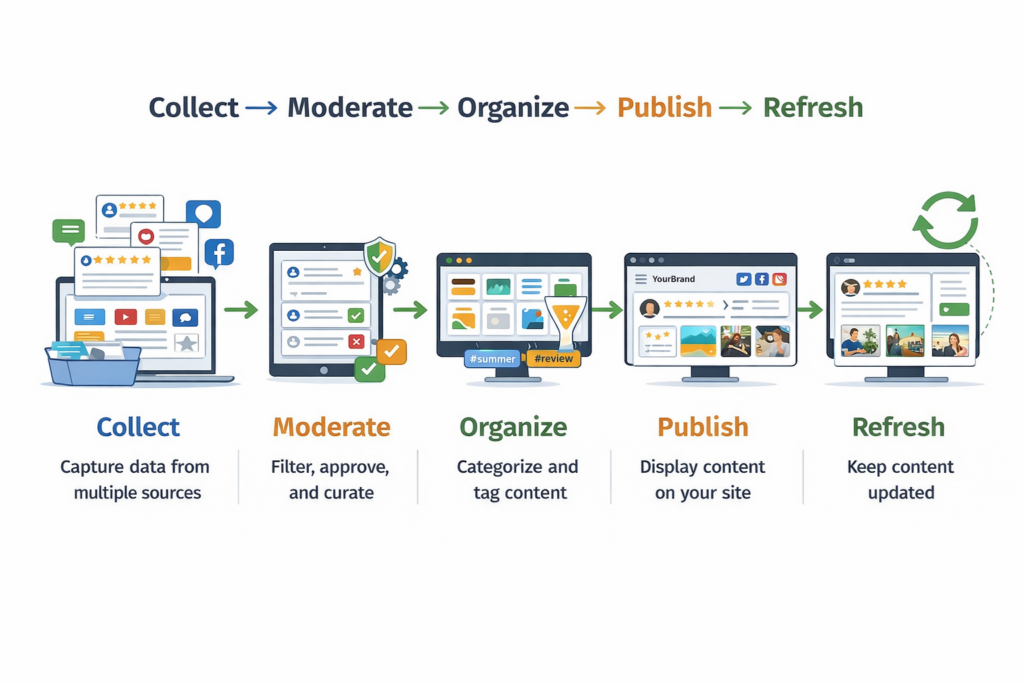
At EmbedSocial, the goal is not just to help brands collect content. It is to help them turn real customer content into something organized, moderated, and publish-ready.
Here’s a simple graphic covering the process of aggregating social media content:
And here are the steps you need to complete after creating your EmbedSocial account:
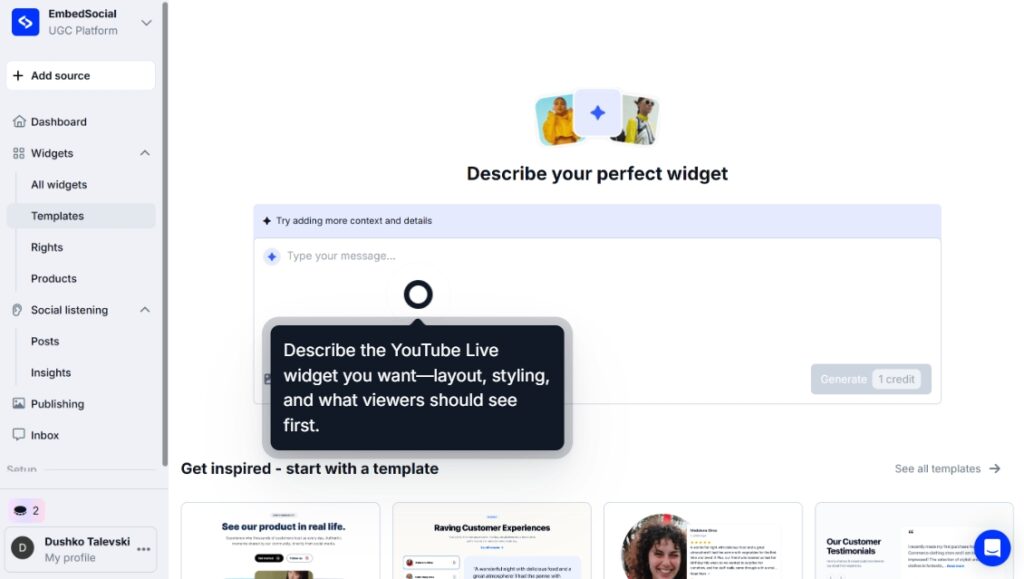
Step 1: Submit an AI widget design prompt
First, you have to prompt the AI widget editor to create your new social media widget:
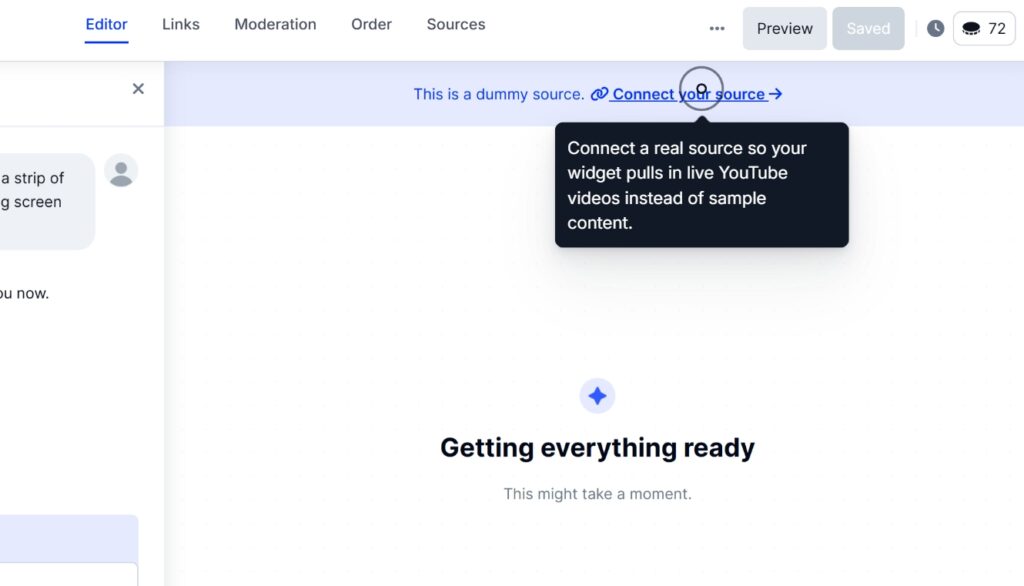
Step 2: Connect your social media source(s)
Then, you have to connect to your social media to pull their content in EmbedSocial:
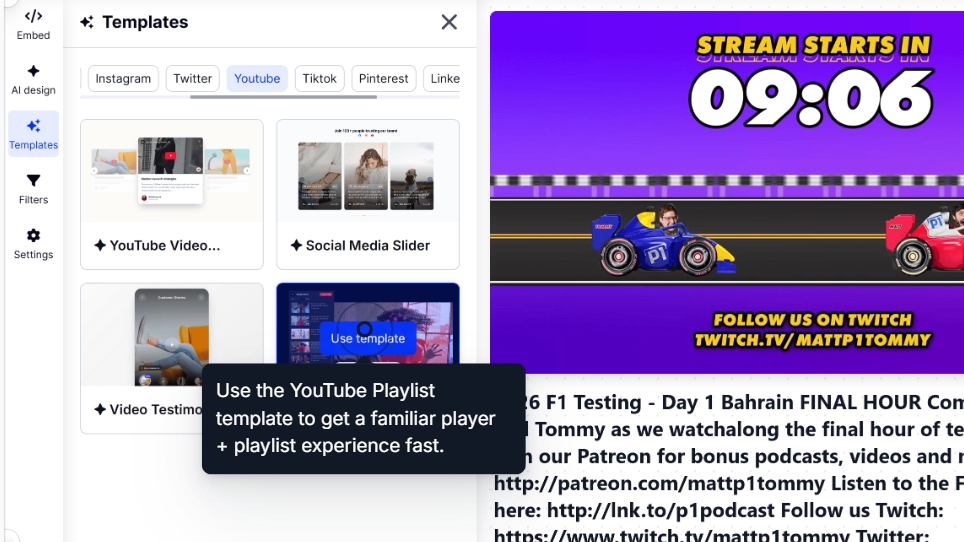
Step 3: Design and customize your widget
Then, you can select your widget template and further customize it via AI prompts:
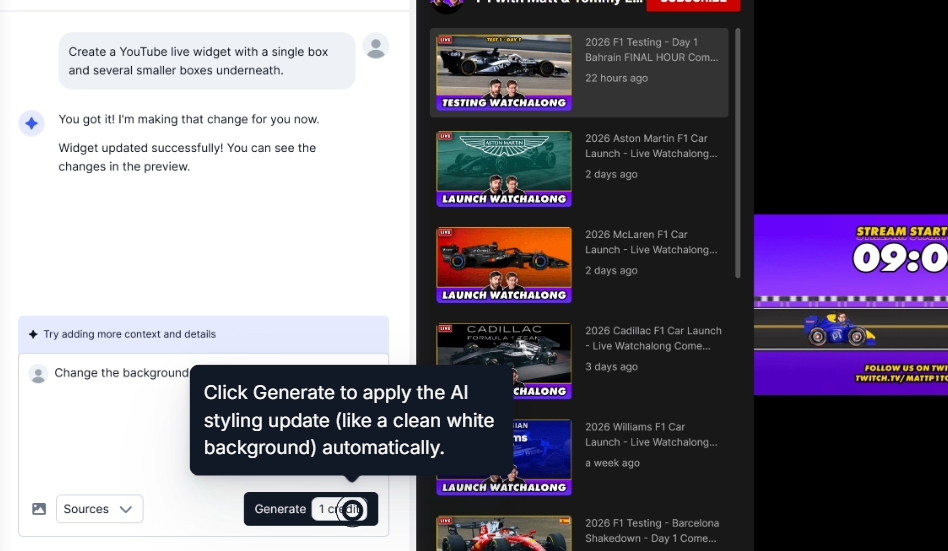
If you’re unhappy with the widget look, simply navigate to AI design and add further prompts:
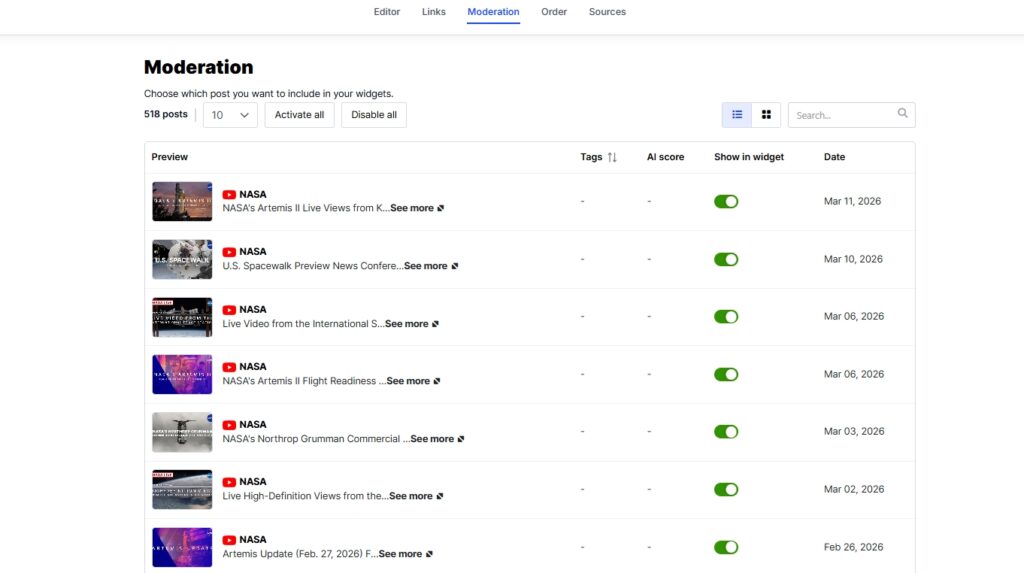
Step 4: Moderate your widget contents
Head on over to the Moderation tab to select specific posts you want to showcase:
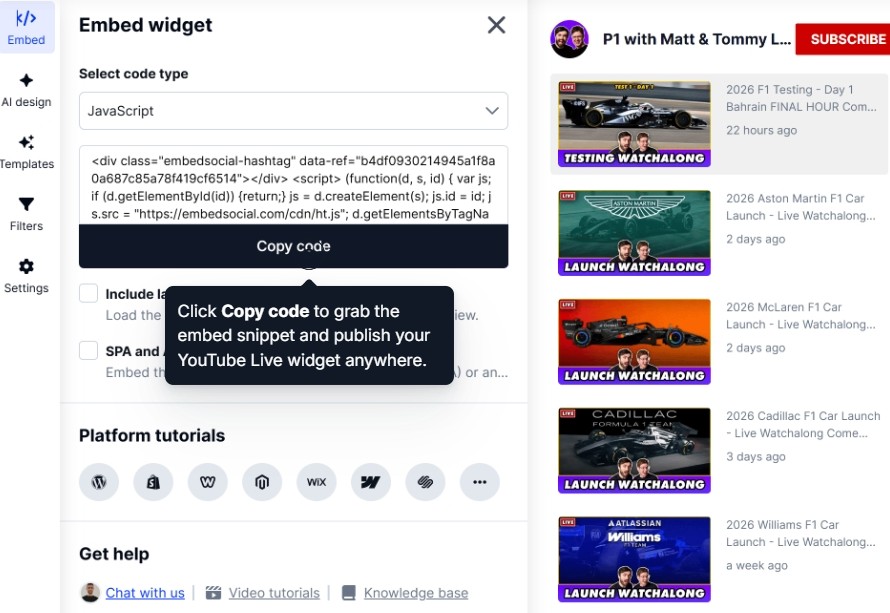
Step 5: Publish the widgets on the website
Once the widget or feed is ready, you need to copy its embeddable code via the Embed tab:
Step 6: Paste the widget code on your website
The last thing you need to do is navigate to your website builder and paste the widget code.
Here’s how that works across all popular website builders:
How to embed UGC on WordPress?

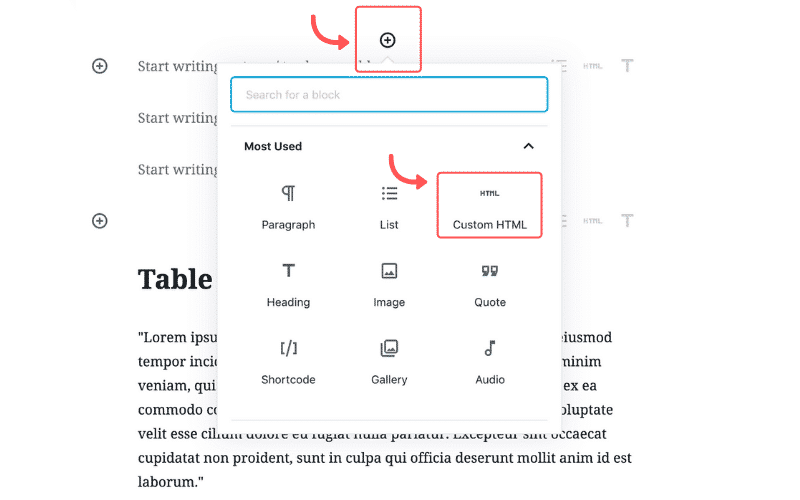
Here’s how to embed UGC on WordPress sites:
- Once you create your EmbedSocial widget, go to your WordPress admin page;
- Sign in to your account and open the page where you want to add the UGC widget;
- Click the + button in the editor and choose Custom HTML to paste the widget code;
- Click “Save” when you’re done.
How to embed UGC on Shopify?

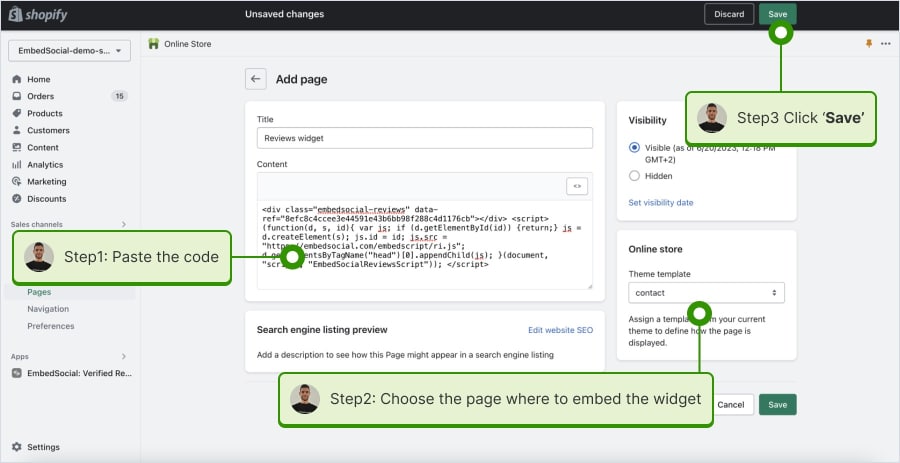
Here’s how to embed UGC on Shopify sites:
- Log into your Shopify account after copying the embeddable widget code in EmbedSocial;
- Navigate to the ‘Pages’ tab and click ‘Add page’;
- In the ‘Content’ field pages the embeddable code;
- Select the page where you want the code to appear and press ‘Save’.
How to embed UGC on Squarespace?

Here’s how to embed UGC on Squarespace sites:
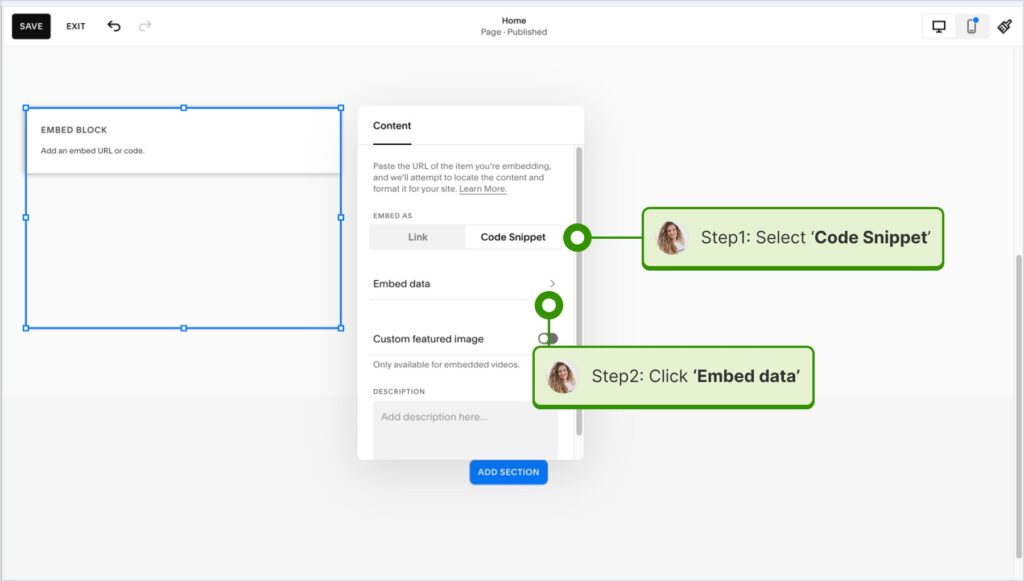
- Copy your EmbedSocial widget code and log into your Squarespace account;
- Choose the page where you want the reviews to appear;
- Click ‘Add new section’ and then ‘Add block’ where you want to display the widget;
- From the blocks list, choose ‘Embed‘;
- Click on the block, select ‘Code snippet’, and click ‘Embed data’;
- Finally, in the code box, paste the copied reviews code;
- Make sure to save and publish your changes on Squarespace.
How to embed UGC on Wix?

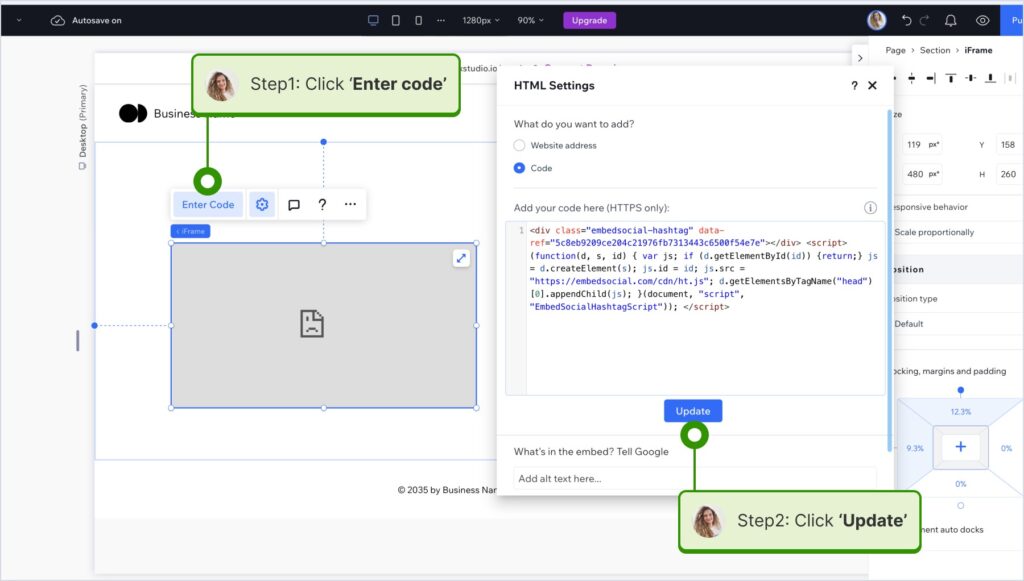
Here’s how to embed UGC on Wix sites:
- Log into your Wix editor and choose the page and location to add the widget;
- Click the “+” icon in the top-left corner to add a new element;
- Find the ‘Embed & Social’ section and tap ‘Embed Code’;
- Paste the code and tap ‘Update’.
How to embed UGC on Webflow?

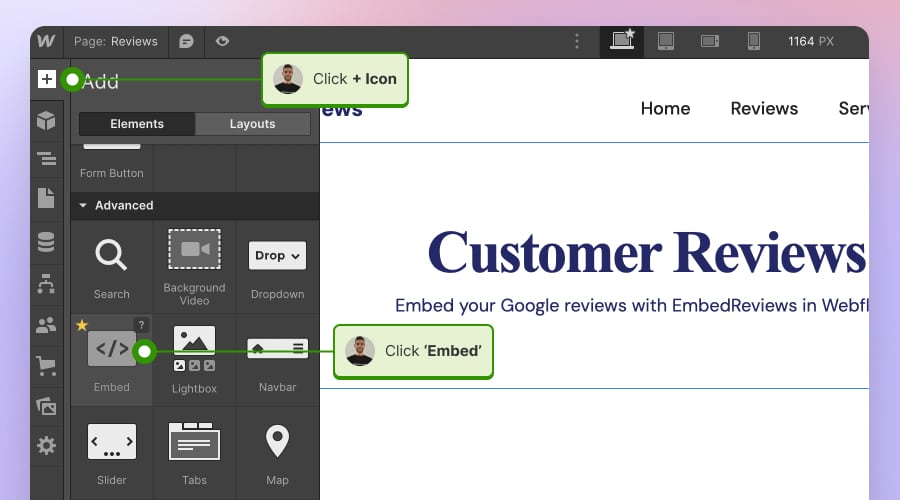
Here’s how to embed UGC on Webflow sites:
- After creating the widget in EmbedSocial, log in to your Webflow account;
- Go to the edit view of your website within Webflow;
- Choose to ‘Add element’ in Webflow and select the ‘Embed’ element;
- Drag and drop it where you want your reviews to appear;
- In the input field, paste the copied EmbedSocial code.
How to embed UGC on Pagecloud?

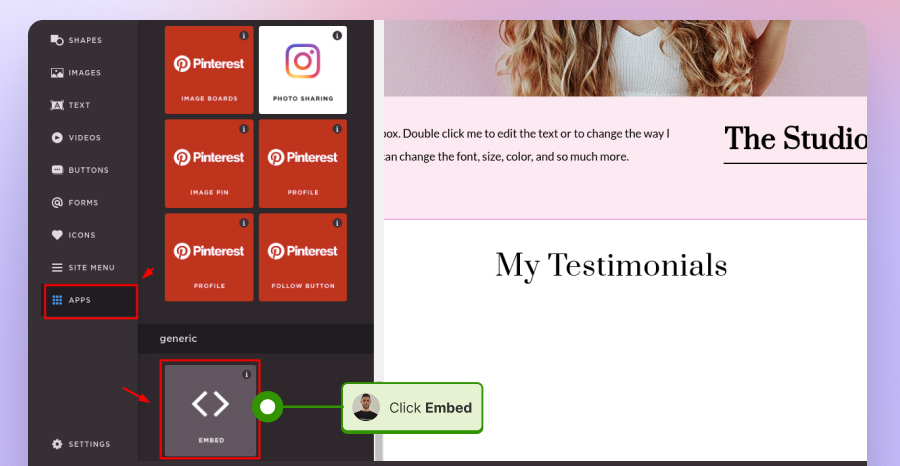
Here’s how to embed UGC on Pagecloud sites:
- After copying the EmbedSocial code, log in to your Pagecloud account;
- Start editing the webpage where you want the reviews to appear;
- Tap on ‘Apps’ from the left ribbon menu and select ‘Embed’;
- Paste the EmbedSocial code into the popup field and click ‘Ok’ to complete the process.
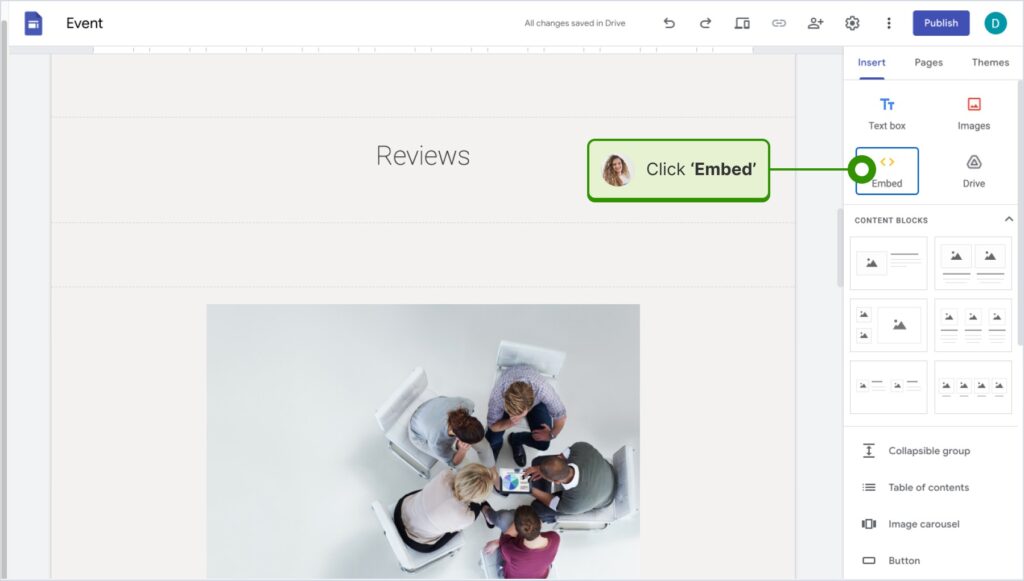
How to embed UGC on Google Sites?

Here’s how to embed UGC on Google Sites:
- Once you copy your embeddable widget code in EmbedSocial, log in to your Google Sites account;
- Navigate to the page where you want to embed the widget;
- Use the ‘Insert’ tab in Google Sites and choose where you want to place the widget;
- Choose ‘Embed‘ from the menu and paste the copied code in the dialog box;
- Click ‘Next‘ and then ‘Insert‘ to finalize the embedding.
How to embed UGC on Elementor?

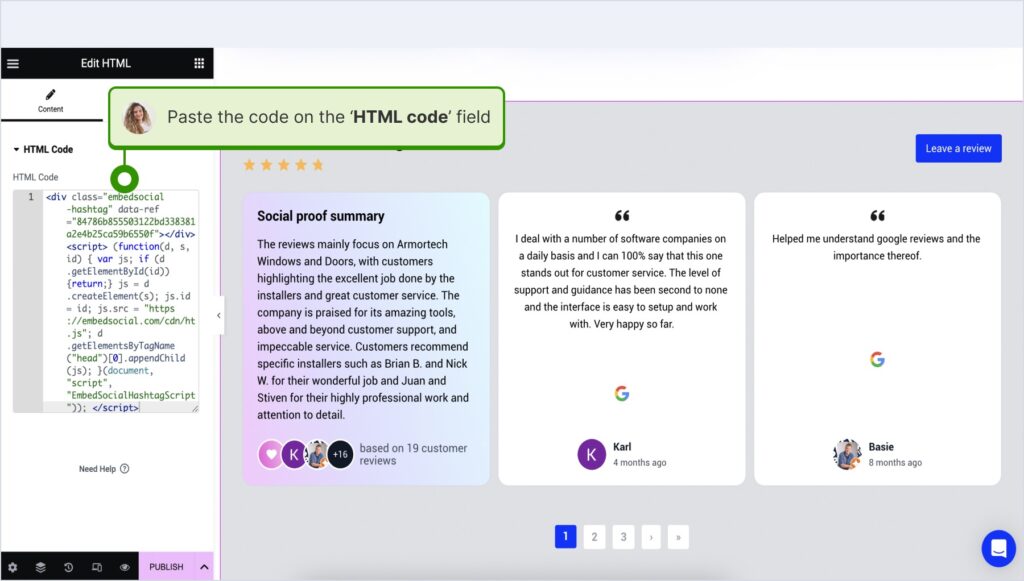
Here’s how to embed UGC in Elementor:
- Log in and navigate to the page where you want to add the reviews;
- Tap an empty section and choose the ‘HTML’ block from the left ribbon section;
- Drag and drop it on the page and paste the widget code in the empty field;
- Update and publish the page to see the live widget.
How to embed UGC in Notion?

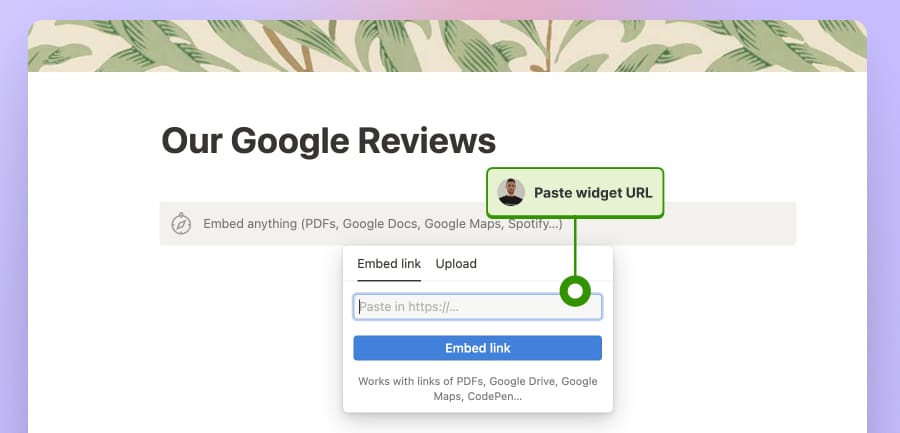
Here’s how to embed UGC in Notion:
- After copying the widget code, log in to Notion, and go to the relevant page;
- Type the /embed command, and from the dropdown, choose the ‘Embed’ option;
- Paste the URL and click the ‘Embed link’ button to add your reviews to Notion.
How to embed UGC on HTML websites?

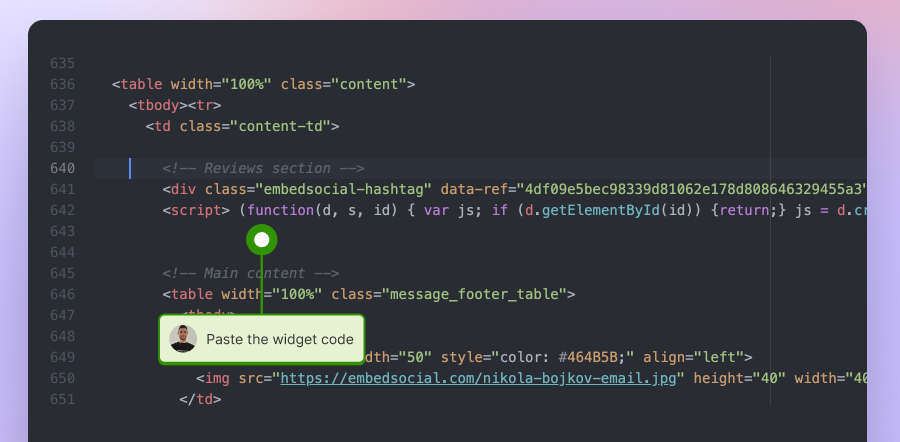
Here’s how to embed UGC on HTML sites
- Copy the EmbedSocial widget review from the ‘Embed’ tab in the top-left corner of the Editor;
- Open the HTML file of your website, which could be either a new page or an existing one;
- Paste the copied EmbedSocial embed code where you want the reviews to display.
Conclusion: Use UGC platforms with API access to build a reliable social proof workflow!
The reason web scraping vs API remains such a common question is simple: both methods can help collect online data. But for brands, that framing is still too narrow.
The better question is how to turn social media content into a stable, trustworthy, customer-facing experience that keeps the website fresh over time.
From my perspective, scraping still has a place in research, monitoring, and exploratory analysis. But when the goal is publishing social proof on a live website, an API-based aggregation workflow is usually the smarter long-term answer.
That approach gives you more than access.
It gives you structure, moderation, consistency, and a realistic path from scattered customer content to live website widgets that actually build trust.
FAQs about web scraping vs API for social media content
What is the difference between using an API and web scraping?
The main difference between web scraping and API is how the data is accessed.
Web scraping pulls information from what appears on a webpage, while an API provides structured data through an official access point designed for software integration.
Is using an API better than web scraping?
When teams compare API vs web scraping, the answer depends on the use case.
For research or one-off monitoring, scraping can make sense. For repeatable workflows and customer-facing website content, APIs are usually the stronger choice.
What is web scraping in simple terms?
If I had to answer what is web scraping in one sentence, I would say it is the process of automatically collecting visible information from webpages and turning it into structured data.
That is why it is often used in monitoring, public-data collection, and research workflows.
How web scraping works step by step?
At a basic level, how web scraping works follows a sequence.
A scraper requests a page, reads the HTML or rendered content, identifies the target elements, extracts the needed fields, and saves them in a structured format such as JSON or CSV.
What are the pros and cons of web scraping?
The main pros and cons of web scraping come down to flexibility versus reliability.
Scraping is flexible because it can collect public data even when no API exists, but it is also more fragile, more maintenance-heavy, and usually a weaker fit for customer-facing website experiences.
What are the main advantages of using APIs?
The main advantages of using APIs are structure, consistency, and repeatability.
APIs usually return cleaner data, are less dependent on front-end page changes, and are easier to connect to long-term workflows.
Can you use web scraping for social media data?
Yes, web scraping social media data is possible in some situations.
But from my experience, it is much less reliable when the goal is to publish that content on a live website where formatting, freshness, and moderation all matter.
Why do scraped social feeds break so often?
Scraped feeds often break because they depend on page structure.
If a platform changes how captions, thumbnails, media cards, or other elements are rendered, the scraper may stop returning complete or consistent data.
When does web scraping still make sense?
Web scraping still makes sense for research, social listening, public-data collection, and some internal experiments.
I become much more cautious about recommending it when the content is meant for a customer-facing brand experience.
What is the difference between a direct API and an aggregation platform?
A direct API gives you raw access to source data.
An aggregation platform takes that access and turns it into a usable workflow by helping you collect, moderate, organize, and publish content across multiple sources.
Can I display social media content on my website without scraping?
Yes.
In fact, for most brands, that is the better path. An API-based aggregation workflow lets you collect social proof through official connections and publish it through widgets, carousels, galleries, or review feeds without relying on brittle scraping methods.
Is web scraping cheaper than APIs?
Not always.
Scraping can look cheaper at first, but the long-term maintenance burden often changes the cost picture once fixes, monitoring, formatting issues, and public-facing breakage are added in.
Is API-based social media aggregation better for brands?
For most brands, yes.
When the goal is to keep a website fresh with trustworthy customer content, API-based aggregation is usually the better long-term system because it supports collection, moderation, and publishing in one workflow.