Your reviews have an expiry date. Most brands just never check it.
A review widget goes live, the team moves on, and three months later the “latest” reviews on your product page are from spring. Meanwhile, hundreds of new customer posts sit unused in your accounts.
Here’s how to keep UGC fresh on your website without babysitting it: find the widgets that stopped updating, fix the sources and filters that froze them, and put a weekly AI freshness check on autopilot. I’ll show the exact setup I use with EmbedSocial, Claude and the EmbedSocial MCP.
This guide grew out of a LinkedIn thread where one of our users shared how he connected EmbedSocial to Claude. The comments were full of sharp questions. I’ve used them as the backbone of this post.
Why stale UGC costs conversions
User-generated content on a UGC platform works because it proves real people buy from you. Old content proves the opposite: that they used to.
Old reviews hurt more than no reviews
A conversion consultant in that thread put it bluntly: when visitors see three-month-old reviews on a product page, trust can drop faster than if there were no reviews at all.
That sounds extreme until you think like a shopper. No reviews reads as “new product.” Old reviews read as “something happened.” Did people stop buying? Did quality slip? Is the company still around?
Stale reviews don’t just fail to help. They raise questions you never wanted asked.
Recent reviews signal a live product
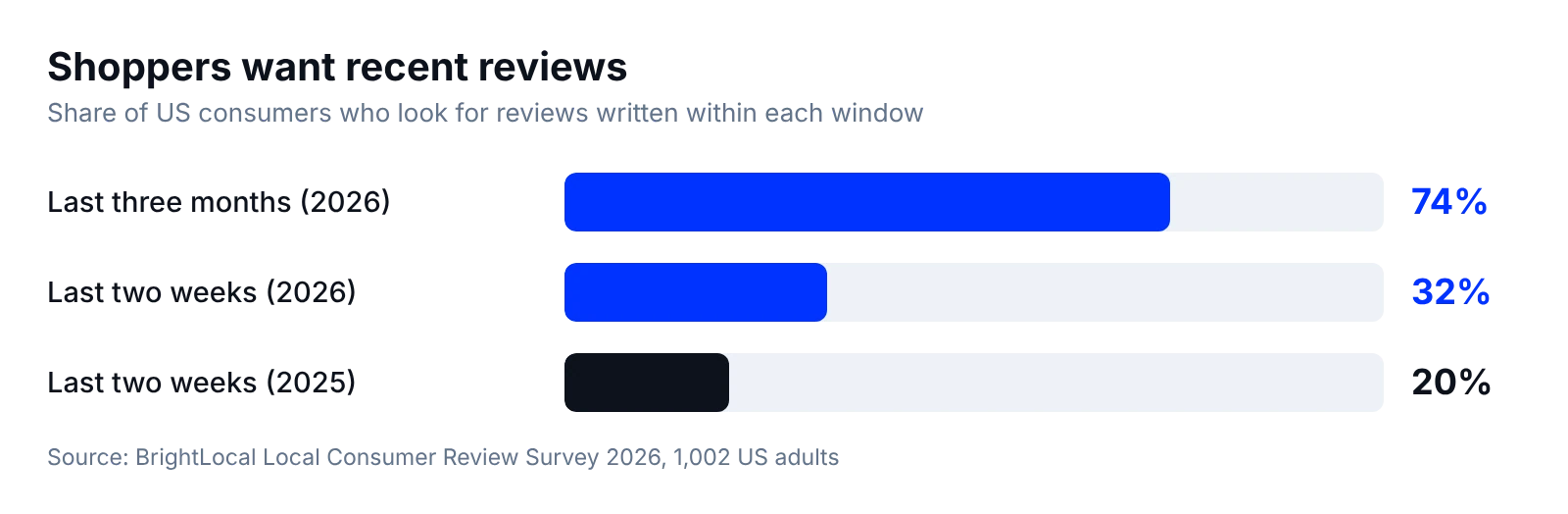
The data backs this up. In BrightLocal’s 2026 Local Consumer Review Survey, 74% of consumers look for reviews written in the last three months, and 32% want reviews from the last two weeks, up from 20% a year earlier.
Volume still matters too. Northwestern’s Spiegel Research Center found that a product with five reviews is 270% more likely to be purchased than one with none.
Put those together and the rule is simple: you need enough social proof, and it has to look current. That’s the whole job of UGC management. Our own UGC statistics roundup and analysis of 300,000 online reviews point the same way.
Why UGC widgets go stale
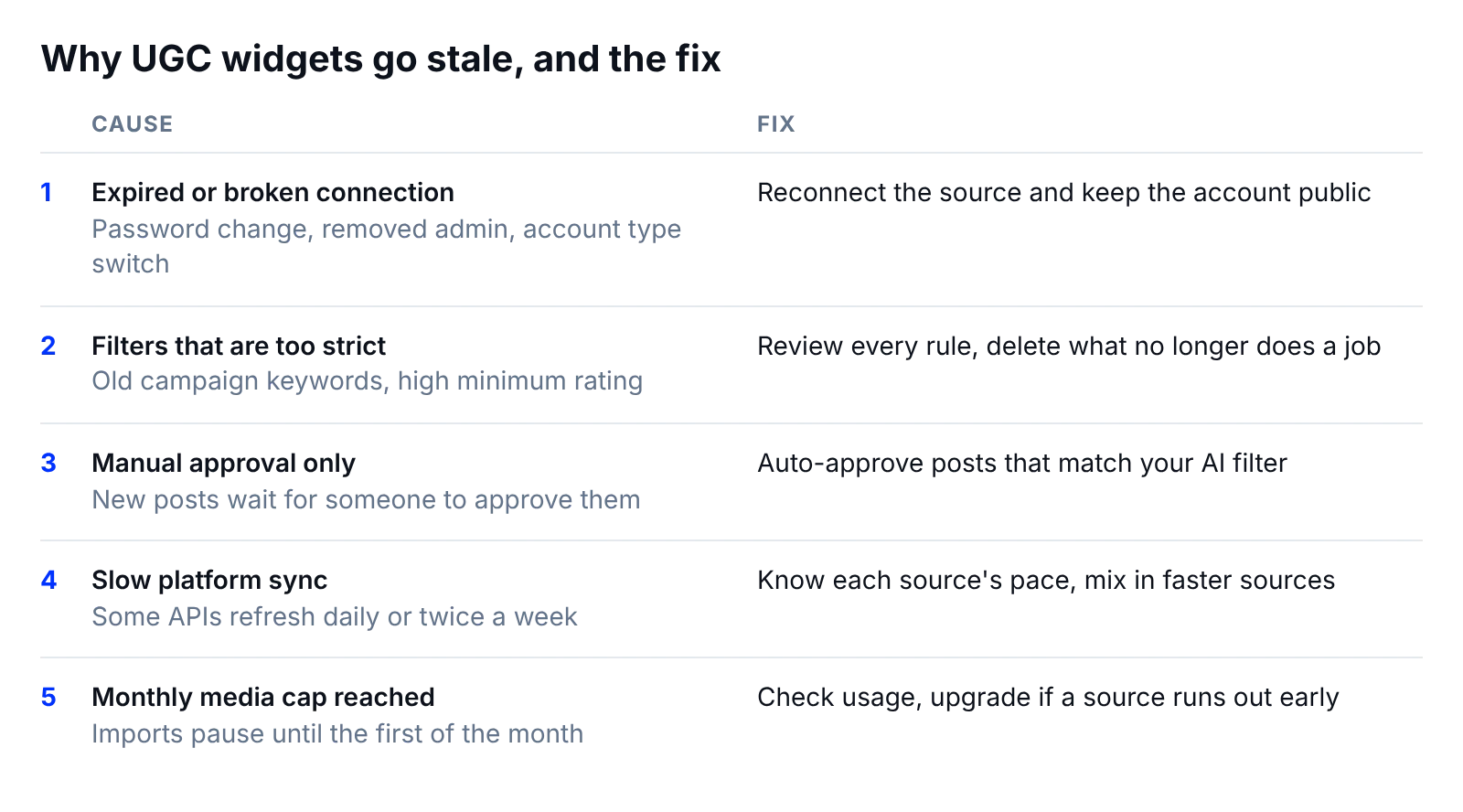
Here’s the uncomfortable part. Most stale widgets aren’t short on content. New posts and reviews keep coming in. Something between the platform and your social proof widget just stopped passing them through.
These are the usual suspects.
Expired tokens and disconnected sources
Social platforms grant access through permissions that can expire. A password change, a removed admin or a switch from a Business to a personal Instagram account can quietly break the connection.
The widget doesn’t crash. It just keeps showing the last posts it received, so nobody notices.
Filters that are too strict
A keyword filter you set for a launch campaign two quarters ago still runs today. A minimum star rating hides every new 4-star review. A relevance threshold set high blocks almost everything.
Each filter made sense once. Together, they starve the widget.
Posts stuck in moderation
Some widgets are set to show only content you approve by hand. That’s a safe default for hashtag and mention feeds. It also means the widget only stays fresh while someone keeps approving.
When that person goes on holiday, so does your social proof.
API sync limits
Every platform sets its own pace. In EmbedSocial, Google reviews refresh every 15 minutes, while YouTube and Facebook reviews refresh every 24 hours, and X syncs twice a week. Each source also has a monthly media import limit that resets on the first of the month.
None of this is broken. But if you don’t know the limits, a slow source looks like a dead one.
How to keep UGC fresh on your website: step by step
This process works with any widget tool. Each step starts with what to do, then shows how I do it in EmbedSocial.
Step 1: Audit your widgets for stale content
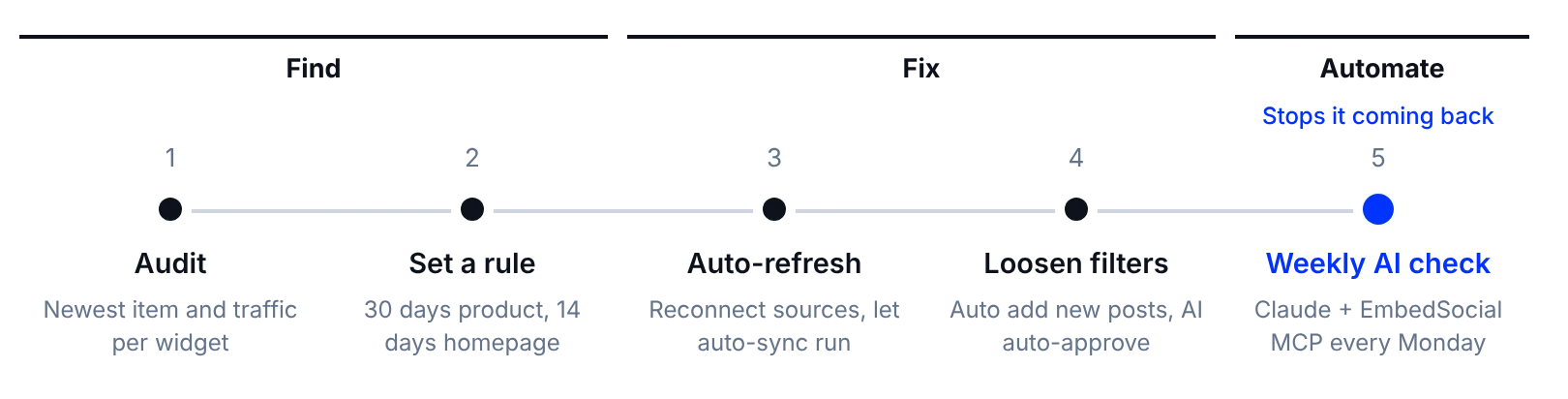
List every widget on your site, the page it lives on, and the date of its newest post or review. Anything older than a month on a high-traffic page goes to the top of the list.
Then check the traffic. A stale widget on your pricing page costs far more than one on an old blog post.
With EmbedSocial: open each widget and sort by date. Turn on widget analytics to see visits, post clicks and CTR per widget (it’s off by default and available from the Pro plan). To skip the manual audit, use the stale widgets automation, which exports a refresh list into Google Sheets with the widgets that need new content.
Step 2: Set a freshness rule per page
“Fresh” means different things in different places. Set a rule per page type so your team knows when to act:
| Page type | Freshness rule | Why |
|---|---|---|
| Product and pricing pages | Newest item under 30 days | Buyers are deciding right now |
| Homepage | Newest item under 14 days | First impression for every visitor |
| Landing pages for campaigns | Content from this campaign only | Old campaigns confuse the offer |
| Blog and resource pages | Newest item under 90 days | Lower intent, slower decay |
The rule turns “looks a bit old” into a yes or no. That’s what makes it automatable later.
Step 3: Reconnect and auto-refresh your sources
Swap any manually updated UGC for a source that syncs on its own. Copy-pasted testimonials and uploaded screenshots go stale the day you publish them. A live social media feed on your website keeps itself current.
Then reconnect anything that broke, and check that each account is still public. Private profiles and restricted posts can’t be pulled by any tool.
With EmbedSocial:
- Create your account at embedsocial.com/admin/register. Start on the Free plan or the 7-day trial.
- Click ‘+ Add source’ and connect each account: your Instagram feed, TikTok, Google reviews, Trustpilot and more. For Instagram, use a Business account.
- Let auto-sync do the rest. It runs from the moment a source connects: every 24 hours on Free, every 3 hours on Pro and Pro Plus, every 30 minutes on Premium and every 5 minutes on Enterprise.
You never re-embed anything. New content flows into the same embed code. If you’re starting from scratch, our guides to embedding an Instagram feed and embedding Google reviews cover the setup end to end. Short on content in the first place? Here’s how to collect UGC that keeps your sources busy.
Step 4: Loosen filters and moderation rules
Open every widget’s filters and ask one question per rule: is this still doing a job? Delete the campaign keywords from last year. Lower a minimum rating that hides good 4-star reviews. Drop a relevance threshold that blocks most new posts.
For moderation, move from “approve everything by hand” to “auto-approve what matches my rules.”
With EmbedSocial: in the widget editor, open Filters and check that ‘Auto add new posts’ is switched on. When it’s off, the widget freezes at whatever was approved last. That single toggle explains a lot of stale widgets.
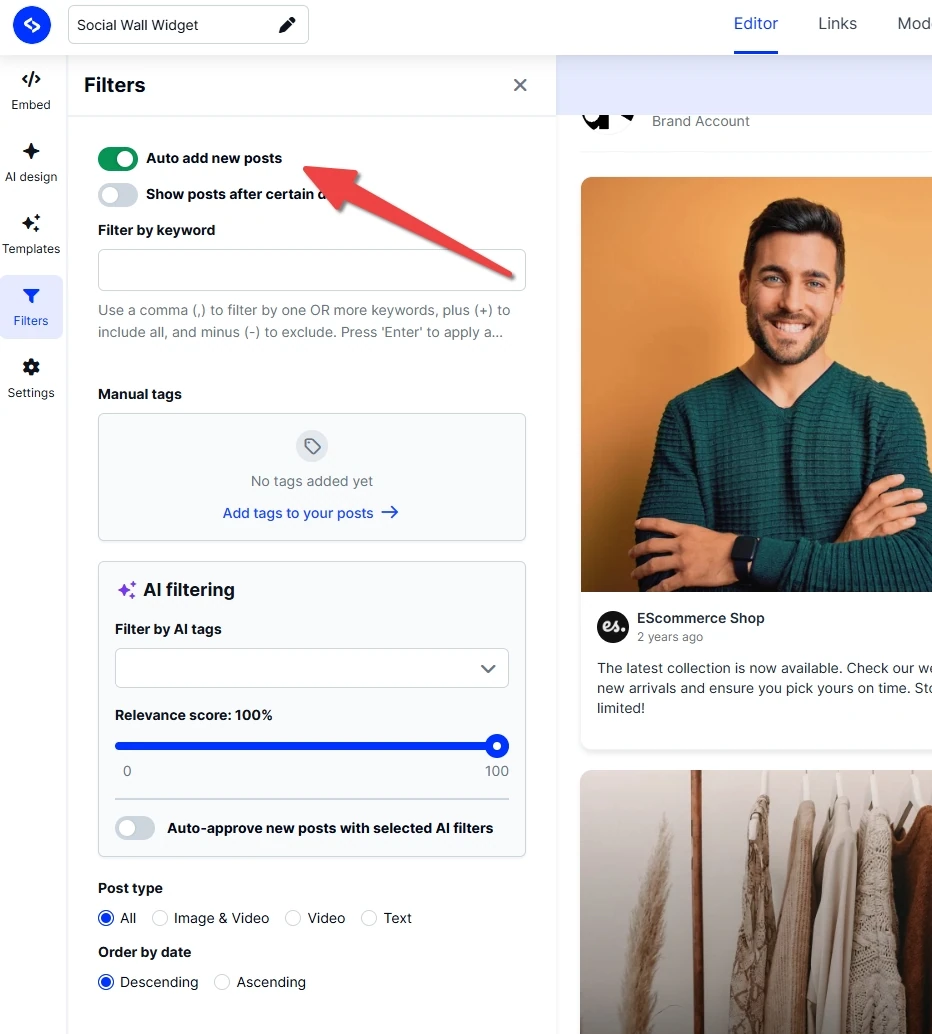
Then set up AI filtering. You describe what’s relevant in plain language, the AI scores every post, and posts below your threshold never reach the site. Pair it with ‘Auto-approve new posts with selected AI filters’ so good content goes live without waiting for you. On hashtag and mention sources, keep ‘Only posts that have approved rights’ on, so you only show creators who granted permission. EmbedSocial’s UGC rights tool handles those requests.
Step 5: Automate a weekly freshness check with AI
Steps 1 to 4 fix today’s problem. Step 5 stops it coming back.
Connect your UGC data to an AI assistant and give it one recurring job: compare every widget against your freshness rules and flag what slipped.
With EmbedSocial: connect the EmbedSocial MCP to Claude in a few minutes (full setup guide):
- In Claude, click + → Add connector → Add custom connector.
- Name it “EmbedSocial” and paste the server URL:
https://embedsocial.com/admin/mcp - Go to Settings → Connectors, find EmbedSocial and click Connect.
Prefer ChatGPT? The same MCP server works there too. Then run a prompt like this every Monday:
For my ‘Instagram’, ‘TikTok’ and ‘Google Business Profile’ accounts, show the date of the newest post or review. Then show the last 30 days of post clicks and CTA clicks for my ‘Homepage Reviews’ and ‘Product Page UGC’ widgets. Flag anything that breaks these rules: product pages under 30 days, homepage under 14 days.
That’s the core of automated review management for what’s on your site, and the easiest kind of review automation to trust: you stop checking widgets, and the widgets start reporting to you.
MCP for marketing: 4 workflows to run weekly
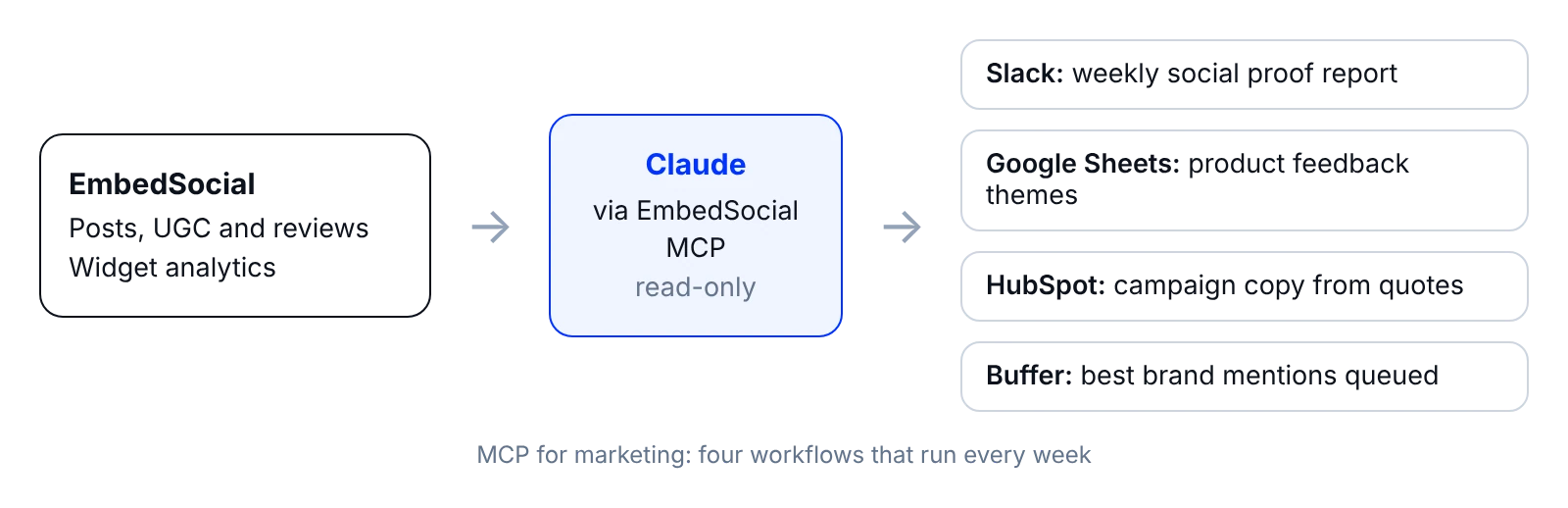
Once the freshness check runs, the same connection can do a lot more. That’s the real promise of MCP for marketing: your AI assistant reads live customer content instead of guessing.
As one commenter put it, live social proof is a better input for operations than most dashboards, because it’s what customers are saying right now. Here are four ready-made workflows from our automations hub, each with a full setup page.
1. Send a weekly social proof report to Slack
Every Monday, Claude pulls widget metrics and sends your team a short recap: top movers, key numbers and action items. Everyone sees how social proof performs, not just the person who manages widgets.
Set it up: Send weekly social proof report to Slack. For a deeper dive into the numbers, see UGC analytics.
2. Export product feedback into Google Sheets
A single complaint is noise. The same complaint five times in two weeks is a signal. This workflow has Claude read Instagram mentions, comments and UGC captions and sort them into complaints, feature requests, confusion points and praise, with counts and examples.
Set it up: Export Instagram product feedback into Google Sheets. Route each theme to the team that owns it.
3. Turn customer quotes into campaign copy
A growth marketer in the thread made the point well: customers describe your value in words no marketer would choose, and that’s exactly why those words convert.
This workflow pulls your strongest recent reviews and drafts a campaign around the best quotes. Use the same phrases in headlines for ads and landing pages. Your copy ends up sounding like your buyers, because it came from them.
Set it up: Generate review-based email campaigns in HubSpot.
4. Repost your best brand mentions
Your best UGC shouldn’t live only on your website. This workflow finds your highest-performing brand mentions and queues them in Buffer, ready to schedule.
Set it up: Repost your best brand mentions with Buffer. Our guide on how to repost UGC covers crediting creators properly, and EmbedSocial’s repost tool handles the rights requests.
Customer review analysis for mixed feedback
The sharpest question in the thread came from a developer: when reviews conflict, does the recap just average the sentiment, or does it surface the specific complaint?
An average is the least useful answer. “Sentiment is 4.2 and stable” can hide ten customers in one market complaining about delivery while everyone else is happy.
Good customer review analysis fixes that with how you ask. Here’s the prompt structure I use on the reviews and UGC in my EmbedSocial accounts.
Split praise and complaints
Ask Claude to separate positive and negative feedback first, before summarizing anything. Mixed reviews (“love the product, hate the shipping”) get split into both lists.
Count and quote each theme
For every theme, ask for the number of mentions and one or two short quotes. The quotes let you check the grouping yourself in seconds. If a theme has no quote that fits, the grouping is wrong.
Find where customers disagree
When some customers say setup was easy and others say it was confusing, ask what differs between them: product, plan, location or source. Disagreement is usually two customer groups, not one confused one.
Flag new and growing themes
Ask Claude to compare this week with the last four and flag anything new or rising. That’s how a small problem gets caught before it shows up in your star rating.
Pull the last 30 days of reviews and posts from my ‘Trustpilot’ and ‘Instagram’ accounts. Split praise and complaints. For each theme give a count and two short quotes. Show where customers disagree and what differs between them. Flag themes that are new or growing compared with the previous 30 days.
That turns review sentiment analysis from a mood report into a list of things someone can fix. For more on the method, see our guide to sentiment analysis with AI and 8 ways to collect customer feedback.
One boundary worth knowing. EmbedSocial collects and displays your reviews. Replying to Google reviews and reporting on your Google Business Profile is a different job, and that’s what Localith is built for.
Roll out AI automation safely
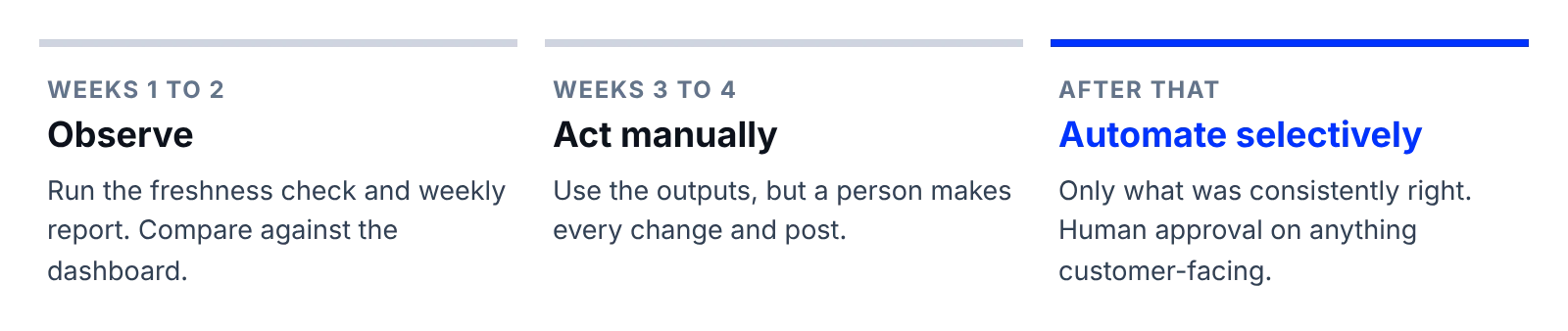
A GTM advisor gave the most practical advice in the thread: keep the connection read-only for the first two weeks, and only automate actions once you trust the recaps.
Good news: the EmbedSocial MCP is read-only by design. Claude can read your content and analytics through your API key, but it can’t change, delete or publish anything in your EmbedSocial account. Actions happen elsewhere, in Slack, Sheets, Buffer or HubSpot. That’s where you need the guardrails.
Weeks 1 to 2: Observe
Run the freshness check and the weekly report. Compare Claude’s output against what you see in the dashboard. Note anything it gets wrong or misses, and tighten your prompts.
Weeks 3 to 4: Act on outputs manually
Use the recaps, feedback sheets and copy ideas, but have a person make every change and publish every post. You’re testing whether the outputs are worth acting on.
After that: Automate selectively
Automate only the actions that were consistently right. Keep a human approval step for anything customer-facing, like social posts and email sends.
Close the loop: track whether fixes worked
A founder in the thread raised the point most automation guides skip: if feedback triggers actions, you need to know whether those actions solved the problem. Otherwise you automate the reaction without learning anything.
Log each fix and its ship date
When a complaint theme gets flagged, write down the fix and the date it shipped: a new courier, a clearer onboarding email, a sizing chart. A shared sheet is enough.
Compare complaint frequency before and after
In the following weekly recaps, ask Claude to count how often that theme comes up before and after the ship date. If mentions drop, the fix worked. If they don’t, the problem is somewhere else.
Learn what customers know you for
Run this for a few months and something bigger shows up. As another commenter observed, the patterns in what customers consistently praise tell you what you’re really known for. That’s useful far beyond a widget. It can shape positioning, product priorities and the social proof examples you lead with.
EmbedSocial features that keep UGC fresh
Everything above runs on a handful of features. Here’s what each one does for freshness.
Auto-syncing social and review sources
Connect a source once and EmbedSocial’s social media aggregator keeps pulling new posts, mentions and reviews on a schedule, from Instagram, TikTok, Facebook, LinkedIn, YouTube, Google, Trustpilot, Yelp and more. Your widgets update without touching the embed code. For reviews, see EmbedSocial Reviews. Setup: Sources and Auto-sync.
Moderation and auto-approve rules
Moderation lets you hide, pin and prioritize posts, so your best and newest content shows first. Combine keyword filters, minimum ratings and rights-approved-only mode to control what reaches the page. Setup: Filters and Pin and prioritize posts.
AI feed filtering by source
AI filtering scores every incoming post against criteria you write in plain language and auto-approves what clears your threshold. It’s the difference between a widget that waits for you and one that runs on its own. It powers the AI widget builder too. Setup: AI filtering.
Widget analytics
Per-widget analytics show widget visits, post clicks, link clicks and CTR, so you can prioritize the stale widgets that cost the most. Export the data for your own reports. Setup: Widget analytics.
EmbedSocial MCP
The MCP connects your EmbedSocial account to Claude or ChatGPT with read access to your posts, UGC, reviews and widget analytics. It powers every workflow in this guide. Browse the reporting automations, read how agencies use Claude and ChatGPT for Instagram, or see the agencies page for multi-client setups. Setup: Claude MCP connector.
Conclusion: Put your UGC freshness on autopilot
You don’t need all of this on day one. Start with the stale widget audit this week. It takes minutes, it protects conversions immediately, and it shows you how reliable your sources are.
Then follow the order that worked for the people in that thread: freshness check, weekly report, product feedback, then copy and reposts. Keep everything read-only until the outputs earn your trust.
That’s how to keep UGC fresh on your website for good. The brands that win with social proof won’t be the ones with the most reviews. They’ll be the ones whose reviews are always from this month.
Ready to try it? Start your free trial, connect your first source, and pick a plan on our pricing page when you need faster sync.