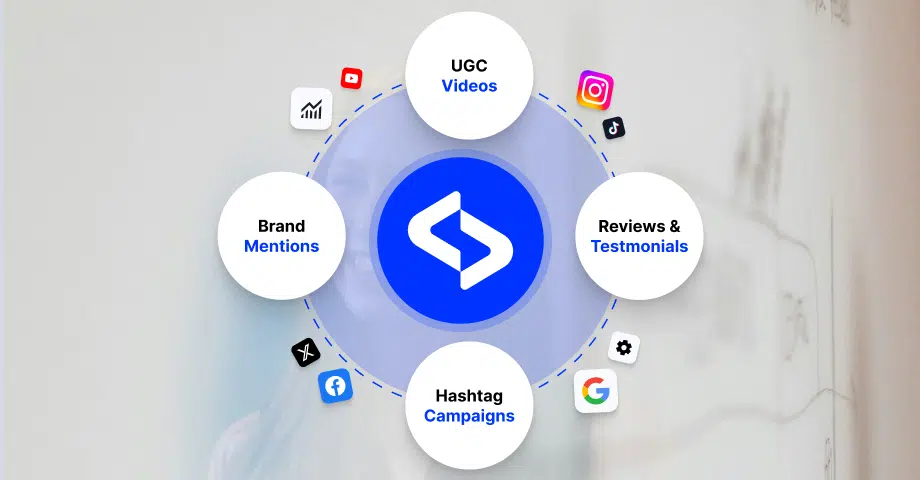

For marketers juggling multiple platforms, picking the best social media aggregator is a game-changer, as it can easily collect, organize, and utilize content from different social platforms.
Whether you’re showcasing user-generated content or doing social listening, they streamline your workflow, save you time, and boost your visibility.
For that reason, I explore all the great social media aggregator options out there, each of which offers unique features that enhance your marketing efforts.
Let’s find the best social media aggregator for your exact needs!
What is a social media aggregator?
A social media aggregator is a tool that collects content from various social media platforms thanks to a direct API integration with said platforms. It pulls posts, comments, hashtags, and mentions into one central dashboard.
‘Social media aggregator’ definition
Once they collect this content, these social media management tools display it in various forms, such as web widgets, web feeds, social media walls, and other similar forms.
A social feed aggregator makes it easier for marketers to manage multiple accounts, monitor conversations, and display curated content from their fans.
They are especially useful for showcasing user-generated content on websites or digital displays, which keeps your audience engaged with real-time, authentic social proof.
Whether you’re curating content or managing campaigns, the best social media aggregator app will simplify your process and keep your brand organized everywhere!

Social media aggregator by EmbedSocial
Types of social network aggregation based on platform
You can aggregate content from almost every social media out there. Here are the most used types of social media aggregation processes:
- Facebook aggregator, fetches your Facebook business page posts or mentions.
- Instagram aggregator, collects posts published on your Instagram profile, account mentions, or public hashtagged posts.
- Twitter aggregator, generates and embeds Twitter hashtags, posts that mention your account, or your own posts.
- YouTube video aggregator, crafts a video feed from YouTube and displays it on your website.
- Vimeo video aggregator, creates a video feed from a Vimeo channel and show it on your website;
- TikTok aggregator, creates a TikTok video feed from your TikTok account and embeds it on your website.
Social media aggregators compared
Here’s how the 7 tools compare on the features that matter for website feeds and UGC. Click a name to jump to its review.
| Tool | Type | Website feed widgets | UGC collection | Shoppable posts | Free plan | Starting price |
|---|---|---|---|---|---|---|
| Juicer.io | Social feed aggregator | ✅ | ✅ Hashtags | ❌ | ✅ (1 source, 300 views/mo) | $15/mo ($13.50 yearly) |
| Nosto | E-commerce personalization | ⚠️ Shoppable UGC module | ✅ | ✅ | ❌ | Custom |
| EmbedSocial | UGC and review platform | ✅ | ✅ Hashtags, mentions, reviews | ✅ | ✅ | $29/mo |
| Buffer | Social scheduler | ❌ | ❌ | ❌ | ✅ (3 channels) | $5/channel/mo yearly |
| Hootsuite | Social media suite | ❌ | ⚠️ Streams only | ❌ | ❌ | From $99/user/mo |
| Sprout Social | Social media suite | ❌ | ⚠️ Listening add-on | ❌ | ❌ | $79/seat/mo yearly ($99 monthly) |
| Loox | Shopify reviews app | ✅ Review widgets | ✅ Photo and video reviews | ⚠️ Product pages | ✅ (up to 500 orders) | $49.99/mo |
Prices checked on vendor pages in October 2026.
7 best social media aggregators to choose from
So, what’s the best social media aggregator app for your brand?
The answer is simple: the one that automates most of the tasks for you. Therefore, you have to take a look at what you need done first. That said, most of them can collect your social media posts and create website widgets that update automatically, such as:
Disclosure: EmbedSocial publishes this guide and appears at #3.
1. Juicer.io
Juicer.io is a dedicated social media aggregator that pulls posts from Instagram, Facebook, TikTok, YouTube, LinkedIn, X and other sources into one embeddable feed for your website.

Key features:
- Multi-source feeds: combine posts from several social networks and hashtags in one feed;
- Unlimited embeds: place the same feed on as many pages as you need, on every plan;
- Moderation: approve or hide posts before they appear on your site;
- Custom styling: choose a layout and match your brand colors.
Juicer.io has a free plan (1 source, 300 views per month, Juicer branding). Paid plans start at $15/month, or $13.50/month billed yearly.
Juicer.io is best for small businesses that want a simple, affordable social feed on their website.
2. Nosto

Nosto is a marketing experience platform designed primarily for e-commerce brands. While it includes social content aggregation features, its main focus is delivering personalized shopping experiences using behavioral data and AI-driven recommendations.
By combining aggregated social content with personalization engines, Nosto helps brands deliver highly relevant product recommendations and content. This approach enables businesses to turn social engagement into deeper customer relationships and improved conversions.
Key features
- Social content integration: embed social posts and user-generated content within product pages and campaigns;
- AI-powered personalization: deliver customized content and product recommendations based on user behavior;
- Advanced segmentation tools: target audiences with tailored marketing campaigns;
- Omnichannel marketing support: connect social content with email, web, and onsite marketing;
- Conversion optimization tools: analyze shopper behavior to improve engagement and sales.
Nosto doesn’t publish prices: pricing is custom, and there’s no free plan or self-serve trial.
Nosto is best suited for mid-to-large e-commerce brands that want to combine personalization, social content, and conversion optimization.
3. EmbedSocial

EmbedSocial is a UGC and social media aggregator platform, allowing businesses to collect, moderate, and display content from multiple social networks in one place.
It supports major platforms like Facebook, Instagram, TikTok, YouTube, LinkedIn, and X, making it easy to turn scattered social content into a unified feed.
As a powerful UGC platform with official API integrations for Google, Instagram, TikTok, and more, EmbedSocial ensures reliable and compliant data aggregation.
Businesses can automatically collect posts, manage user-generated content, and embed customizable social feeds on their websites without technical complexity.
Key features:
- Multi-platform content aggregation: collect posts from Instagram, Facebook, TikTok, YouTube, LinkedIn, X, and other major networks automatically;
- Flexible widget customization: choose layouts such as grid, carousel, masonry, or slider and adjust colors, fonts, and branding;
- Content moderation tools: approve, filter, hide, tag, or search posts before publishing them on your website;
- Shoppable UGC feeds: tag products inside Instagram posts and turn social content into a conversion-driven shopping gallery;
- Built-in analytics dashboard: track impressions, clicks, and engagement to measure the performance of embedded feeds;
- Advanced agency features: support multiple users, white-label options for multi-location brands.
EmbedSocial has a free social media aggregator plan for one source. Paid plans start at $29/month, with a 7-day free trial.
EmbedSocial is ideal for brands, e-commerce stores, agencies, and multi-location businesses that want to turn social media content into social proof, marketing assets, and shoppable experiences.
4. Buffer
Buffer is a widely used social media management and scheduling platform that simplifies multi-channel content planning. It allows creators, marketing teams, and businesses to aggregate their publishing queues, monitor campaign performance, and manage social updates across all key networks from one unified dashboard.
By centralizing planning across Instagram, Facebook, X, LinkedIn, Pinterest, and TikTok, Buffer helps brands maintain a consistent posting cadence without jumping between different native apps.
Key features
- Multi-channel publishing & queue: plan, draft, and schedule posts across multiple social networks simultaneously;
- Social engagement dashboard: review and respond to incoming comments from a centralized inbox;
- Visual calendar planner: organize content visually across weekly or monthly calendar views;
- Performance analytics: track post engagement, click-through rates, and audience growth trends;
- Team collaboration workflows: set up approval processes, drafts, and contributor permissions.
Buffer’s free plan covers 3 channels with 10 scheduled posts each. Paid plans start at $5/month per channel billed yearly, with a 14-day trial.
Buffer is best for creators, small teams, and growing brands looking for an intuitive, affordable way to plan and aggregate their social publishing schedules.
5. Hootsuite
Hootsuite is an established enterprise social media management suite designed to give organizations full visibility and control over their social footprint. Its customizable stream interface allows social media managers to aggregate real-time feeds, monitor keyword mentions, and track brand sentiment across numerous profiles in one place.
In addition to feed aggregation and listening streams, Hootsuite offers comprehensive scheduling, team governance, and advanced social ROI reporting for enterprise marketing departments.
Key features
- Customizable monitoring streams: build personalized dashboards that display real-time feeds, mentions, and search queries;
- Unified social inbox: aggregate and manage direct messages and public comments across platforms;
- Bulk scheduling & campaign planner: schedule hundreds of posts in advance with smart scheduling recommendations;
- Comprehensive social analytics: measure multi-channel ROI, engagement metrics, and team response efficiency;
- Enterprise security & compliance: granular user permissions, approval workflows, and audit logs.
Hootsuite pricing starts at $99/month per user (Standard plan), with a 14-day free trial.
Hootsuite is ideal for mid-size to enterprise organizations and agencies that need multi-channel monitoring streams, compliance controls, and robust publishing workflows.
6. Sprout Social
Sprout Social is a powerful social media intelligence and management platform built to help businesses extract meaningful insights from their audience interactions. It aggregates publishing schedules, customer care messages, and brand listening streams into an organized, collaborative workspace.
The platform excels at connecting social data to business outcomes, giving marketing and customer support teams the tools to coordinate replies, measure sentiment, and optimize audience engagement.
Key features
- Smart Social Inbox: aggregates all incoming messages, mentions, and comments across profiles into a unified feed;
- Advanced social listening: monitors industry conversations, competitive benchmarks, and brand sentiment in real time;
- Collaborative publishing calendar: plan, review, and publish content across networks with optimal send-time automation;
- Deep reporting & analytics: generate presentation-ready reports on engagement, audience demographics, and team productivity;
- CRM & helpdesk integrations: connects seamlessly with platforms like Salesforce and Zendesk for customer support.
Sprout Social starts at $79/month per seat billed yearly ($99 monthly) on the Essentials plan, with a 30-day free trial. Listening is a paid add-on.
Sprout Social is best for growing businesses and enterprises that want sophisticated social listening, unified customer care, and in-depth performance analytics.
7. Loox

Loox is a social proof platform designed to showcase user-generated content, particularly customer reviews and visual testimonials. It helps e-commerce brands collect photos and videos from customers and display them on product pages.
The platform focuses on increasing trust and conversions by highlighting authentic customer experiences. Loox integrates with e-commerce platforms to turn customer feedback into visually engaging marketing assets.
Key features
- Photo and video review collection: gather visual testimonials from customers automatically;
- UGC display widgets: embed customer photos and reviews across product pages;
- Review moderation tools: manage and approve customer content before publishing;
- Customer incentive features: encourage shoppers to submit reviews and photos;
- E-commerce platform integrations: connect with popular online store builders.
Loox has a free plan for up to 500 orders. Paid plans start at $49.99/month, with a 14-day free trial.
Loox is best for e-commerce businesses that want to leverage customer photos and reviews as powerful social proof.
Related:
- How to embed social media feed in WordPress
- How to embed a social media feed in PageCloud
- How to embed social media feed in Squarespace
- How to add an Instagram feed to Wix
- How to embed your Instagram feed in Shopify
How to choose the best social media aggregator
We compared the tools above on these criteria. Use the same checklist for your own shortlist:
- Source coverage: the social networks, hashtags and review sites it can pull from. More sources mean one feed instead of several.
- Mixed feeds: combine content from several platforms into one feed and update it on the spot.
- Multi-site embedding: embed feeds on several websites from one account, which matters for agencies and multi-location brands.
- Real-time updates: new posts appear on your social wall automatically, with no manual refresh.
- UGC collection: collect UGC where customers mention or tag your brand.
- UGC rights management: request and track permission before you reuse a customer’s post.
- Shoppable feeds: tag products in posts and turn your feed into a UGC shop.
- Moderation: filter, approve and hide posts so only on-brand content goes live.
- Design control: responsive layouts, customization options and custom CSS.
- Integrations: works with your CMS or store builder, such as WordPress, Shopify, Wix or Squarespace.
- TikTok support: embed TikTok videos, which audiences now expect to see.
- Free plan and pricing: a free plan or trial to test before you pay, and transparent paid pricing.
Benefits of content aggregation platforms
There are multiple benefits of social media marketing aggregators for businesses of all types and sizes, as these platforms can greatly improve audience engagement:

- Streamline UGC management: manage your UGC from multiple platforms in one place for easier oversight and scheduling;
- Showcase user-generated content: highlight authentic customer posts and reviews directly on your website or social displays;
- Monitor brand mentions in real-time: keep track of what people are saying about your brand across all channels, instantly;
- Boost social proof: display positive interactions and testimonials to build trust and encourage new customers;
- Save time and effort: manage multiple social profiles efficiently without constantly switching between platforms;
- Engage the audience: provides dynamic, regularly updated content that keeps visitors interested;
- Collect user-generated content: showcases authentic customer experiences to boost reputation and encourage community engagement;
- Stand out from the competition: adds interactive social feeds that create a more modern and engaging website experience.
Naturally, by leveraging these benefits, you improve your social media strategy and deliver a more cohesive brand experience across platforms.
How does a social media content aggregator work?
So, how do you incorporate this social network aggregation process into your business? It’s easier than you think, and it will have a massive impact on your brand.
For social media marketing aggregators to work, they need to be enabled by an application programming interface (API) provided by social networks.
So, for an API to access the user’s actions from another platform, the user will have to allow the social network aggregation platform to pull their content.
Here’s a simple illustration of how the best social media aggregators rely on user tokens to get content they publish on various social media networks or accounts:

How to embed a social media feed using EmbedSocial?
Here’s how to collect your social media posts and display them on your website with EmbedSocial.
Step 1: Sign up and log into EmbedSocial
Create your account to start a 7-day free trial, with no setup fees. Start your free trial, then log in to your dashboard.
Step 2: Choose your social media source
Pick the network you want to pull content from, such as Instagram, Facebook, TikTok or YouTube. Then approve the connection so EmbedSocial can collect your posts through the official API.

Step 3: Choose or vibe-code your widget template
Pick a ready-made template such as a grid, carousel or social wall. Or describe the widget you want in the AI chat, and EmbedSocial builds it for you.

Step 4: Customize your widget
Adjust the layout, colors, fonts and number of posts to match your brand. The preview updates as you make changes.

Step 5: Copy the widget code and embed it on your website
Click “Embed” and copy the widget code. Paste it into your website builder or CMS where you want the feed to appear, and it updates automatically as you post.

AI website builders work the same way: see how to embed a live social media feed in Lovable.
Read more:
5 ways to use social media aggregation on your website
Luckily, there are great social media aggregator tools and social media monitoring tools that don’t limit you in terms of social media platform support or the ways you can use them.
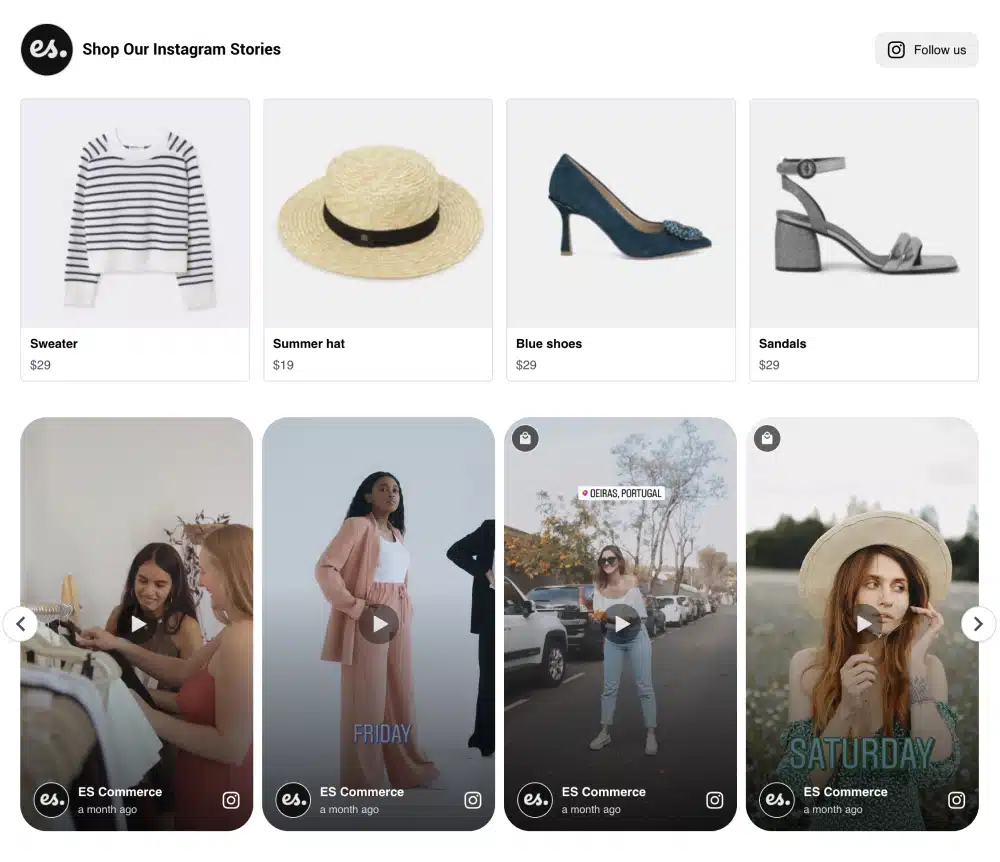
For instance, instead of just displaying static social posts only, you can use these social media aggregators to sell your products as well via shoppable UGC widgets.
Here are some ideas you can copy to sell on-site:
1. Create a shoppable feed with UGC content
Embed a unique shoppable UGC widget on your website that includes product links on posts:
2. Combine various social media into a UGC social wall
You can and should combine different social media networks into one UGC widget. For example, EmbedSocial can merge all social media feeds into one stunning widget:

3. Create a slideshow with your products
Display your products via posts on different social media in which people show how they use them. Use a grid or a carousel effect for the biggest impact:

4. Create and display a hashtag campaign
Hashtag contests can really motivate your customers to create original content you can use! Then, you only have to use one of our social media hashtag widgets to get the most out of that content:

Check out more examples of Instagram walls!
5. Show reviews and social posts in one widget
Mix customer reviews with Instagram and TikTok posts in a single widget, so visitors see ratings and real product photos side by side. EmbedSocial’s AI widgets can combine both sources in one layout.

This example displays Threads posts in an EmbedSocial widget.
What 7 marketing experts say about social media aggregator tools
I asked the industry’s leading voice about the best social media aggregator tools they’ve tried out. Here’s what they had to say:
Aggregators centralize mentions, speed responses, ensure consistency
How do social media aggregator tools support brand management online?
Brands may use an aggregation tool for collecting social media posts, mentions, and conversations on several social networks and displaying them on one dashboard. Marketing teams benefit by having a single view of how people are talking about the brand at all times. Real-time feedback allows teams to be more reactive and consistent with messaging across all social media channels.
Using these tools will create efficiencies for marketers as they do not have to access each social media network individually. By aggregating social media activity, brands are able to view trends, engage with customers, and ensure consistency of message across all their digital platforms.
What tools are most useful for monitoring brand mentions and conversations?
Social media management software like Hootsuite and Sprout Social helps monitor and control how customers talk about your brand. These programs let you set up tracking of specific words (keywords), hashtags and your company’s name on all major social networks in one place. This lets you quickly respond to customer inquiries or complaints so they know you care about what they think.
Another benefit of these social media management software programs is their ability to put all incoming comments and messages in one inbox. This makes it much easier for teams to work together and make sure no customer comment or question goes unanswered. The quicker you can answer and provide solutions to your customers, the more they will build a level of trust with your brand.
Rahul Vishwakarma, Owner, bloggervoice
-——————————————
Automated UGC aggregation cuts time and guides strategy
Most marketers I speak with are still taking screenshots of customer posts and uploading them individually. I did the same thing at Kratom Earth until it did not become sustainable anymore. We exist in a regulated space, so customer-generated content is some of the most believable proof we have around and time lost to UGC collection manually was slowing down our content calendar. Moving to an automated UGC aggregator changed that. It makes tagged customer posts from Instagram and TikTok appear in one moderated feed, which is automatically published at a schedule we can dictate on our end, and our publishing time is cut by about 70% for UGC. More importantly, the built-in analytics revealed what posts other visitors actually stopped on, and it was that one piece of data that restructured the way we planned content on a month to month basis.
Loris Petro, Marketing Manager, Kratom Earth
-——————————————
Unified feeds streamline aggregation and protect brand safety
Social media platforms are bigger and more far-reaching than ever. Anyone can do the bare minimum with SEO and AEO, but if you really want to get your name and product in front of the right people, you need some help in pulling it all together. This is where having the right social media aggregator tools comes in clutch.
For years, CRMs like Constant Contact were virtually one of the only options for compiling and communicating with your customer list. That changed when we started using social media more than email for marketing.
Now, with AI search gradually replacing search engine queries, it makes sense to find a tool that merges all of the tools you need into one package. I have been using dedicated social media aggregation tools for a while, and I like what they can do.
One of the main things an aggregator does that saves me a ton of time and energy is compile all of our social media feeds so that we have one embed code to use everywhere. Another pro is being hashtag-friendly, which is critical in today’s marketing environment.
Another thing a quality aggregator does that basic embeds don’t is that it keeps your feed and content family-friendly. It’s not something everyone needs, but it’s a cool feature and helps you not inadvertently have content posted on your socials that is NSFW.
Shawn Hill, Head of Growth/People, MoveBuddha
-——————————————
Hootsuite and Buffer streamline law firm social
To put it simply, social media aggregator tools are a key part of how I manage marketing operations. In many campaigns, my team uses Hootsuite when handling social media for law firms active on LinkedIn, Facebook, and X. In practical terms, it helps us schedule posts in advance and monitor comments, mentions, and messages from one dashboard. That organization makes it much easier for us to stay responsive while keeping content publishing consistent.
In addition, for content planning and smaller campaigns, my team and I frequently work with Buffer. In everyday use, it works very well for scheduling educational posts, blog promotions, and short videos weeks ahead of time. You know, the biggest value comes from efficiency and better oversight. Rather than switching between platforms all day, we track engagement, refine messaging, and maintain a steady online presence with far less manual work.
Sasha Berson, Co-Founder and Chief Growth Executive, Grow Law Firm
-——————————————
Use specialized tools for posts, metrics, oversight
As a brand grows, it becomes increasingly difficult to manually manage the huge volume of content generated daily across various platforms. For organizing content and scheduling, we use Buffer or Later. Both tools are easy to use, and have a good-looking calendar view. They enable us to publish content across platforms while giving the organization a way to publish content on multiple platforms without the hassle of trying to publish on each individual platform. Teams that require more advanced platforms I recommend using Hootsuite and Sprout Social, which provide much more robust capabilities. In addition to being able to publish content across multiple platforms, they offer detailed reporting across platforms, analytics on email and social media campaigns, support for team projects, and approval processes.
For brand monitoring, I recommend Mention and Brandwatch the most. They monitor each occurrence where the name of our brand appears in all online channels, including social media, news sites, and blogs. Any brand that wants to protect and develop its image must have an option to monitor their branding in real-time, because a PR problem that has gone unnoticed for 48 hours is much more difficult to handle than if it is caught within the first two hours.
Metricool provides us with both comparative and performance metrics that can be used to track our internal operations. By providing all of this information in one place, it allows us also to monitor our competitors in terms of performance, as well as provide easy access to accurate information to make faster and more accurate decisions.
The main point I always communicate to brands is: Don’t try to do everything on one platform; instead, choose a tool for each job, master it, and then apply that knowledge to get work done.
Mushegh Hakob, Founder & SEO strategist, Andava
-——————————————
Hootsuite saves hours, centralizes schedules and reports
Among the aggregator tools I have tried, Hootsuite is the one I really returned to. I am responsible for content creation for multiple platforms at Opus Virtual Offices, and I used to spend about six hours each week logging in to each of them individually to schedule posts and review metrics. This was not a content issue for me, but a problem with tools I use, and Hootsuite helped me prevent this issue.
To give you a context on how it changed my workflow, I now sit down every week and batch-schedule posts for three to four weeks ahead for all of my channels, including email. I now walk away from the calendar completely. All of my reports are now on the same dashboard, so when I want to compare the performance of a specific post on LinkedIn to the performance of that post on Facebook, I can easily find it and get an apples to apples comparison within minutes. With all brand managers operating with a lean resource model, those six hours can go back into planning, testing out different types of content and actually looking at audience engagement.
Elliot Sterling, Web Content Writer, Opus Virtual Offices
-——————————————
EmbedSocial widgets display live reviews
I use the widgets from Embedsocial to display review sliders on pages that update from multiple sources as reviews come in. Reviews are more important than ever in rankings, and I think this is the best tool to help boost any website’s online presence.
Paul Stratch, Owner, Trash Daddy Dumpsters
-——————————————
Conclusion: Social media aggregators are a must-have for your marketing toolbox!
If you are looking for a creative and effective method of leveling up your marketing efforts, quality social media aggregators are essential tools for that.
As for which platform to pick, there’s no one-size-fits-all answer, as the best social aggregator tool varies depending on your specific needs and preferences.
That said, a great deal of brands rely on EmbedSocial, as it allows you to collect UGC from different social media platforms via official API connections.
Plus, you can combine said content into a single customizable widget that loads on demand and can be embedded anywhere via a single code.