AI credits are the unit that pays for EmbedSocial's AI features. Every AI generation, whether it is building a widget from a prompt or translating post captions, spends credits from your account balance instead of counting against your plan.
Credits are separate from your plan's usage and view limits: a plan limit resets every month, while credits are bought once and stay in your account until you spend them.
What spends AI credits
| Feature | Cost |
|---|---|
| AI design generation (build or a follow-up change in the widget editor's AI chat) | 1 credit per generation |
| AI translation (post captions, in widget settings) | 1 credit per 5 posts |
| AI relevance scoring (in the AI Filtering settings) | 1 credit per post scored |
| Starting from a template, connecting a source, setting display options by hand | Free, no credits spent |
See AI design for how the editor's AI chat works, and AI filtering for how scoring criteria are written.
How to check your balance
Your credit balance is shown in two places inside the widget editor: the top right of the editor, and the bottom left of the left rail. Both count down as you generate.
How to buy more credits
Credits are bought on demand, so you can top up at any time without changing your subscription plan.
Open the credits dialog. Inside the widget editor, click the credit counter in the top right. 'Get more credits' opens with your current balance at the top.
Choose how many. Drag the 'Customize credits' slider to the amount you want, anywhere from 10 to 500 credits. The price per credit and the total update as you drag.
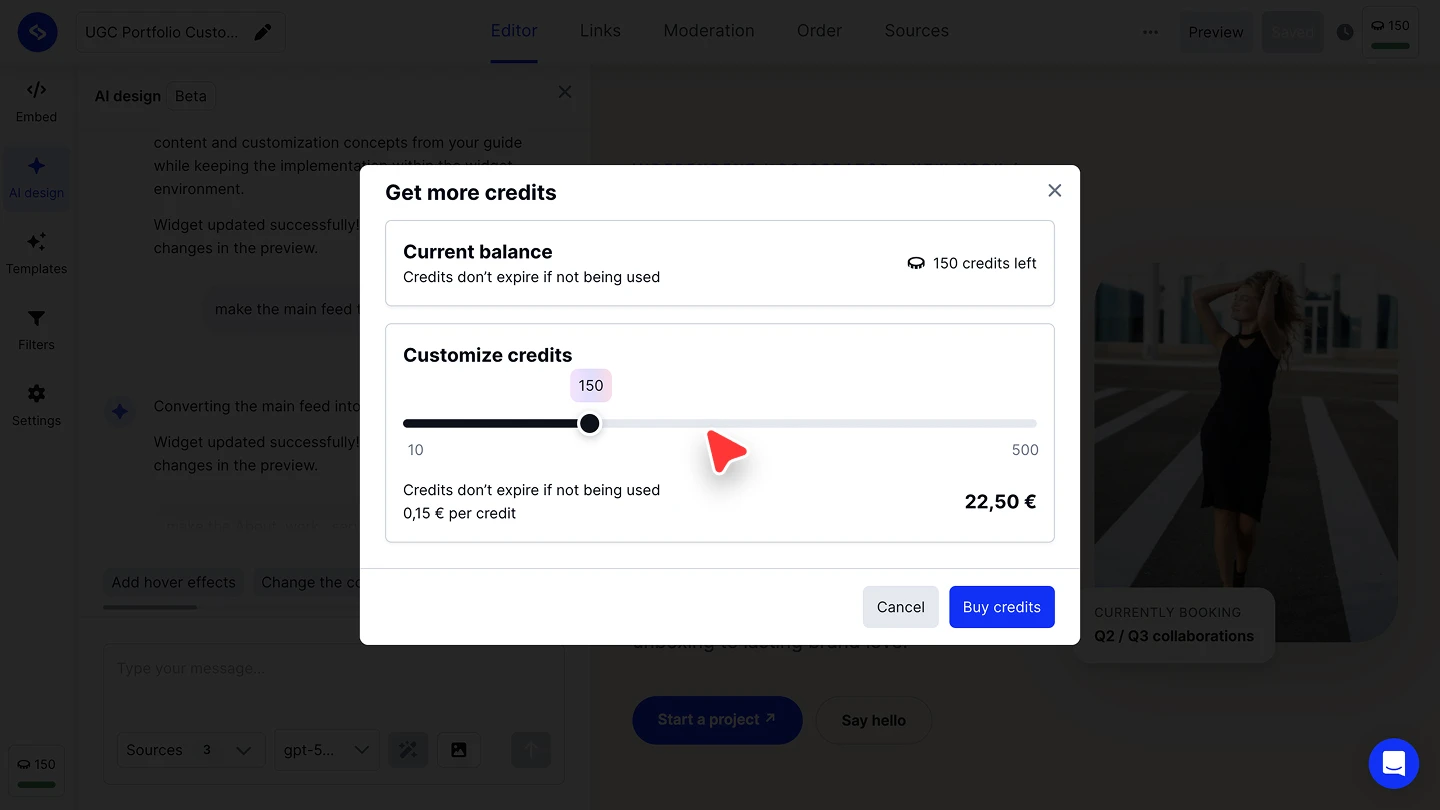
Buy the credits. Click 'Buy credits'. The new balance is available in the editor straight away.

Credits do not expire if you do not use them, so a top-up carries over until you spend it.
FAQ
Do AI credits expire?
No. Credits do not expire if you do not use them.
What happens when I run out of credits?
AI generation stops until you buy more. Click the credit counter in the widget editor and buy from 'Get more credits' at any time, on any plan.
Do credits come included with my plan?
Credits are bought separately from your subscription. Check the pricing page for whether your plan includes a starting credit allowance.
Does every AI feature cost the same number of credits?
No. AI design generation costs 1 credit per generation. AI translation costs 1 credit per 5 posts. See the table above for the full breakdown.
Can I buy exactly the number of credits I need?
Yes. The 'Customize credits' slider in the 'Get more credits' dialog goes from 10 to 500 credits, and the price updates as you drag it.
What's next
Read AI design for the full walkthrough of building a widget with the editor's AI chat, or check Usage and view limits for the plan limits credits do not count against.
If you have any questions, click the bottom right chat icon to talk with our customer success team or send us an email at support@embedsocial.com We're here for you 🙏