An RSS Feed source pulls posts from any blog, news site, or platform that publishes an RSS link, so you can display them on your website next to the content from your social accounts.
It is the source to use when the content you want is not on a social platform at all: your own blog, a company newsroom, a publication you contribute to. Connecting one takes a single field, the feed URL.
RSS Feed sources are available on the Pro plan and above.
How to connect an RSS Feed source
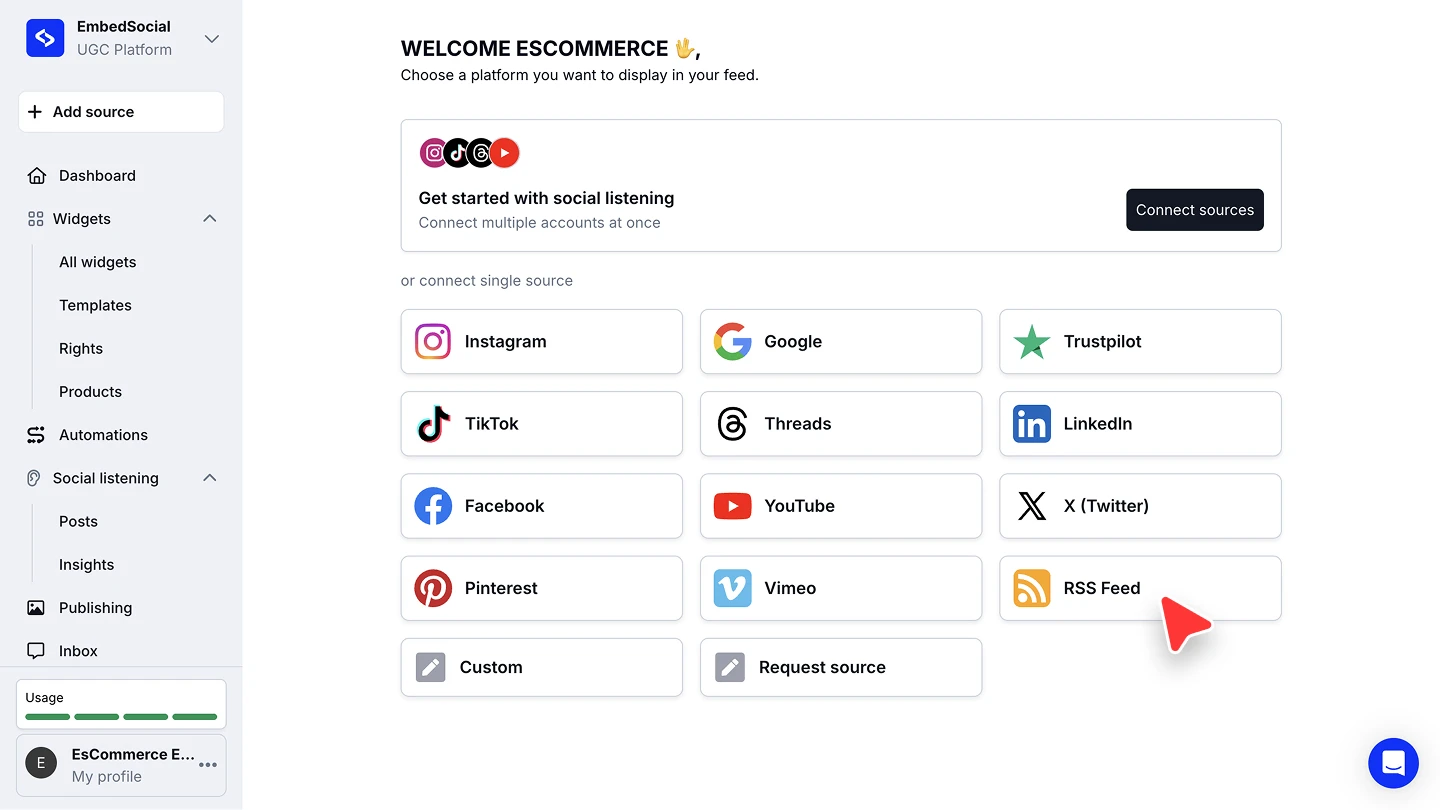
Open the source picker. Click '+ Add source' in the left menu.
Choose RSS Feed. Under 'or connect single source', click 'RSS Feed'.
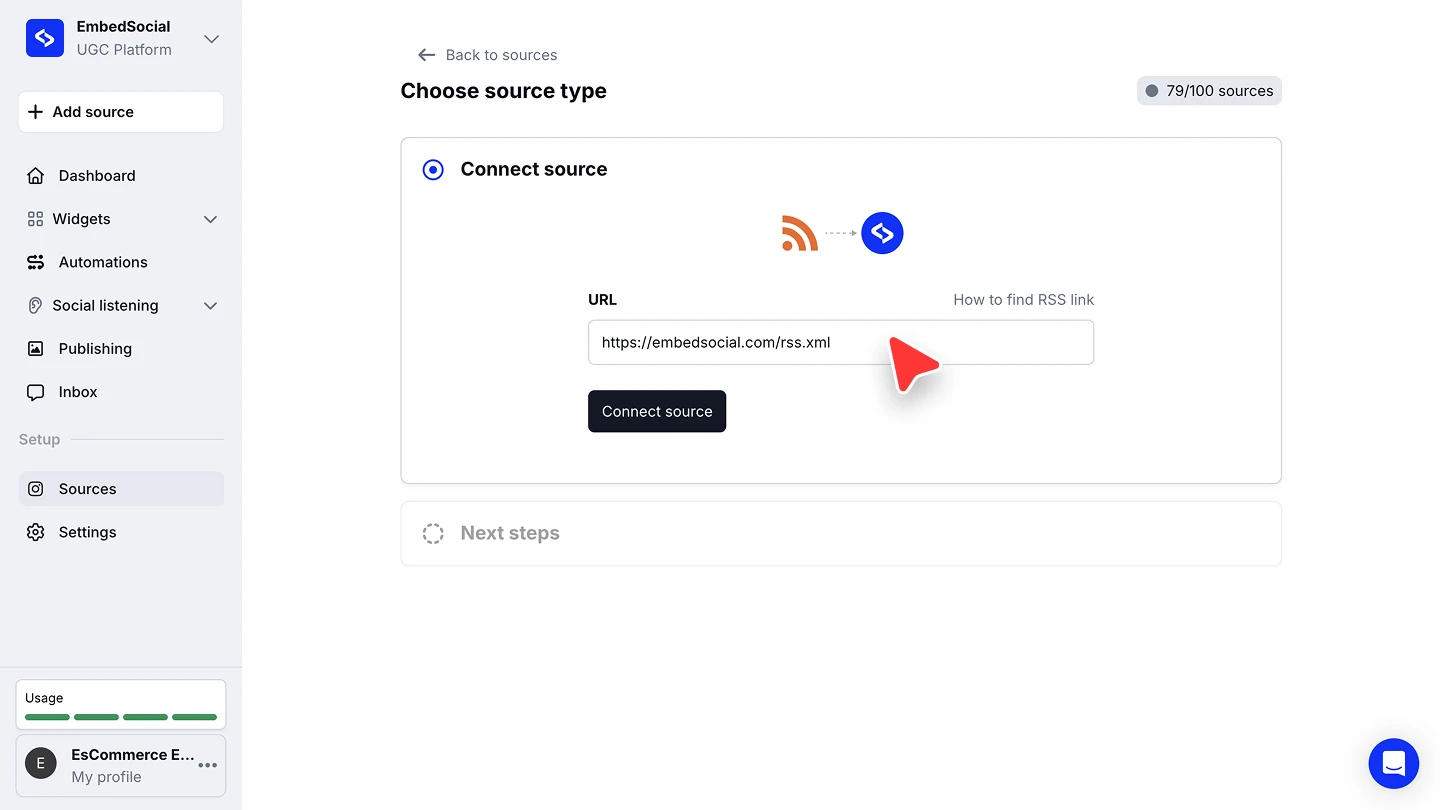
Paste the feed URL and connect. Enter the feed address in 'URL', then click 'Connect source'. The 'How to find RSS link' link next to the field opens the same guidance as the section below.
Pick a widget template. Choose a template for the widget that will display the feed, or combine it with your other sources in an existing widget.


The URL you need is the feed itself, not the page it belongs to. It usually ends in something like/feed,/rss, or.xml.
Once connected, the feed keeps syncing on your plan's interval like any other source. See Auto-sync for how often that happens.
How to find your RSS feed URL
Most platforms expose the feed at a predictable address. Append the path below to your site's URL:
| Platform | What to add | Example |
|---|---|---|
| WordPress | /feed | https://embedsocial.com/feed |
| Tumblr | /rss | https://yoursite.tumblr.com/rss |
| Blogger | /feeds/posts/default | https://yoursite.blogspot.com/feeds/posts/default |
| Medium | /feed/ before the publication name | medium.com/feed/example-site |
| Wix | /blog-feed.xml | https://www.yourdomain.com/blog/blog-feed.xml |
| Squarespace | ?format=rss | https://yourdomain.com/blog?format=rss |
| YouTube | nothing, paste the channel URL | https://youtube.com/@yourchannel |
If none of those apply, open the site in your browser, right-click and choose 'View page source', press Ctrl + F (or Cmd + F on a Mac) and search for RSS. The feed URL sits in the matching line.
Ready to mix your blog posts in with your social content?
FAQ
Which plan do I need for an RSS Feed source?
RSS Feed sources are available on the Pro plan and above.
Can I show RSS posts and social posts in the same widget?
Yes. Connect the feed as its own source, then select it alongside your social sources when you build the widget.
Can I connect more than one feed?
Yes. Run through '+ Add source' again for each feed. Every connected feed counts as one source against your plan's source limit.
Can I pull a feed from a site I do not own?
Yes, as long as that site publishes a public RSS feed. Check that you are allowed to republish its content before you display it on your website.
The URL was rejected. What went wrong?
Almost always the address points at a page rather than at the feed. Open it in your browser: a feed shows XML or a list of items, not the site's normal layout.
What's next
With the source connected, decide how its posts reach your site. See Sources for how sources feed your widgets, and the social media aggregator for what you can build once several are connected.
If you have any questions, click the bottom right chat icon to talk with our customer success team or send us an email at support@embedsocial.com We're here for you 🙏