AI Post Enrichment analyzes your collected posts and applies AI-generated tags and categories, so you can understand and filter your content by topic and intent instead of reading every caption.
It runs from the 'Posts' page under 'Social listening' (the page header reads 'Monitor'), on the posts you choose, when you choose. This is different from the Auto tagging automation: see the comparison below.
What the AI generates
When you enrich a post, the AI adds two types of organizational labels:
- Categories: Posts are automatically sorted into one or more pre-defined categories to help you quickly identify their intent or sentiment. The categories include
Positive Feedback,Complaint,Brand Praise,Potential Lead,Promotional,Noise,Other, andQuestion. - Tags: The AI reads the post's caption and generates 1 to 5 descriptive tags about the specific topics being discussed. If a post has no caption or the text is unclear, the tag
"unclear"is applied.
Enriching one post costs 1 AI credit, which covers both the tags and the categories, so enriching 10 posts costs 10 credits.

How to enrich your posts
You can organize selected posts with AI from the 'Posts' page:
Select the posts. Tick the checkbox on each post you want to enrich.
Tag them with AI. Open the 'Bulk options' menu and click 'Tag with AI'. Only the selected posts are processed.
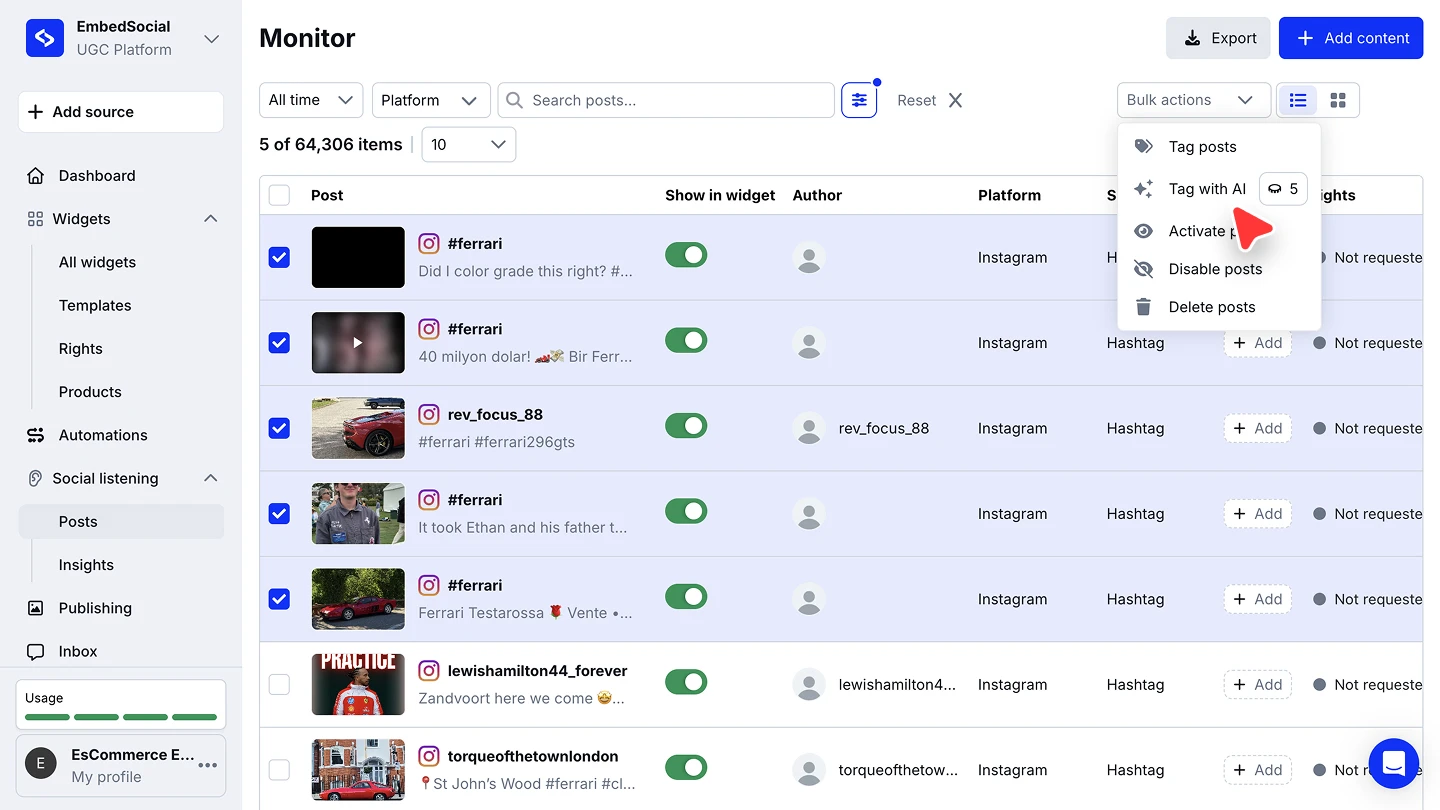
Give it a few minutes. Enrichment is not instant: tags and categories can take up to 5 minutes to appear. Refresh the page if they have not shown up yet.

Enrich the posts you actually plan to work with. Each post costs a credit, and the bulk option lets you target exactly the campaign or period you are analyzing.
AI Post Enrichment vs the Auto tagging automation
The two features sound alike but do different jobs:
- AI Post Enrichment (this page) runs manually on posts you pick, and the AI decides the tags and categories by reading each caption. 1 credit per post.
- Auto tagging runs automatically on every new post from the sources you chose, and applies the tags you typed when creating the automation. No AI reading, no categories.
Use enrichment to discover what is in your content, and auto tagging to stamp known campaign tags on everything a source collects.
Using the tags and categories
Enriched posts become filterable everywhere tags work: narrow the 'Posts' page by tag or category, or point a widget at them with 'Filter by AI tags' under AI filtering. See Filters.
Ready to make sense of your collected content?
FAQ
What does enrichment cost?
1 AI credit per post, covering both the tags and the categories.
Why do my posts not show tags yet?
Enrichment takes up to 5 minutes. Refresh the page, and if a caption was empty or unreadable the tag will be "unclear".
How is this different from Auto tagging?
Auto tagging applies the tags you typed to every new post from chosen sources, automatically. Enrichment lets the AI generate tags and categories for the posts you pick, on demand.
How many tags does a post get?
Between 1 and 5, based on the caption.
What's next
Filter widgets by the generated tags with Filters, or read what your enriched data says in Social Insights.
If you have any questions, click the bottom right chat icon to talk with our customer success team or send us an email at support@embedsocial.com We're here for you 🙏